
Estimate how extra car loan payments may change your payoff time, interest cost, and savings after any early payoff fee.
Table of contents
How to use our Car Loan Prepayment Calculator
- Enter your Current loan balance ($), APR (percent), and Months left from your loan statement.
- Enter the Extra monthly payment ($) you plan to add on top of your normal payment.
- Open Advanced options if you know your exact Your regular monthly payment ($), have a One-time extra payment ($), or need to include an Early payoff fee ($).
- Use the main results first: Estimated savings after fee, Time saved, and New payoff time.
- Sanity-check the answer by comparing Regular monthly payment used with your statement and asking your lender how extra money must be marked so it reduces principal.
Definitions
Current loan balance ($): The amount you still owe on the auto loan today, not the car's market value.
APR (percent): The annual percentage rate on the loan. The calculator divides it by 100 and by 12 to get a monthly rate.
Principal: The loan balance before interest. Extra money usually helps most when it reduces principal.
Extra monthly payment ($): Money added each month on top of the regular required payment.
One-time extra payment ($): A single extra amount, such as a tax refund or bonus, applied in one selected payment month.
Early payoff fee ($): A prepayment penalty or payoff charge from the lender. Check your loan terms before relying on savings [2].
Interest saved before fee: The interest difference between the no-extra-payment plan and the extra-payment plan, before subtracting any payoff fee.
Estimated savings after fee: Interest saved before fee minus the early payoff fee. A negative number means the fee is larger than the interest saved.
Common mistakes and quick fixes
Mistake: Using the car's resale value for Current loan balance ($) .
Fix: Use the remaining payoff balance from your lender or statement.
Mistake: Typing 0.065 in APR (percent) for a 6.5 percent loan.
Fix: Enter 6.5, not the decimal version.
Mistake: Putting your full normal payment in Extra monthly payment ($) .
Fix: Enter only the extra amount you will add each month.
Mistake: Filling in Your regular monthly payment ($) with a payment that is too low to cover monthly interest.
Fix: Use the statement payment, or leave it blank so the calculator estimates the payment from the balance, APR, and months left.
Mistake: Leaving out a known Early payoff fee ($) and looking only at Interest saved before fee .
Fix: Enter the fee so Estimated savings after fee shows the money effect after the fee.
Mistake: Ignoring the Lender check note and sending extra money without instructions.
Fix: Ask the lender how to apply extra payments to principal instead of only advancing the next due date.
Limitations & Key Assumptions / Boundary Conditions
- The estimate uses a fixed-rate monthly amortization model. It may not match loans with daily interest, changing rates, skipped payments, late fees, or add-on products.
- The regular payment is estimated from the balance, APR, and months left unless you enter Your regular monthly payment ($).
- Extra payments are treated as principal-reducing payments. Some lenders require special instructions for extra money to reduce principal.
- The final month can have a smaller final payment. Real payoff quotes can include interest through a specific payoff date.
- The calculator subtracts only the Early payoff fee ($) you enter. It does not estimate title fees, lender processing fees, taxes, or insurance changes.
- Results are rounded to cents for display, but the payoff loop keeps full precision during the calculation.
Methodology
Calculation steps
The calculator first converts APR to a monthly rate and estimates the regular monthly payment unless you enter your own payment. Standard loan amortization applies interest first, then reduces principal with the rest of the payment [3].
monthly_rate = APR_percent / 100 / 12
payment = P * r / (1 - (1 + r)^(-n))
if r = 0, payment = P / n
In those formulas, P is the current loan balance, r is the monthly rate, and n is the months left. If you enter Your regular monthly payment ($), that amount replaces the estimated payment.
Next, the calculator runs two payoff loops: one with only the regular payment and one with the extra payment plan. Each month, it adds interest, applies the planned payment, and lets the last payment be smaller if that is all that is needed to pay the balance to zero.
interest_for_month = balance_before_payment * monthly_rate
planned_payment = regular_payment + extra_monthly + one_time_extra_if_this_month
actual_payment = min(planned_payment, balance_before_payment + interest_for_month)
principal_paid = actual_payment - interest_for_month
new_balance = balance_before_payment - principal_paid
After both loops finish, the calculator compares interest and payoff time.
interest_saved_before_fee = interest_without_prepay - interest_with_prepay
net_savings_after_fee = interest_saved_before_fee - payoff_fee
months_saved = base_payoff_months - new_payoff_months
Mini example
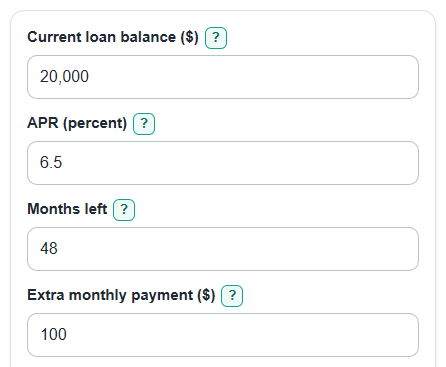
For a $20,000 balance at 6.5 percent APR with 48 months left, the estimated regular payment is about $474.30. Adding $100 per month pays the loan off in about 39 months instead of 48 months, saves about $542.90 of interest before fees, and saves about $542.90 after fees if the payoff fee is $0.
How to read negative savings
The calculator does not clamp savings to zero. If Estimated savings after fee is negative, the entered fee is larger than the interest saved. If Time saved is negative, the entered payment setup takes longer than the no-extra comparison.