
Estimate how extra car loan payments can change your payoff date, interest cost, and savings after any payoff fee.
Advanced options
Table of contents
How to use our Car Loan Early Payoff Calculator
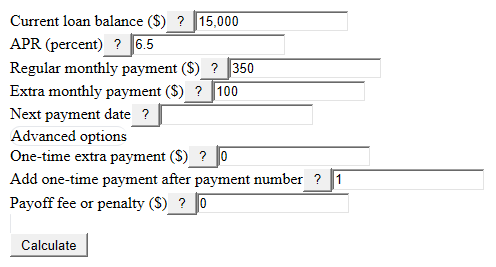
- Enter your Current loan balance ($) from your latest statement, then add the APR (percent) and Regular monthly payment ($).
- Enter the Extra monthly payment ($) you plan to add each month and check the Next payment date so the payoff date lines up with your payment schedule.
- Open Advanced options if you want to test a One-time extra payment ($), include a Payoff fee or penalty ($), or opt into a clearly defined biweekly comparison.
- Click Calculate and read Interest saved after fees first, then compare New payoff time, Time cut off, Estimated payoff date, and Estimated final payment.
- Sanity-check the result: if Interest saved after fees is negative or the Check before you pay extra note appears, compare the fee, timing, and payment amounts before sending extra money.
Definitions
Current loan balance ($): The remaining principal you still owe, before new interest is added.
APR (percent): The annual percentage rate used to estimate monthly interest.
Regular monthly payment ($): The required payment you make before adding extra money.
Extra monthly payment ($): Extra money added each month. This estimate treats it as going toward principal after interest due is paid.
One-time extra payment ($): A single added payment, such as a bonus or tax refund.
Payoff fee or penalty ($): A fee some contracts may charge for paying a loan early [3].
Interest saved after fees: The interest avoided by the early payoff plan, minus the payoff fee you entered.
Estimated final payment: The smaller last payment needed to bring the estimated balance to zero.
Common mistakes and quick fixes
Mistake: Using the car's trade-in value for Current loan balance ($).
Fix: Use the remaining principal balance from your loan statement.
Mistake: Entering APR (percent) as 0.065 instead of 6.5.
Fix: Type the percent number shown on the loan, such as 6.5 for 6.5 percent.
Mistake: Putting the full planned payment in Extra monthly payment ($).
Fix: Put only the amount above your Regular monthly payment ($).
Mistake: Setting Add one-time payment after payment number after the loan is already paid off.
Fix: Use 1 for after the next payment, or move the One-time extra payment ($) earlier.
Mistake: Ignoring Payoff fee or penalty ($) when reading Interest saved after fees.
Fix: Enter any fee from your contract so the savings number shows the net effect.
Mistake: Treating Estimated payoff date as an exact lender payoff quote.
Fix: Use it as a planning month and ask your lender for the exact payoff amount before the final payment.
Limitations & Key Assumptions / Boundary Conditions
- The estimate assumes a simple-interest auto loan. Precomputed-interest loans and some dealer contracts can handle early payments differently [1].
- The calculator assumes extra money is applied to principal after any interest due is paid. Confirm your lender's payment instructions before sending extra money.
- The existing monthly results use APR divided by 12. An optional biweekly comparison uses APR divided by 26 and payments exactly 14 days apart. Real payoff quotes may use daily interest, posting dates, late fees, or lender rounding.
- The Estimated payoff date is a month-and-year estimate based on the Next payment date, not a guaranteed payoff quote.
- Payoff fee or penalty ($) is subtracted only as a dollar amount you enter. The calculator does not look up your contract terms.
- If your Regular monthly payment ($) is not higher than the first month's interest, the balance will not shrink, so the calculator blocks the result with an error.
- The loop stops at 1200 months as a safety limit. If that happens, check the Current loan balance ($), APR (percent), and Regular monthly payment ($).
Methodology
How the estimate is built
The calculator starts with Current loan balance ($), then runs two month-by-month payoff paths: one with Regular monthly payment ($) only and one with Regular monthly payment ($), Extra monthly payment ($), and any One-time extra payment ($). Extra payments can help repay a loan faster and with less interest when they reduce principal [4].
monthly_rate = (APR (percent) / 100) / 12
For the regular-payoff path, each month adds interest, uses the smaller of the scheduled payment or the amount due, and stops when the balance reaches zero.
interest = balance * monthly_rate
payment_used = min(Regular monthly payment ($), balance + interest)
end_balance = balance + interest - payment_used
For the early-payoff path, the monthly payment includes Extra monthly payment ($). If the month number matches Add one-time payment after payment number, the calculator applies One-time extra payment ($), but only up to the remaining balance.
monthly_payment_used = min(Regular monthly payment ($) + Extra monthly payment ($), balance + interest)
lump_used = min(One-time extra payment ($), balance_after_monthly) when the selected payment number is reached
new_balance = balance_after_monthly - lump_used
How savings and dates are reported
Interest saved after fees compares the two interest totals, then subtracts Payoff fee or penalty ($) when the early payoff plan saves interest. The result stays signed, so a negative value means the fee is larger than the interest saved.
Interest saved after fees = Interest with regular payments only - Interest with extra payments - fee_used
Time cut off = regular payoff months - New payoff time
Estimated payoff date = Next payment date plus (New payoff time - 1) calendar months
Optional biweekly comparison
The comparison leaves the monthly result cards unchanged. It defines the monthly plan as Regular monthly payment plus Extra monthly payment, then either spreads the same annual amount across 26 payments or uses half that monthly plan every 14 days. The half-monthly choice makes 26 half-payments, equal to 13 monthly plan payments per year. Derived payments round to cents. The comparison excludes any one-time extra payment and fee so it isolates the recurring schedule, and it uses APR divided by 26 rather than claiming to reproduce a lender's daily-interest ledger.
Mini example
For a $1,000 Current loan balance ($), 12 percent APR, $300 Regular monthly payment ($), $100 Extra monthly payment ($), no one-time extra payment, and no fee, the monthly rate is 1 percent. The regular path takes 4 payments and about $22.48 of interest. The early path takes 3 payments and about $18.26 of interest, so Interest saved after fees is about $4.22, Time cut off is 1 month, and the Estimated final payment is about $218.26.
Sources
- What's the difference between a simple interest rate and precomputed interest on an auto loan? | Consumer Financial Protection Bureau - Consumerfinance
- Can I prepay my loan at any time without penalty? | Consumer Financial Protection Bureau - Consumerfinance
- Does Paying the Principal Lower a Monthly Car Payment? - Nerdwallet
- Loan amortization and extra payments - Wells Fargo - Wellsfargo