
Estimate the fixtures, lumens, average foot-candles, and energy cost needed to light a retail space.
Table of contents
How to use our Retail Lighting Calculator
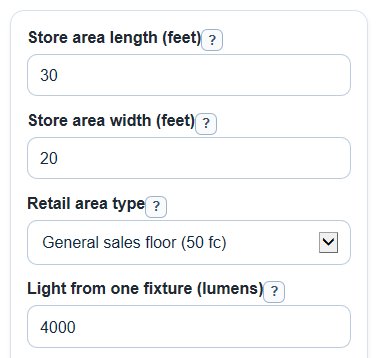
- Enter Store area length (feet) and Store area width (feet) for only the part of the store that will use this lighting plan.
- Choose Retail area type, or pick Use my own target and enter Your target light level (foot-candles).
- Enter Light from one fixture (lumens) from the fixture spec sheet, not the watt rating.
- Open Advanced options if you want to adjust Light that reaches the area (percent), Kept light over time (percent), power, hours, electricity price, or Number format.
- Click Calculate, then sanity-check the result: Fixtures needed should be a whole number, and Estimated average light level after rounding should be at or above your target.
Definitions
Foot-candle: Light landing on one square foot. In this calculator, 1 foot-candle means 1 lumen per square foot [3].
Lumen: The amount of light a fixture gives off. Light from one fixture (lumens) should come from the fixture spec sheet.
Light that reaches the area (percent): The percent of fixture light that actually reaches the floor, shelves, counters, or work area. Lighting designers often call this coefficient of utilization.
Kept light over time (percent): The percent of light still useful after dirt, aging, lens yellowing, and similar losses. Lighting designers often call this light loss factor.
kWh: Kilowatt-hour, a unit of electrical energy. A 1000-watt load running for 1 hour uses 1 kWh.
Scientific notation: A compact way to show very large or very small numbers, such as 1.2e6 for 1,200,000.
Common mistakes and quick fixes
Mistake: Putting the full building size in Store area length (feet) and Store area width (feet).
Fix: Measure only the sales floor, display zone, counter, or back room area that will use the same lighting layout.
Mistake: Choosing Retail area type and then expecting Your target light level (foot-candles) to change the answer when a preset is selected.
Fix: Select Use my own target before using Your target light level (foot-candles).
Mistake: Entering watts in Light from one fixture (lumens).
Fix: Use the fixture lumen value from the spec sheet; put watts in Power used by one fixture (watts) only if you want energy results.
Mistake: Setting Light that reaches the area (percent) or Kept light over time (percent) to 0.
Fix: Use a value greater than 0 and no more than 100, or use 100 for a no-loss shortcut.
Mistake: Using Electricity price ($ per kWh) as the total monthly bill divided by 30.
Fix: Enter the energy price per kWh from your bill; the Estimated 30-day energy cost does not include demand charges, taxes, or fees.
Limitations & Key Assumptions / Boundary Conditions
- The area calculation treats the lit space as a rectangle. For odd shapes, use average length and width or split the store into smaller zones.
- The result is an average light estimate. It does not place fixtures, check beam spread, find dark spots, measure glare, or predict shelf shadows.
- Retail area type values are starter targets for planning. Final targets can vary by brand standards, merchandise, age of customers, surface colors, and local code requirements.
- Light that reaches the area (percent) and Kept light over time (percent) are estimates. Real values depend on fixture photometrics, ceiling height, wall reflectance, cleaning schedule, and fixture age.
- Fixtures needed is rounded up to whole fixtures. The installed layout may still need changes for symmetry, aisles, emergency lighting, circuits, and mounting locations.
- Energy outputs use input watts, hours per day, electricity price, and a 30-day shortcut. They do not include demand charges, taxes, rebates, dimming schedules, or maintenance costs.
Methodology
Core calculation
The calculator first finds the lit floor area from the entered store dimensions.
area_ft2 = length_ft * width_ft
It then converts the target foot-candle level into lumens that need to land on that area. A foot-candle is one lumen per square foot [3].
target_lumens_on_area = area_ft2 * target_fc
The target light level comes from Retail area type, unless Use my own target is selected. Then the calculator uses Your target light level (foot-candles).
Next it adjusts for two loss factors: Light that reaches the area (percent) and Kept light over time (percent).
source_lumens_needed = target_lumens_on_area / ((cu_percent / 100) * (llf_percent / 100))
Rounding and average light
The needed source lumens are divided by Light from one fixture (lumens), then rounded up because partial fixtures cannot be installed.
fixture_count = ceil(source_lumens_needed / lumens_per_fixture)
The calculator then recomputes the average foot-candles from the rounded whole fixture count.
estimated_average_fc = (fixture_count * lumens_per_fixture * (cu_percent / 100) * (llf_percent / 100)) / area_ft2
Installed fixture lumens are the whole fixture count times the lumen output of one fixture.
installed_fixture_lumens = fixture_count * lumens_per_fixture
Power and cost
When the power inputs are valid, the calculator estimates lighting power, energy per day, and a simple 30-day energy cost.
total_watts = fixture_count * watts_per_fixture
lighting_power_density = total_watts / area_ft2
daily_energy_kwh = total_watts * hours_per_day / 1000
thirty_day_energy_cost = daily_energy_kwh * electricity_rate * 30
Worked example
For a 30 ft by 20 ft sales floor, the area is 600 sq ft. With a 50 fc target, the target lumens on the area are 30,000 lm. With Light that reaches the area at 80% and Kept light over time at 90%, the fixture lumens needed before rounding are 30,000 / (0.80 * 0.90) = 41,666.7 lm. If one fixture gives 4,000 lm, the calculator rounds up to 11 fixtures. Those fixtures install 44,000 lm and give an estimated average of 52.8 fc after the same 80% and 90% factors. If each fixture uses 35 W for 12 hours per day at $0.16 per kWh, the total power is 385 W, daily energy is 4.62 kWh, and the estimated 30-day energy cost is $22.18.