
Estimate fixture count, maintained light level, Food Code minimum checks, and yearly lighting cost for one restaurant area.
Table of contents
How to use our Restaurant Lighting Calculator
- Pick the closest Restaurant area so the calculator can load a starter Target light level.
- Enter the Lit area, Lumens per fixture, and Watts per fixture from your plan or fixture spec sheet.
- Open Advanced options if you want to change Room and fixture efficiency, Dirt and aging factor, Hours on per day, Electricity price, or Number style.
- Click Calculate and read Fixtures to install first, then check Food Code minimum check and Estimated installed light level.
- Sanity-check the result: if Fixtures to install looks much too high or low, recheck Lit area, Target light level, Lumens per fixture, Room and fixture efficiency, and Dirt and aging factor.
Definitions
Foot-candle (fc): A light level unit equal to 1 lumen spread over 1 square foot.
Lumen (lm): The amount of visible light a lamp or fixture gives out.
Lux (lx): The metric light level unit. The calculator converts Target light level to Target in lux.
Room and fixture efficiency (CU): The share of fixture light that reaches the area after room shape, fixture aim, and surface reflection are considered.
Dirt and aging factor (LLF): A reduction factor for dirt, aging LEDs, and normal wear.
Maintained light level: The estimated light level after room efficiency and light loss are included.
Lighting power per square foot: Installed lighting watts divided by Lit area.
Common mistakes and quick fixes
Mistake: Using the whole restaurant for Lit area when only one zone is being planned.
Fix: Enter only the floor or work area served by this fixture group in Lit area.
Mistake: Leaving Target light level below the built-in minimum after choosing Kitchen or food prep, Buffet or self-service food, Storage or cleaning area, or Handwashing, warewashing, or restroom.
Fix: Raise Target light level or use Food Code minimum check to see why the entered target may be too low.
Mistake: Entering bulb watts in Lumens per fixture.
Fix: Put light output in Lumens per fixture and put power use in Watts per fixture.
Mistake: Setting Room and fixture efficiency to 1.00 for a normal room.
Fix: Use a realistic Room and fixture efficiency value, such as 0.60 to 0.80, unless you have fixture layout data.
Mistake: Treating Dirt and aging factor as a brightness boost.
Fix: Use Dirt and aging factor as a reduction factor between 0.01 and 1.00; lower values mean more lost light over time.
Mistake: Using 24 for Hours on per day when the lights are only on during open and cleaning hours.
Fix: Enter the usual daily on-time in Hours on per day so Estimated yearly energy cost is not overstated.
Limitations & Key Assumptions / Boundary Conditions
- This is an early lumen-method estimate for average maintained light, not a stamped lighting design.
- The estimate does not place fixtures on a ceiling plan, check beam spread, model shadows, calculate glare, or test light uniformity.
- Food Code minimum check uses built-in minimums for matching restaurant support areas. Local rules, inspectors, or project documents may require more.
- Dining table and dining room presets are design starters, not Food Code pass-fail minimums.
- Room and fixture efficiency and Dirt and aging factor are rough inputs unless they come from photometric data or a lighting professional.
- Estimated yearly energy cost is energy-only. It does not include demand charges, taxes, dimming schedules, occupancy sensors, maintenance, or lamp replacement.
- Lighting power per square foot is only a quick comparison number. It is not a full energy-code compliance result.
Methodology
Calculation steps
The calculator estimates the total fixture lumens needed to reach the entered Target light level over the entered Lit area. A foot-candle is 1 lumen per square foot, so a larger area or higher target needs more lumens.
required_initial_lumens = target_fc * area_sqft / (cu_factor * llf_factor)
The exact fixture count is the needed lumens divided by Lumens per fixture.
fixtures_exact = required_initial_lumens / lumens_per_fixture
Because you cannot install part of a fixture, the calculator rounds up to the next whole fixture.
fixtures_to_install = ceil(fixtures_exact)
After rounding, the calculator recalculates the estimated installed light level from the actual fixture count.
installed_light_level_fc = fixtures_to_install * lumens_per_fixture * cu_factor * llf_factor / area_sqft
Target in lux uses the standard conversion from foot-candles to lux.
target_lux = target_fc * 10.76391
Power and cost use the rounded fixture count, because energy use depends on what is actually installed.
total_watts = fixtures_to_install * watts_per_fixture
annual_energy_cost = total_watts / 1000 * hours_per_day * 365 * electricity_rate
watts_per_sqft = total_watts / area_sqft
Food Code check
For matching restaurant support areas, the calculator compares the entered Target light level and the rounded installed estimate with the built-in minimum for the selected Restaurant area. The built-in minimums are 10 foot-candles for storage or cleaning areas, 20 foot-candles for buffet or self-service food and wash/restroom areas, and 50 foot-candles for kitchen or food prep areas. The calculator does not silently raise your Target light level; it shows a warning when the entered target is below the built-in minimum.
Mini-example
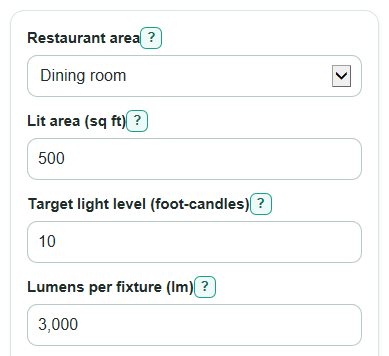
For a 500 sq ft dining room with a 10 fc target, 3,000 lm fixtures, CU 0.70, and LLF 0.80, the needed fixture lumens are 10 * 500 / (0.70 * 0.80) = 8,928.57 lm. Dividing by 3,000 lm per fixture gives 2.98 fixtures, so the calculator rounds up to 3 fixtures. Those 3 fixtures give an estimated installed level of 3 * 3,000 * 0.70 * 0.80 / 500 = 10.08 fc. With 30 W fixtures, 10 hours per day, and $0.15 per kWh, yearly energy cost is 90 / 1000 * 10 * 365 * 0.15 = $49.28 per year.