
Estimate how many classroom light fixtures you need and the expected brightness at desks from room size, fixture lumens, and lighting factors.
Table of contents
How to use our Classroom Lighting Calculator
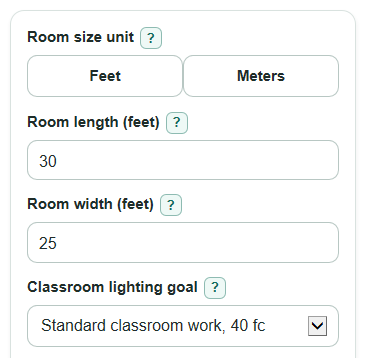
- Choose Room size unit, then enter Room length and Room width using the same unit for both measurements.
- Pick a Classroom lighting goal, or choose Use my own target and enter Your target brightness in foot-candles.
- Enter Light from one fixture in lumens. If you know the fixture data, use delivered lumens instead of lamp-only lumens.
- Open Advanced options only if you want to change Light that reaches desks, Light kept over time, Power for one fixture, or Number display.
- After you click Calculate, sanity-check the result: Expected classroom brightness should be at or above your target, and Fixture lumens needed before rounding should be close to but not higher than Total lumens from chosen fixtures after rounding.
Definitions
Foot-candle: A measure of illuminance, meaning light arriving on one square foot of surface, such as a desk or work area [2].
Lux: The metric measure of illuminance. This calculator converts foot-candles to lux by multiplying by 10.76391.
Fixture lumens: The amount of light emitted by one light fixture before room losses are applied.
Light that reaches desks (CU): Coefficient of utilization. It is the decimal share of fixture light estimated to reach the work area.
Light kept over time (LLF): Light loss factor. It accounts for fixture output dropping over time from aging, dirt, and similar losses [3].
Expected classroom brightness: The maintained desk-level brightness after rounding up to a whole number of fixtures.
Lighting power per floor area: Total lighting watts divided by Classroom floor area, shown as W per sq ft.
Common mistakes and quick fixes
Mistake: Mixing feet and meters in Room length and Room width.
Fix: Set Room size unit first, then enter both dimensions in that same unit.
Mistake: Treating Light from one fixture as the brightness on the desks.
Fix: Enter fixture lumens there, then read Expected classroom brightness for the desk-level estimate.
Mistake: Choosing Use my own target but leaving Your target brightness blank or at 0.
Fix: Enter a positive foot-candle target, such as 40 for standard classroom work.
Mistake: Setting Light that reaches desks above 1 because it is read as a percent.
Fix: Enter Light that reaches desks as a decimal from 0.01 to 1.00, such as 0.70.
Mistake: Leaving an old low value in Light kept over time after changing fixtures.
Fix: Check Light kept over time before recalculating; use 0.80 as a rough starter value if you do not have better data.
Mistake: Using Power for one fixture to judge brightness.
Fix: Use Power for one fixture only for Total lighting power and Lighting power per floor area; brightness comes from lumens, CU, and LLF.
Limitations & Key Assumptions / Boundary Conditions
- This is a screening estimate, not a code compliance check or a final photometric lighting design.
- The result assumes light is spread evenly across the classroom work area. Real rooms can have bright and dark spots.
- Fixture spacing, ceiling height, wall colors, window light, glare, controls, and furniture can change real desk brightness.
- Light that reaches desks and Light kept over time are planning factors. Replace the default 0.70 CU and 0.80 LLF when fixture data or a lighting plan gives better values.
- If Light from one fixture is lamp lumens instead of delivered fixture lumens, Fixture lumens needed before rounding may look easier to meet than it really is.
- Power for one fixture only estimates energy use. It does not prove the room has enough light.
- For final school decisions, check local requirements and confirm the installed room with a light meter or professional lighting layout.
Methodology
Inputs converted first
The calculator works in square feet because the target is in foot-candles. If Room size unit is Meters, each dimension is multiplied by 3.280839895 to convert meters to feet before the area is found.
area_ft2 = length_ft * width_ft
Brightness target
The Classroom lighting goal supplies the target in foot-candles. If Use my own target is selected, the calculator uses Your target brightness instead. The preset list is classroom-focused; general classroom guidance is often shown around 30 to 50 foot-candles [1].
target_fc = preset_fc or custom_target_fc
Fixture lumens and fixture count
The lumen method estimates how many emitted fixture lumens are needed after accounting for Light that reaches desks (CU) and Light kept over time (LLF). Both factors are decimals, so 0.70 means 70%.
required_lumens = target_fc * area_ft2 / (CU * LLF)
Because a room cannot use part of a fixture, the fixture count is rounded up to the next whole fixture.
fixture_count = ceil(required_lumens / lumens_per_fixture)
Brightness after rounding
After rounding up, the calculator recomputes the maintained classroom brightness from the whole number of fixtures. This is why Expected classroom brightness can be a little higher than the selected target.
expected_fc = fixture_count * lumens_per_fixture * CU * LLF / area_ft2
expected_lux = expected_fc * 10.76391
Optional power check
If Power for one fixture is entered, the calculator also estimates total watts and watts per square foot.
total_watts = fixture_count * watts_per_fixture
watts_per_ft2 = total_watts / area_ft2
Mini-example
For a 30 ft by 25 ft classroom, the area is 750 sq ft. With a 40 fc target, CU of 0.70, LLF of 0.80, and 4,000 lumens per fixture, required fixture lumens are 40 * 750 / (0.70 * 0.80) = 53,571.43 lumens. Dividing by 4,000 gives 13.39, so the calculator rounds up to 14 fixtures. The rounded plan gives 14 * 4,000 * 0.70 * 0.80 / 750 = 41.81 foot-candles, or about 450.08 lux.