
Estimate how much electricity a solar panel or solar array can make per day, month, year, and after aging.
Table of contents
How to use our Solar Panel Output Calculator
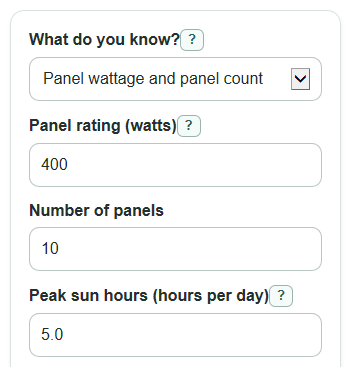
- Choose What do you know? based on your starting point: Panel wattage and panel count, or Total system size.
- Enter Panel rating (watts) and Number of panels, or enter Total system size (kW) if you already know the array size.
- Enter Peak sun hours (hours per day) and Real-world output kept (percent) for your location and setup.
- Open Advanced options only if you want to change Output drop each year (percent), Future year to check (years), Days in monthly estimate (days), or Number format.
- Sanity-check the result: Estimated energy per day should be in kWh per day, while Solar array size used should be in kW.
Definitions
Panel rating (watts): The power rating printed for one solar panel under test conditions, such as 400 W.
Solar array size used: The total rated power of all panels together, shown in kilowatts (kW).
Watt (W) and kilowatt (kW): Units of power, which means the rate of making or using electricity. One kW equals 1,000 W.
Kilowatt-hour (kWh): A unit of energy made or used over time. A 1 kW system making power for 1 hour makes about 1 kWh before losses.
Peak sun hours: The day's sunlight converted into hours of full-strength sun. It is not the same as total daylight hours.
Real-world output kept: The percent of rated output left after losses from heat, shade, dirt, wiring, and the inverter.
Output drop each year: The yearly percent decrease used for the aging estimate.
Common mistakes and quick fixes
Mistake: Using daylight hours for Peak sun hours (hours per day).
Fix: Use peak sun hours, which means the sunlight for the day converted into full-strength sun hours.
Mistake: Entering a single panel's watt rating in Total system size (kW).
Fix: If you know one panel rating, choose Panel wattage and panel count and enter Panel rating (watts) plus Number of panels.
Mistake: Typing 80 as 0.80 in Real-world output kept (percent).
Fix: Enter the percent number itself, such as 80 for 80 percent.
Mistake: Leaving Number of panels as a decimal, such as 10.5.
Fix: Use a whole number of panels, such as 10 or 11.
Mistake: Treating Estimated energy per month as an exact utility bill forecast.
Fix: Check Days in monthly estimate (days) and remember that weather, shade, and seasonal sun can change real production.
Mistake: Setting Output drop each year (percent) above 100 or leaving Future year to check (years) as a non-whole number.
Fix: Use an annual drop from 0 to 100 and a whole number of years.
Limitations & Key Assumptions / Boundary Conditions
- This is a simple average-energy estimate. It does not model hourly weather, panel tilt, roof direction, clouds, snow, shading patterns, or inverter clipping.
- Peak sun hours should already reflect your location and the time period you care about. A summer value can overstate a yearly average.
- Real-world output kept (percent) combines several losses into one number. If that percent is too high, the kWh outputs will be too high.
- Annual output uses 365 days. Monthly output uses the Days in monthly estimate (days) value you enter.
- The future-year output applies the same Output drop each year (percent) every year. Real panels and warranties may age differently.
- In Total system size mode, Energy per panel per day is not shown because the calculator does not know the number of panels.
Methodology
How the estimate is calculated
The calculator uses the selected What do you know? mode to find the total solar array size. In panel mode, it multiplies one panel's rating by the number of panels and converts watts to kilowatts.
system_size_kw = (panel_watts * panel_count) / 1000
Daily energy is the array size times peak sun hours times the real-world output kept percent.
daily_output_kwh = system_size_kw * peak_sun_hours * (system_efficiency_percent / 100)
Monthly and yearly energy are scaled from the daily estimate.
monthly_output_kwh = daily_output_kwh * days_per_month
annual_output_kwh = daily_output_kwh * 365
The aging estimate applies the same yearly drop for the selected number of years.
aging_factor = (1 - annual_drop_percent / 100) ^ years_ahead
future_daily_output_kwh = daily_output_kwh * aging_factor
future_annual_output_kwh = annual_output_kwh * aging_factor
When panel mode is used, the calculator also estimates one panel's daily energy.
per_panel_daily_kwh = (panel_watts / 1000) * peak_sun_hours * (system_efficiency_percent / 100)
Mini-example
For 10 panels rated at 400 W each, the array size is (400 * 10) / 1000 = 4 kW. With 5 peak sun hours and 80 percent real-world output kept, daily energy is 4 * 5 * 0.80 = 16 kWh per day. A 30-day month is 16 * 30 = 480 kWh, and a 365-day year is 16 * 365 = 5,840 kWh. With a 0.5 percent yearly drop for 25 years, the aging factor is about 0.8822, so future daily energy is about 14.12 kWh per day.
Input checks
The calculator rejects negative sun hours, percent values outside 0 to 100, non-whole panel counts, non-whole future years, zero or negative array sizes, and any result that is not a finite number. In panel mode it does not use Total system size (kW), and in system-size mode it does not use Panel rating (watts) or Number of panels.
Sources
- U.S. Department of Energy - Understanding Solar Photovoltaic System Performance (PDF) - Energy
- University of Maryland Extension - Working on Solar: Design and System Sizing (PDF worksheet; PSH/sizing concepts) - UMD
- Measuring electricity - U.S. Energy Information Administration (EIA) - EIA
- Watt | Power, Energy, Electricity | Britannica - Encyclopedia Britannica