
Estimate how many peak-sun hours and solar days your panel setup may need to charge a battery.
Advanced options
Table of contents
How to use our Solar Panel Charge Time Calculator
Choose "No devices running" to keep the original charging estimate. Choose "Daily energy use included" to account for electricity used throughout the day and overnight, then enter "Daily energy drawn from the battery/system (Wh/day)". Use energy at the battery/system side, including inverter and standby losses. The new mode shows daily energy and average net recovery days, rather than treating peak-sun hours as clock hours.
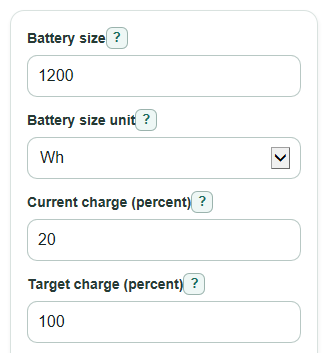
- Enter Battery size and choose Battery size unit: Wh, kWh, or Ah.
- If you choose Ah, enter Battery voltage; Wh and kWh already include voltage.
- Enter Current charge, Target charge, and Solar panel power for the panels connected to the charger.
- Open Advanced options if you want to change Solar output after losses, Peak sun hours per day, Slow finish add-on, or Number format.
- Click Calculate, then sanity-check Useful solar power and Energy the battery needs; if either looks far from your setup, recheck units, percent values, and panel watts.
Definitions
Wh: Watt-hours. This is a unit of stored energy. A 1200 Wh battery can store about 1200 watts for 1 hour in an ideal case.
kWh: Kilowatt-hours. One kWh equals 1000 Wh.
Ah: Amp-hours. This is a battery capacity label that needs Battery voltage to convert to Wh.
Peak sun hours per day: The daily amount of sunlight written as full-strength sun hours. It is not the same as total daylight time.
Solar output after losses: The percent of panel label watts that actually reaches the battery after real-world losses.
Slow finish add-on: Extra time added for the slower part of charging near the target charge, especially near full.
Useful solar power: The panel watts after applying Solar output after losses.
Common mistakes and quick fixes
Mistake: Entering a Battery size in Ah but leaving Battery voltage at the wrong value.
Fix: Choose Ah in Battery size unit and set Battery voltage to the battery system voltage, such as 12, 24, or 48.
Mistake: Typing 1.2 as Battery size while Battery size unit is Wh when you mean 1.2 kWh.
Fix: Change Battery size unit to kWh, or enter 1200 as Battery size in Wh.
Mistake: Using one panel's Solar panel power when several panels are connected.
Fix: Enter the total Solar panel power in watts for all panels feeding the charger.
Mistake: Setting Solar output after losses to 100 percent for a normal outdoor setup.
Fix: Use a lower Solar output after losses if heat, angle, wires, controller loss, clouds, or shade reduce power.
Mistake: Reading Estimated charging time as clock hours from sunrise to sunset.
Fix: Treat Estimated charging time as peak sun hours, then use Estimated time in days for a day-based estimate.
Mistake: Entering a Target charge below Current charge and expecting a positive charge time.
Fix: Set Target charge above Current charge if you want the calculator to estimate added solar charging.
Limitations & Key Assumptions / Boundary Conditions
- This is a planning estimate, not a guarantee. Actual solar radiation changes with location, time of day, season, weather, shade, and panel angle.
- The Solar output after losses input combines many effects into one percent, including heat, wiring, controller efficiency, dirt, and shade.
- The Slow finish add-on is a simple percent increase. It does not model a full battery charging curve, battery chemistry, temperature, or charger limits.
- If Battery size unit is Wh or kWh, the calculator does not know battery voltage, so Estimated charge current is not shown.
- If Target charge is the same as or below Current charge, Energy the battery needs and charging time are shown as 0 because no added solar charging is needed to reach that target.
- "Peak sun hours per day" must be above 0 to estimate days. In "No devices running", the peak-sun-hour result remains available without a daily sun value. "Daily energy use included" requires a positive daily sun value.
Daily energy use and net recovery
"Daily energy use included" is an average daily budget for an existing battery and solar array. It does not size new equipment or model hourly charging.
Useful solar energy per day (Wh/day) = panel watts x solar output after losses / 100 x peak sun hours per day.
Daily recharge surplus (Wh/day) = useful solar energy per day - daily energy drawn from the battery/system.
When more stored energy is needed and the daily surplus is positive: average net recovery time (days) = energy the battery needs / daily recharge surplus x (1 + slow finish add-on / 100).
In this mode, "Slow finish add-on (percent)" is a rough extra-time allowance. It is not an additional efficiency loss or a simulated charging curve. With zero daily use and the same settings, the days result matches "No devices running".
Example: a 1,200 Wh battery going from 20% to 100% needs 960 Wh. A 200 W array at 75% useful output and 5 peak sun hours supplies an estimated 750 Wh/day. Using 300 Wh/day leaves 450 Wh/day. With the 15% extra-time allowance, recovery is approximately 960 / 450 x 1.15 = 2.45 days, versus 1.47 days without use.
At 750 Wh/day of use there is no daily surplus. At 900 Wh/day there is a 150 Wh/day shortfall. A positive recovery time cannot be estimated from those daily averages. This does not mean the target can never be reached temporarily during daylight. If the target is already reached, additional recovery is zero, but a daily shortfall still warns that stored energy is declining on average.
Daily averages cannot show whether the battery can cover overnight use or exactly when it reaches a target. Actual weather, load timing, battery capacity limits, controller clipping and charge acceptance can change the result. Keep those checks separate. For the underlying daily-energy and peak-sun-hour concepts, see Victron's solar sizing guidance. The recovery estimate here is a simplified energy balance with a user-selected allowance, not a manufacturer charging formula.
Methodology
The peak-sun-hour formulas below describe "No devices running". The daily mode uses the energy-balance method above.
How the estimate is calculated
The calculator first converts the battery size to watt-hours, written as Wh. If the battery is entered in Ah, voltage is needed because energy depends on both amp-hours and volts.
battery_wh = battery_size when Battery size unit is Wh
battery_wh = battery_size * 1000 when Battery size unit is kWh
battery_wh = battery_size * battery_voltage_v when Battery size unit is Ah
Next, it finds the energy needed to move from Current charge to Target charge. If the target is not above the current charge, the needed energy is set to 0.
energy_to_add_wh = battery_wh * (target_charge_pct - current_charge_pct) / 100
energy_to_add_wh = max(0, energy_to_add_wh)
The solar panel's label watts are reduced by Solar output after losses. Real solar input varies by place, season, time, and weather [2].
effective_power_w = panel_watts * solar_output_pct / 100
The basic charging time is energy divided by useful power. Then the Slow finish add-on increases that time. Some battery charging methods slow near full during topping or saturation stages [1].
bulk_time_hours = energy_to_add_wh / effective_power_w
charge_time_hours = bulk_time_hours * (1 + finish_stage_add_pct / 100)
Estimated time in days divides the peak-sun-hour time by Peak sun hours per day.
charge_days = charge_time_hours / peak_sun_hours_per_day
Estimated charge current is shown only when Battery voltage is known.
estimated_charge_current_a = effective_power_w / battery_voltage_v
Mini example
For a 1200 Wh battery going from 20 percent to 100 percent, the energy needed is 1200 * (100 - 20) / 100 = 960 Wh. With 200 W of panels and 75 percent solar output after losses, useful solar power is 150 W. Basic time is 960 / 150 = 6.4 peak sun hours. With a 15 percent Slow finish add-on, the estimate is 7.36 peak sun hours. At 5 peak sun hours per day, that is about 1.47 days.
Validation choices
The calculator blocks a zero or negative Battery size, Solar panel power, Ah Battery voltage, or Solar output after losses because those values would make the charge estimate impossible. Percent inputs must be valid numbers from 0 to 100, and Number format changes only how values are displayed.