
Convert a time amount between common units and choose how months and years should be handled before you trust the result.
Advanced options
Assumptions for months and years
Number display
Table of contents
How to use our Time Unit Converter
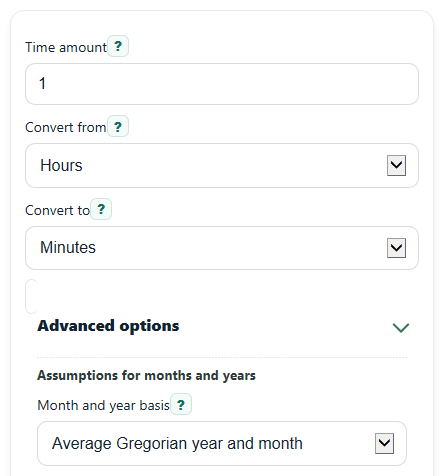
- Enter a number in Time amount. You can use decimals like 0.5 or negative values for offsets or intervals.
- Choose the starting unit in Convert from and the target unit in Convert to.
- If your conversion uses months or years, open Advanced options and pick the Month and year basis you want.
- Set Decimal places or turn on Use scientific notation for very large or very small results if needed, then click Calculate.
- Check Converted time, then sanity-check Conversion setup, Assumption used, and Same amount in seconds to make sure the answer fits your units and basis.
Definitions
Time amount: The number you want to convert. It can be whole or decimal, positive or negative.
Convert from: The unit your starting value is currently in, such as seconds, hours, or weeks.
Convert to: The unit you want the final answer shown in.
Month and year basis: The rule used when months or years appear. This matters because months and years do not have one exact fixed length in everyday calendars.
Average Gregorian year and month: Uses 365.2425 days per year and 30.436875 days per month, based on the Gregorian calendar average [1].
365-day year and 30-day month: A simpler rule that treats 1 year as 365 days and 1 month as 30 days.
Decimal places: How many digits appear after the decimal point in Converted time.
Scientific notation: A shorter way to write very large or very small numbers, such as 3.6 x 10^12.
Same amount in seconds: The entered time rewritten in seconds using the same basis rules as the main conversion.
Common mistakes and quick fixes
Mistake: Leaving Time amount blank or typing text instead of a number.
Fix: Enter a real number such as 1, 0.5, or -2 in Time amount .
Mistake: Reading a month-to-day or year-to-day result without checking Month and year basis .
Fix: If Convert from or Convert to uses months or years, verify the basis before using Converted time .
Mistake: Choosing the wrong direction in Convert from and Convert to .
Fix: Recheck both selectors and use Conversion setup to confirm the factor goes the way you expected.
Mistake: Thinking Converted time changed because of rounding when the real issue is display only.
Fix: Increase Decimal places to see more digits before deciding the value is off.
Mistake: Being confused by huge nanosecond results or tiny year results written in a long string of zeros.
Fix: Turn on Use scientific notation for very large or very small results when the number is hard to read.
Mistake: Assuming Same amount in seconds will always match an exact real calendar count for months or years.
Fix: Treat Same amount in seconds as based on the selected rule, not as an exact date-by-date calendar calculation.
Limitations & Key Assumptions / Boundary Conditions
- Months and years are only exact inside the selected basis rule, not for every real calendar month or specific date range.
- The tool converts time intervals, not clock times on a calendar, so it does not account for leap seconds, time zones, daylight saving time, or start and end dates.
- When only exact units are used, such as seconds, minutes, hours, days, and weeks, the conversion uses fixed factors.
- When months or years are involved, the result depends on Month and year basis, so two valid settings can give different answers.
- Rounded display can hide tiny differences, especially after converting very large or very small values; increase Decimal places to inspect more digits.
- Scientific notation changes how a number is shown, not the underlying converted value.
Methodology
How the converter works
The converter first changes the entered value into seconds, then changes seconds into the target unit. This keeps the method consistent across all supported units.
result = value * from_seconds / to_seconds
seconds_equivalent = value * from_seconds
Exact units
These units use fixed factors: nanoseconds, microseconds, milliseconds, seconds, minutes, hours, days, and weeks.
1 ns = 0.000000001 s
1 us = 0.000001 s
1 ms = 0.001 s
1 min = 60 s
1 hour = 3600 s
1 day = 86400 s
1 week = 7 days
Month and year basis
If either selected unit is month or year, the converter uses the basis you chose in Month and year basis.
Gregorian average: 1 year = 365.2425 days
Gregorian average: 1 month = 365.2425 / 12 = 30.436875 days
Simple basis: 1 year = 365 days
Simple basis: 1 month = 30 days
The Gregorian average year comes from the Gregorian calendar's repeating pattern over a 400-year cycle [1].
Mini example
Example:
convert 1 hour to minutes. First, 1 hour = 3600 seconds. Then divide by 60 seconds per minute.
result = 1 * 3600 / 60 = 60 minutes
Example: convert 1 month to days using the Gregorian average basis.
result = 1 * 30.436875 / 1 = 30.436875 days
Same-unit case
If Convert from and Convert to are the same, the converted value stays equal to the entered amount. The tool still reports the setup and basis note when useful.
Assumptions that affect results
This tool is for unit conversion, not date counting between two calendar dates. Because of that, month and year outputs are average-rule conversions when those units are used, and results can differ from real date-to-date elapsed time.