
Convert weeks to hours fast, with exact or rounded results and a simple time breakdown you can read at a glance.
Table of contents
How to use our Weeks to Hours Converter
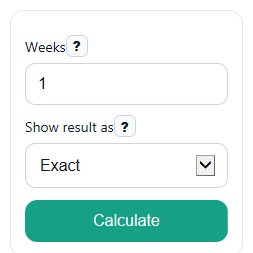
- Enter a value in Weeks. You can use whole numbers, decimals like 2.5, or negative values for signed time differences.
- Pick a choice in Show result as: Exact, Nearest whole hour, or 2 decimal places.
- Click Calculate to see Hours, Time breakdown, and Formula used.
- Sanity-check the result: 1 week should equal 168 hours, so 0.5 week should equal 84 hours and 2 weeks should equal 336 hours.
Definitions
Weeks: The time value you enter, measured in weeks.
Hours: The converted time in hours. One hour is a standard unit of time [1].
Show result as: A display choice that keeps the answer exact or rounds it to a whole hour or 2 decimal places.
Time breakdown: The same total time rewritten as whole weeks, whole days, and leftover hours.
Exact: Shows the direct conversion without rounding the displayed answer.
Common mistakes and quick fixes
Mistake: Leaving Weeks blank and expecting a result.
Fix: Enter any finite number in Weeks , such as 1, 0.5, or -1.25.
Mistake: Typing days into Weeks .
Fix: Enter only week values in Weeks . If you mean 7 days, enter 1.
Mistake: Thinking the Hours result changed the conversion rule.
Fix: The rule stays the same: 1 week = 168 hours. Show result as only changes how the number is displayed.
Mistake: Reading Time breakdown as a separate answer from Hours .
Fix: Treat Time breakdown as the same time written in weeks, days, and hours for easier reading.
Mistake: Being confused by a negative Hours value.
Fix: A negative Hours result means the entered Weeks value was negative. The size of the time is the same, but the sign is kept.
Limitations & Key Assumptions / Boundary Conditions
- This converter uses standard civil time only: 1 week = 7 days and 1 day = 24 hours, so 1 week = 168 hours.
- It converts by fixed units and does not account for calendars, daylight saving time changes, leap seconds, or clock-based scheduling details.
- The Time breakdown is a readable rewrite of the same total time. It does not change the main Hours answer.
- When rounding is selected in Show result as, only the displayed Hours value is rounded. Small display differences can happen compared with the exact value.
- Negative values are allowed and stay negative in Hours. The breakdown shows the size of the time span, with the sign understood from the original input.
Methodology
Conversion rule
The calculator uses one fixed rule: 1 week equals 168 hours. That comes from 7 days per week and 24 hours per day.
hours = weeks x 168
Breakdown rule
To make the answer easier to read, the calculator also rewrites the total time as whole weeks, whole days, and leftover hours.
abs_hours = abs(hours)
whole_weeks = floor(abs_hours / 168)
rem1 = abs_hours - whole_weeks x 168
whole_days = floor(rem1 / 24)
rem_hours = rem1 - whole_days x 24
If the original input is negative, the sign is kept in the main Hours result, while the breakdown describes the size of that time span.
Worked example
Example: if Weeks is 2.5, then the hour result is 2.5 x 168 = 420.
420 = 2 x 168 + 3 x 24 + 12
So the Time breakdown is 2 weeks, 3 days, 12 hours.
Rounding and display
If Show result as is set to Exact, the calculator shows the direct conversion. If it is set to Nearest whole hour or 2 decimal places, the displayed Hours value is rounded for easier reading. Rounded negative zero is shown as 0.
Assumptions used
This method assumes standard fixed time units, not calendar events or clock changes. That is why it is good for unit conversion but not for cases where local clock time changes during the period.