
Plan a serial dilution by ratio, factor, or volumes and get a clear tube-by-tube setup with concentrations and diluent amounts.
Advanced options
How to use our Serial Dilution Calculator
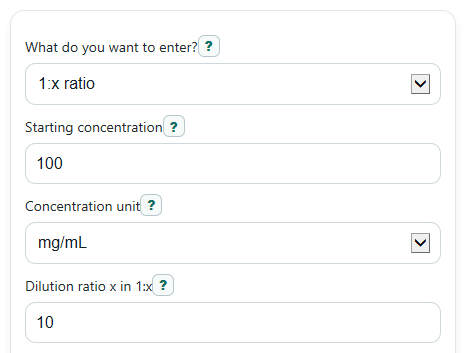
- Choose your setup under What do you want to enter?: use Dilution ratio x in 1:x, Dilution factor per step, or Transfer volume per step plus Final volume in each tube.
- Enter Starting concentration, pick the matching Concentration unit, choose Volume unit if needed, and enter Number of dilution steps.
- If you want reverse planning, open Advanced options and add Target final concentration. Add Extra volume to keep in each tube if you want leftover liquid after each transfer.
- Click Calculate, then check that Per-step dilution, Diluent to add each step, and the Tube-by-tube plan match what you would actually do in the lab. A quick sanity check is that each new tube should be lower than the one before it by the same factor.
Definitions
Serial dilution: A step-by-step dilution where each new tube is made from the previous one, so concentration drops repeatedly [2].
Starting concentration: The concentration of the original stock before any dilution steps.
Dilution ratio x in 1:x: The size of one dilution step. For example, 1:10 means each new tube is 10 times less concentrated than the previous tube.
Dilution factor per step: The fold decrease used at every step. In this calculator, it must be greater than 1.
Transfer volume per step: The amount moved from one tube into the next tube.
Final volume in each tube: The total volume in a tube after transfer plus diluent.
Diluent to add each step: The solvent volume added to reach the final volume. It equals final volume minus transfer volume.
Final concentration after all steps: The concentration in the last tube of the series.
Total dilution from start to finish: How many times lower the last tube is compared with the original stock.
Target final concentration: An optional goal concentration used to check whether your chosen number of steps goes low enough.
Common mistakes and quick fixes
Mistake: Entering 0.1 in Dilution ratio x in 1:x for a 1:10 step.
Fix: Enter 10, not 0.1. In this calculator, a 1:10 dilution means the Per-step dilution is 10x.
Mistake: Using Transfer volume per step that is equal to or bigger than Final volume in each tube .
Fix: Make Final volume in each tube larger so the Diluent to add each step is positive.
Mistake: Mixing units, such as entering a value in ug/mL while Concentration unit is set to mg/mL.
Fix: Convert your number first or change Concentration unit so the typed value and unit match.
Mistake: Typing a decimal or negative value in Number of dilution steps .
Fix: Use a positive whole number because the Tube-by-tube plan is built one step at a time.
Mistake: Expecting Target check to work when Target final concentration is higher than Starting concentration .
Fix: Enter a positive target that is lower than Starting concentration if you want Minimum whole steps to reach target .
Mistake: Forgetting that hidden mode fields should not matter, then checking the wrong input.
Fix: Only verify the inputs for your chosen What do you want to enter? mode and confirm the shown Per-step dilution matches your intended setup.
Limitations & Key Assumptions / Boundary Conditions
- This tool assumes the same dilution is repeated at every step. It does not model changing ratios from tube to tube.
- It only handles dilution, so the per-step factor must be greater than 1. It does not plan concentration increases.
- In volume-based mode, Final volume in each tube must be greater than Transfer volume per step so that some diluent is actually added.
- Minimum whole steps to reach target is only meaningful when Target final concentration is positive and lower than Starting concentration.
- Concentration unit handling stays within the same family of units. The calculator does not convert between mass concentration and molar concentration because molar mass is not provided.
- Extra volume to keep in each tube is a planning aid for leftover liquid, not a full lab workflow model for pipette loss, evaporation, or mixing error.
- Real lab results can differ from the plan because of rounding, measurement limits, incomplete mixing, and transfer losses.
Methodology
Core math
The calculator first finds the per-step dilution factor, called d.
d = x
Use this when you enter Dilution ratio x in 1:x. A 1:10 step means d = 10.
d = factor
Use this when you enter Dilution factor per step directly.
d = Vfinal / Vtransfer
Use this in volume mode, where Vfinal is Final volume in each tube and Vtransfer is Transfer volume per step.
For a repeated serial dilution, each new concentration is the previous concentration divided by the same dilution factor [1].
Cn = C0 / d^n
Here, C0 is Starting concentration, n is Number of dilution steps, and Cn is the concentration in the last tube.
Dtotal = d^n
This gives Total dilution from start to finish.
Vdiluent = Vfinal - Vtransfer
This gives Diluent to add each step in volume mode.
Target planning
If you enter Target final concentration, the calculator checks whether your chosen step count reaches or goes below that target.
n_min = ceil( log(C0 / Ctarget) / log(d) )
This returns the smallest whole number of steps needed when the target is lower than the starting concentration and d > 1.
Holdback planning
If you enter Extra volume to keep in each tube, the calculator also estimates a helpful starting amount for tube 1 so you do not run short while making later transfers.
Vtube1_needed = Vfinal + (n - 1) * Vtransfer + n * Vhold
This is a planning aid. It assumes the same transfer volume each step and the same extra saved amount in each tube.
Mini-example
Suppose Starting concentration is 100 mg/mL, the step is 1:10, and Number of dilution steps is 3.
d = 10
C3 = 100 / 10^3 = 0.1 mg/mL
Dtotal = 10^3 = 1000x
So the last tube is 0.1 mg/mL, which is 1000 times lower than the stock.
If you instead use 100 uL transferred into a final volume of 1000 uL each step, then:
d = 1000 / 100 = 10
Vdiluent = 1000 - 100 = 900 uL
That means each tube gets 900 uL of diluent and 100 uL from the previous tube.
Assumptions used
The calculator assumes perfect mixing, no liquid loss, and the same dilution pattern at every step. Real results may vary if pipetting is inaccurate, some liquid sticks to the tip or tube, or you intentionally change volumes between steps.