
Use this calculator to solve a one-step dilution and get the stock amount, solvent amount, dilution factor, and an easy-to-read ratio.
How to use our Dilution Factor Calculator
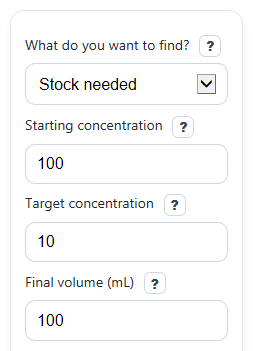
- Choose What do you want to find?, then fill in the other visible boxes using the same unit for both concentration values and the same unit for both volume values.
- Enter Starting concentration, Target concentration, Final volume (mL), or Stock available to add (mL) as needed for your chosen solve mode.
- Pick Decimal places if you want more or less rounding in the displayed results.
- Click Calculate to see the Calculated result, Stock to use, Solvent to add, Dilution factor, and the ratio note.
- Sanity-check the answer: for a true dilution, Target concentration should not be greater than Starting concentration, and Stock to use plus Solvent to add should match Final volume (mL) except for small display rounding.
Definitions
Starting concentration: The concentration of the stronger stock solution before dilution.
Target concentration: The concentration you want after adding solvent. For a dilution, it must be equal to or lower than the starting concentration.
Final volume (mL): The total amount of solution after the stock and solvent are combined.
Stock available to add (mL): The volume taken from the starting stock solution.
Stock to use: The measured stock volume needed for the dilution.
Solvent to add: The amount of diluent added after measuring the stock volume.
Dilution factor: How many times more dilute the final solution is than the starting solution. A 10x dilution means the final concentration is one-tenth of the starting concentration [3].
Stock-to-total form: A ratio written as 1 part stock in x parts total final mixture.
Concentration: The amount of a substance in a given volume of solution [1].
Common mistakes and quick fixes
Mistake: Entering different units in Starting concentration and Target concentration , such as mg/mL in one box and % in the other.
Fix: Convert them first so both concentration boxes use the same unit before you calculate.
Mistake: Typing a larger value in Target concentration than in Starting concentration for a dilution setup.
Fix: For dilution, the target must be equal to or lower than the starting value. If you need a stronger solution, this tool is not the right workflow.
Mistake: Treating Stock available to add (mL) as solvent volume instead of stock volume.
Fix: Enter only the amount of stronger stock solution in that box. The calculator will show the solvent separately in Solvent to add .
Mistake: Entering a Stock available to add (mL) value that is bigger than Final volume (mL) .
Fix: The stock portion cannot be more than the final total volume. Lower the stock value or increase the final volume.
Mistake: Reading Dilution factor as if it were the same as every 1:x recipe label you may see elsewhere.
Fix: Check Stock-to-total form and Ratio note . This page shows 1 part stock in x parts total, which is not always the same as stock-to-solvent wording.
Mistake: Thinking the Calculated result is wrong because Stock to use plus Solvent to add looks off by 0.01.
Fix: Increase Decimal places . A tiny mismatch is usually from rounding in the display, not from the actual math.
Limitations & Key Assumptions / Boundary Conditions
- This calculator is for a single-step dilution only, not a serial dilution series.
- It assumes the standard dilution relationship applies, meaning the amount of solute stays the same before and after dilution.
- Both concentration entries must already be in the same unit before calculation, such as both in M or both in mg/mL.
- Both volume entries must use the same volume unit within the calculation. The label shows mL, so enter all volume values in mL.
- It does not correct for real-world lab effects such as temperature change, density differences, evaporation, or measurement error.
- If your process uses 1:x language, wording may differ between stock-to-total and stock-to-solvent conventions, so always confirm your local lab meaning.
- Displayed values may be rounded, so small differences such as 0.01 can appear in the shown totals even when the underlying math is consistent.
Methodology
Core method
This calculator uses the standard one-step dilution equation, where the amount of solute is unchanged before and after dilution [2][3].
C1 x V1 = C2 x V2
Here, C1 is Starting concentration, V1 is stock volume used, C2 is Target concentration, and V2 is Final volume (mL).
Formulas used
V1 = (C2 x V2) / C1
Vsolvent = V2 - V1
DF = C1 / C2
DF = V2 / V1
Depending on What do you want to find?, the calculator rearranges the same relationship to solve for the missing value. It then shows the practical mixing amounts: Stock to use and Solvent to add.
Ratio interpreter
The page also converts the dilution factor into a plain-language Stock-to-total form. If the dilution factor is 10, the stock-to-total form is 1:10, meaning 1 part stock brought to 10 parts total final volume. This is included because some people confuse that with stock-to-solvent wording.
Worked example
Suppose Starting concentration is 100, Target concentration is 10, and Final volume (mL) is 100.
V1 = (10 x 100) / 100 = 10
Vsolvent = 100 - 10 = 90
DF = 100 / 10 = 10
So you would use 10 mL of stock, add 90 mL of solvent, and the dilution factor is 10x. The stock-to-total form is 1:10.
Assumptions behind the math
The calculator assumes concentration units match each other and volume units match each other before the formulas are applied. It also assumes a normal dilution process rather than concentration, mixing losses, or a multi-step serial dilution workflow.