
Add devices on a power strip and check the strip rating, long-run target, and same-circuit load before you plug in.
Table of contents
How to use our Power Strip Load Calculator
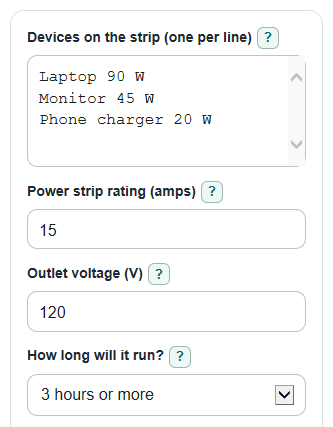
- In Devices on the strip (one per line), type one device per line with one number, such as
Laptop 90 WorFan 1.2 A. - Enter the Power strip rating (amps) from the strip label and keep Outlet voltage (V) at 120 unless your outlet or device label says otherwise.
- Choose How long will it run? and How is the strip plugged in?; long use applies the lower planning target.
- Open Advanced options only if you know the Circuit breaker size (amps), Other load on the same circuit (W), or need a Startup cushion (percent) for a motor-like device.
- After you calculate, sanity-check the result: a heater, tool, or appliance near 1400 W should make you pause even if the math still shows room.
Definitions
Watts (W): How fast a device uses electricity. A 100 W device uses electricity faster than a 20 W charger.
Amps (A): Current, or the amount of electric flow. The calculator converts amps to watts using the outlet voltage.
Outlet voltage (V): The electrical push from the outlet. Regular US household outlets are commonly treated as about 120 V for this kind of estimate.
Power strip rating (amps): The maximum current printed on the strip label. Power strips and surge protectors usually list an electrical rating in watts or amps [3].
Planning target: The load level used for the pass or warning check. For 3 hours or more, this calculator uses 80 percent of the strip rating as a planning target.
Startup cushion (percent): Extra room added for a device that may briefly draw more power when it starts, such as a pump or motor.
Same circuit: Outlets and lights that share the same breaker. The breaker check is separate from the power strip check.
Common mistakes and quick fixes
Mistake: Putting several numbers on one line in Devices on the strip (one per line) , such as "TV 120 W and console 200 W".
Fix: Use one device and one number per line, such as TV 120 W on one line and Console 200 W on the next.
Mistake: Entering VA, kW, mA, or volts in Devices on the strip (one per line) .
Fix: Use W for watts or A for amps; if you only know another unit, convert it before entering the device.
Mistake: Guessing the Power strip rating (amps) instead of reading the label.
Fix: Use the amp rating printed on the strip; if the label is missing or damaged, do not treat the strip as safe for a large load.
Mistake: Leaving How long will it run? on the wrong choice for devices that stay on for hours.
Fix: Pick 3 hours or more for long use so the calculator uses the lower planning target.
Mistake: Choosing Directly into a wall outlet when the strip is really plugged into an extension cord or another strip.
Fix: Set How is the strip plugged in? to the real setup so the Load result and Setup note warn you correctly.
Mistake: Ignoring Other load on the same circuit (W) when lights, a computer, or another outlet are on the same breaker.
Fix: Add a reasonable estimate there, then read Watts left on the same circuit target separately from the strip result.
Limitations & Key Assumptions / Boundary Conditions
- This calculator checks entered watts and amps. It does not inspect wiring, breaker condition, outlet wear, grounding, heat damage, or whether a product is listed for your exact use.
- The 80 percent target is a planning target for loads that may run for 3 hours or more. It does not change the rating printed on the strip.
- The same-circuit check is only as good as Other load on the same circuit (W). Hidden loads on the same breaker can make the real circuit load higher.
- Device nameplate ratings can be higher or lower than real use. Some devices, especially motors, compressors, printers, and heating equipment, can draw more at startup or during a cycle.
- A setup using an extension cord or another power strip is flagged even when the watt total is low, because the setup risk is separate from the load math.
- High-wattage devices at or above 1400 W are flagged for caution. Always follow the device manual and the labels on the strip, outlet, and cord.
Methodology
How device lines are read
Each line in Devices on the strip (one per line) must contain one positive number. If the line ends in W or has no unit, the number is treated as watts. If the line ends in A or amps, the calculator converts it to watts using the outlet voltage.
line_watts = line_amps * voltage
total_load_watts = sum(line_watts)
Strip load check
The calculator converts the total watts to amps, estimates the strip rating in watts, then applies the run-time target. For 3 hours or more, the target factor is 0.80. For Less than 3 hours, the target factor is 1.00.
total_load_amps = total_load_watts / voltage
strip_full_watts = strip_rating_amps * voltage
target_factor = 0.80 if use_time == continuous else 1.00
strip_target_watts = strip_full_watts * target_factor
startup_check_watts = total_load_watts * (1 + startup_cushion_percent / 100)
watts_left_to_target = strip_target_watts - startup_check_watts
strip_rating_used_percent = (total_load_amps / strip_rating_amps) * 100
Same-circuit check
The same-circuit check adds any entered load that is on the same breaker but not on this strip. This result is shown separately so a 20 A strip on a 15 A circuit is not mistaken for a 20 A circuit.
same_circuit_total_watts = total_load_watts + other_circuit_load_watts
same_circuit_amps = same_circuit_total_watts / voltage
same_circuit_watts_left = (circuit_breaker_amps * voltage * target_factor) - same_circuit_total_watts
Mini-example
For the default desk setup, the lines are Laptop 90 W, Monitor 45 W, and Phone charger 20 W. The total device load is 155 W. At 120 V, the total current is 155 / 120 = 1.29 A. With a 15 A strip used for 3 hours or more, the planning target is 15 * 120 * 0.80 = 1440 W. With no startup cushion, watts left before the target is 1440 - 155 = 1285 W.
How the result is worded
If the cushioned load is at or below the strip planning target, the Load result says the load fits the target. If it is above the target or above the full strip rating, the result warns more strongly. If How is the strip plugged in? is an extension cord or another power strip, the result includes a setup warning even when the watt total fits.
Sources
- Compliance requirements for relocatable power taps or "power strips" | Occupational Safety and Health Administration - OSHA
- Electrical - Flexible Cords | Occupational Safety and Health Administration - OSHA
- Guide to Power Strips and Surge Protectors | UL Solutions - UL
- Eastern Washington University (EHS) - Power Cord and Power Strip Safety Brochure (PDF) - EWU