
Check whether your RV loads fit a 15, 20, 30, or 50 amp shore power hookup before you trip a breaker.
Table of contents
How to use our RV Shore Power Load Calculator
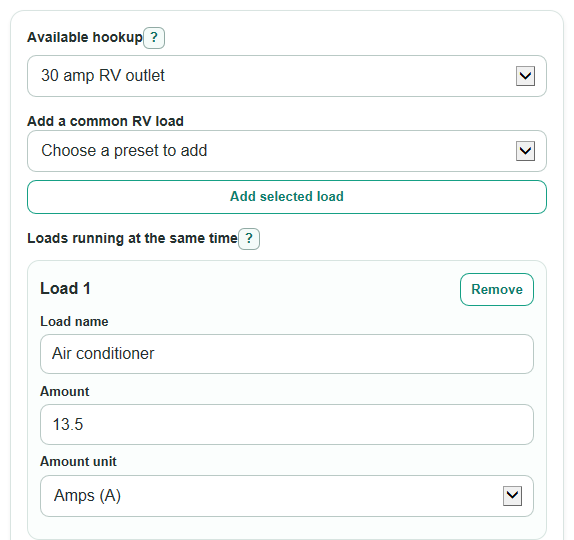
- Choose the Available hookup that matches the outlet or adapter limit you are actually using.
- Enter each item in Loads running at the same time, using either amps or watts from the appliance label or manual.
- For a 50 amp RV outlet, choose the 50 amp leg setting; use Auto split loads if you do not know which panel leg each load uses.
- Open Advanced options only if you want to change Voltage to use for watt loads or the Steady-use target for long-running loads.
- After you calculate, sanity-check the result by looking at Busiest leg load, Room left before the breaker, and Best load to pause first; a negative room value means you are over that limit.
Definitions
Available hookup: The shore power limit you are using, such as a 15 amp household outlet, 30 amp RV outlet, or 50 amp RV outlet.
Loads running at the same time: The appliances or chargers that are on together. The calculator adds these loads before checking the hookup.
Amp (A): A measure of electric current. Breakers are usually rated in amps.
Watt (W): A measure of power. Many appliance labels list watts instead of amps.
Voltage to use for watt loads: The voltage used to convert watts to amps. The default is 120 V for common RV shore power math.
50 amp leg setting: How the calculator handles the two 120 V legs on a 50 amp RV hookup.
Busiest leg load: The highest current on the leg that is doing the most work. This is the number compared with the breaker rating.
Steady-use target: A planning limit set as a percent of the breaker rating for loads that may run for hours.
Common mistakes and quick fixes
Mistake: Picking Available hookup as 30 amp RV outlet when you are plugged into a 15 amp household outlet with an adapter.
Fix: Set Available hookup to the weakest outlet, adapter, extension cord, or breaker limit in the path.
Mistake: Putting every possible appliance into Loads running at the same time, even items that will not run together.
Fix: Include only the loads you expect to use at the same time, then run a second check for a different setup.
Mistake: Entering watts as amps in Loads running at the same time, such as typing 1500 and choosing A for a heater.
Fix: Choose W for watt labels and A for amp labels so the calculator can convert the load correctly.
Mistake: Treating a 50 amp RV outlet as one 100 amp bucket and ignoring 50 amp leg setting.
Fix: Use 50 amp leg setting to check the busiest leg, because either leg can be the one that trips.
Mistake: Changing Voltage to use for watt loads to a guessed number.
Fix: Leave Voltage to use for watt loads at 120 V unless you measured a different shore voltage with a meter.
Mistake: Reading Room left before steady-use target as the same thing as Room left before the breaker.
Fix: Use Room left before the breaker for the hard breaker check and Room left before steady-use target as a long-run planning guide.
Limitations & Key Assumptions / Boundary Conditions
- The calculator estimates running load only. It does not add motor startup surge from air conditioners, refrigerators, pumps, or compressors.
- Appliance labels and manuals can list rated, maximum, or running power. Use the running value when you have it.
- For 50 amp Auto split loads, the calculator estimates a balanced panel. Your real RV panel may place fixed outlets or appliances on different legs.
- For 15, 20, and 30 amp hookups, the 50 amp leg choices do not affect the result because those hookups are treated as one 120 V leg.
- The steady-use target is a planning value, not a new breaker size. A load can be under the breaker but still above the selected target.
- Extension cord length, loose plugs, weak pedestal voltage, inverter behavior, and campground wiring condition can change real-world performance.
- The calculator does not decide whether a cord, adapter, transfer switch, or receptacle is safe for the load. Use hardware rated for the actual circuit.
Methodology
How loads are converted
Each row in Loads running at the same time is converted to amps. If a row is entered in amps, the calculator also estimates watts from the selected voltage. If a row is entered in watts, it divides by the selected voltage to find amps.
watts = amps * voltage
amps = watts / voltage
How the hookup is checked
The breaker rating comes from Available hookup: 15 A, 20 A, 30 A, or 50 A per leg. For 15, 20, and 30 amp hookups, the calculator adds all row amps into one 120 V leg.
busiest_leg_amps = sum(row_amps)
For a 50 amp RV outlet with Auto split loads, rows are sorted from largest to smallest. Each load is placed on the lower-current leg, with ties going to Leg A. The Busiest leg load is the higher of the two leg totals.
busiest_leg_amps = max(leg_a_amps, leg_b_amps)
If Use each row's leg choice is selected, rows assigned to Leg A or Leg B stay fixed. Rows left on auto are split after the fixed rows, using the same lower-leg rule.
How status and room are found
Room left before the breaker keeps its sign. A positive value means amps remain. A negative value means the setup is over the breaker rating.
amps_left_to_breaker = breaker_amps - busiest_leg_amps
percent_of_breaker = busiest_leg_amps / breaker_amps * 100
The steady-use target is based on the selected percent of the breaker rating. The default is 80 percent. This value is checked separately from the breaker.
steady_target_room_amps = breaker_amps * steady_target_percent / 100 - busiest_leg_amps
Total power running is based on all 120 V amps across the loads, not just the busiest leg.
total_watts = sum(row_amps) * voltage
Mini example
Suppose a 30 amp RV hookup has an air conditioner at 13.5 A, a microwave at 1320 W, a refrigerator at 2.5 A, and a converter/charger at 5 A. At 120 V, the microwave is 1320 / 120 = 11 A, so the total load is 13.5 + 11 + 2.5 + 5 = 32 A.
amps_left_to_breaker = 30 - 32 = -2 A
percent_of_breaker = 32 / 30 * 100 = 106.7%
That setup is over the breaker. The largest load is the air conditioner at 13.5 A, so it is the first load the calculator suggests pausing.