
Compare connected lighting watts with your entered allowance and see the lighting power density, watt budget, and remaining watts.
Allowance area
Installed load
Advanced options
Code adjustments
Fixture inventory check
Calculation details
Table of contents
How to use our Lighting Power Density and Wattage Allowance Calculator
- Enter the Project jurisdiction and Code or compliance report reference from the permit documents, specifications, or compliance report.
- Choose the Allowance method and Area and power-density unit that match the code path and plans.
- For Building Area, enter the Building classification, Building area, and Allowed lighting power density. For Space-by-Space, add one complete row for each space type.
- Enter Total installed lighting from the fixture schedule, using fixture input watts that include drivers or ballasts. Add documented adjustments or a Fixture inventory in Advanced options if needed.
- Click Calculate, then check that the Lighting allowance check estimate matches the signed Watts remaining or over the limit and that any fixture inventory gap is explained.
Definitions
Lighting power density (LPD): Connected lighting power divided by floor area, usually shown as W/sq ft. It measures installed electrical load per area, not brightness, lumens, foot-candles, or energy use. [1]
Allowed lighting power density: The code or compliance-report rate applied to an eligible building or space area to create a watt allowance.
Building Area: An allowance method that applies one building classification, area, and allowed density.
Space-by-Space: An allowance method that calculates each classified space separately, then adds the individual watt allowances.
Counted installed lighting: Total installed lighting minus documented exempt installed lighting. This is the load compared with the allowance.
Exempt installed lighting: Connected lighting watts that the applicable code documentation allows to be excluded from the counted installed load.
Additional allowed lighting: Documented watts added to the area-based watt allowance. It does not reduce installed lighting.
Fixture inventory connected load: The sum of fixture quantity times input watts each for complete fixture rows.
Common mistakes and quick fixes
Mistake: Entering bulb-equivalent watts in Total installed lighting (W).
Fix: Use connected fixture input watts from the cut sheet or luminaire schedule, including the driver or ballast load.
Mistake: Using Building area for a mixed set of rooms while Allowance method is Space-by-Space.
Fix: Add a separate complete Space allowance rows entry for each space type, area, and allowed density.
Mistake: Mixing sq ft values with an Allowed lighting power density copied in W/sq m.
Fix: Set Area and power-density unit to the units used by both source values, or convert both values together before calculating.
Mistake: Putting eligible exempt watts into Additional allowed lighting (W).
Fix: Put documented exempt connected load in Exempt installed lighting (W); additional allowance increases the allowed side instead.
Mistake: Treating a negative Watts remaining or over the limit as zero.
Fix: Keep the minus sign. A negative number means counted installed lighting is over the entered allowance by that many watts.
Mistake: Ignoring a nonzero Installed total minus fixture inventory result.
Fix: Recheck fixture quantities and input watts each, then reconcile the fixture inventory with Total installed lighting.
Limitations & Key Assumptions / Boundary Conditions
- This is an estimate based on the jurisdiction, code reference, classifications, areas, and allowances you enter. It does not identify the locally adopted code or local amendments.
- A result of Within entered allowance is not proof of permit approval or code compliance. A plan reviewer may apply scope rules, exceptions, or documentation requirements that are outside this worksheet.
- Use the allowance method required by the applicable code path. Building Area and Space-by-Space use different area structures and should not be mixed.
- Fixture input watts should include drivers or ballasts. Lamp-equivalent watts, lumens, foot-candles, operating hours, utility rates, dimming schedules, and demand charges are outside this calculation.
- Enter exempt installed lighting and additional allowed lighting only when they are supported by the applicable code calculation or compliance report.
- The optional Fixture inventory checks arithmetic against Total installed lighting; it does not confirm fixture eligibility, control credits, or product ratings.
Methodology
Allowance calculation
The calculator uses the active Allowance method only. Building Area multiplies one entered area by one entered allowed density. Space-by-Space adds the allowance from every complete space row.
base allowed watts = area x allowed lighting power density
base allowed watts = sum of (space area x space allowed lighting power density)
Additional allowed lighting is added after the area calculation. Exempt installed lighting is subtracted from the installed connected load, so the two adjustments affect different sides of the comparison.
maximum allowed lighting power = base area watt allowance + additional allowed lighting
installed lighting counted toward the allowance = total installed lighting - exempt installed lighting
watts remaining or over the limit = maximum allowed lighting power - installed lighting counted toward the allowance
A positive remaining value means unused entered allowance. A negative value means the counted load is over the entered allowance.
Lighting power density
Counted lighting power density is counted installed watts divided by the active allowance area. The displayed unit follows the selected Area and power-density unit.
counted lighting power density = counted installed watts / total allowance area
For the optional fixture check, each complete row contributes quantity times input watts each. The inventory gap stays signed so its direction is clear.
fixture inventory connected load = sum of (quantity x input watts each)
installed total minus fixture inventory = total installed lighting - fixture inventory connected load
Worked example
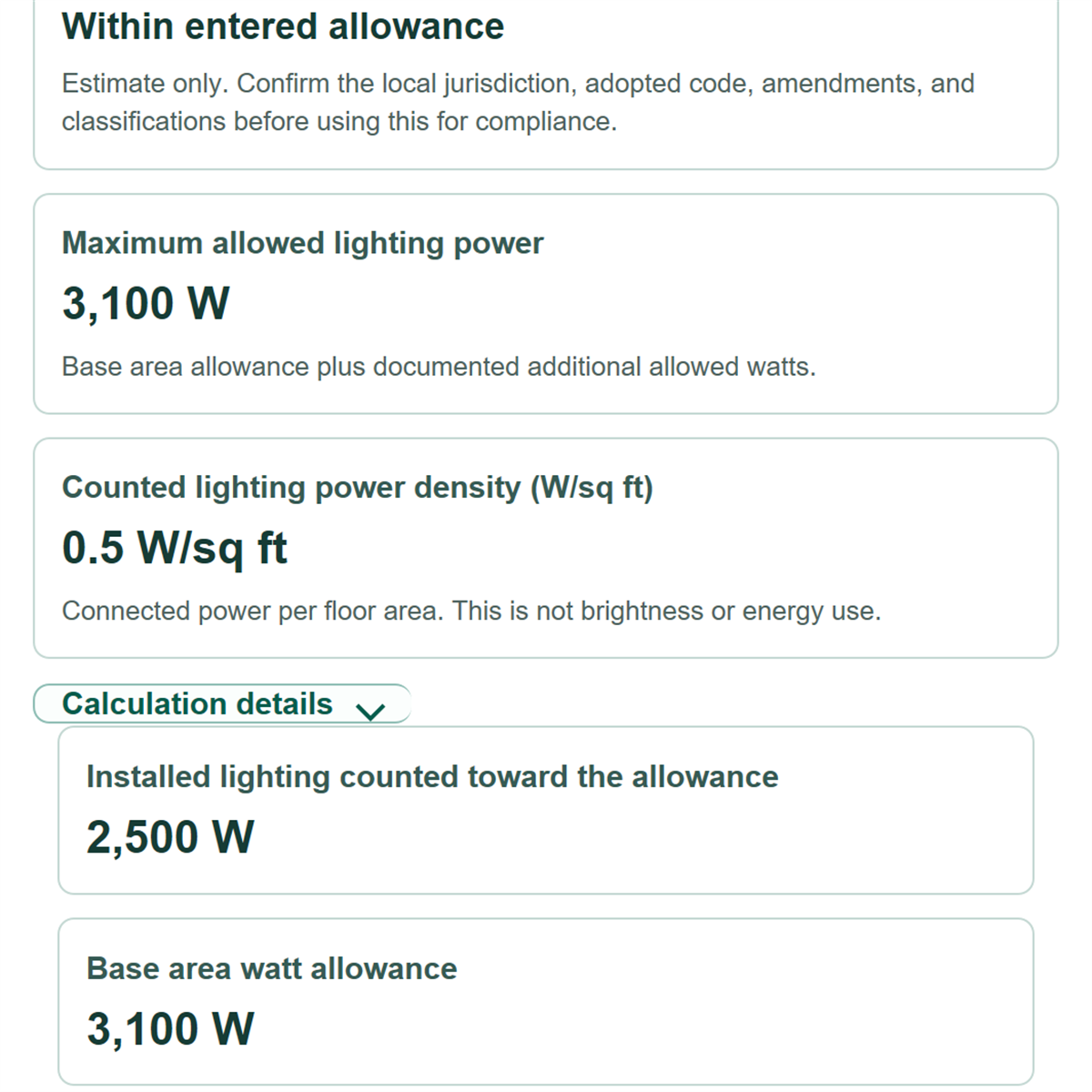
With 5,000 sq ft, an entered allowance of 0.62 W/sq ft, no adjustments, and 2,500 W installed, the base and maximum allowance are 3,100 W. Counted lighting is 2,500 W, leaving 600 W. The counted lighting power density is 0.50 W/sq ft.
Calculation boundaries
Active area must be greater than zero. Exempt installed lighting cannot exceed total installed lighting. Blank optional watt adjustments count as zero, while a nonblank invalid value stops the calculation. The calculator converts square feet and square meters consistently when the area-unit choice changes, but it does not decide which code allowance applies to the project.