
Estimate the light circle from a downlight or find the beam angle needed for a floor, counter, table, or artwork.
Table of contents
How to use our Downlight Beam Angle Calculator
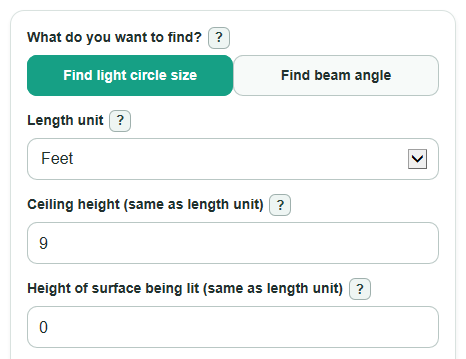
- Choose What do you want to find?: Find light circle size if you know the Beam angle, or Find beam angle if you know the Wanted light circle diameter.
- Set Length unit, then enter Ceiling height and Height of surface being lit using that same unit.
- Enter Beam angle or Wanted light circle diameter, depending on the mode you picked.
- If you are planning a layout, open Advanced options and enter Planned light spacing to check the Spacing overlap or gap.
- After calculating, sanity-check Distance from light to surface first. If it seems wrong, fix the surface height before trusting Light circle diameter or Needed beam angle.
Definitions
Beam angle: The width of the main cone of light coming from the downlight, measured in degrees.
Light circle diameter: The estimated width of the beam circle where it reaches the floor, counter, table, or other surface.
Distance from light to surface: Ceiling height minus Height of surface being lit. This is the throw distance used in the geometry.
Wanted light circle diameter: The target beam circle size you want the calculator to work backward from.
Planned light spacing: The center-to-center distance between nearby downlights.
Spacing overlap or gap: Light circle diameter minus Planned light spacing. Positive means overlap, and negative means a gap.
Common mistakes and quick fixes
Mistake: Using Ceiling height to the floor when the light is aimed at a counter or table.
Fix: Enter the real Height of surface being lit so Distance from light to surface is correct.
Mistake: Mixing feet and meters after choosing Length unit.
Fix: Use the same Length unit for Ceiling height, Height of surface being lit, Wanted light circle diameter, and Planned light spacing.
Mistake: Typing a half-angle into Beam angle because the formula uses half of the angle internally.
Fix: Enter the full Beam angle from the fixture spec sheet.
Mistake: Reading Light circle diameter as a brightness result.
Fix: Treat Light circle diameter as geometry only; brightness depends on the fixture, lumens, room surfaces, and dimming.
Mistake: Treating a negative Spacing overlap or gap as an error.
Fix: A negative Spacing overlap or gap means the main light circles do not touch at your Planned light spacing.
Limitations & Key Assumptions / Boundary Conditions
- This is a geometry estimate. It does not predict lux, glare, shadows, dimming, color, or how bright the surface will look.
- The formulas treat the beam as a centered cone hitting a flat surface. Sloped ceilings, angled fixtures, walls, and uneven surfaces can change the real shape.
- Real downlight beams usually have soft edges. The calculated circle is a useful planning guide, not a hard edge on the floor or counter.
- The spacing check compares only the main calculated circles. It does not replace a full lighting layout or a photometric plan.
- Use a Height of surface being lit that is lower than Ceiling height. If the surface is at or above the light, the geometry does not apply.
- Use one Length unit for all length inputs. Number format changes only how results are shown, not the math.
Methodology
Geometry used
The calculator models the downlight beam as a right triangle spun around the center line of the fixture. The throw distance is the straight distance from the light to the surface being lit.
throw_distance = ceiling_height - surface_height
For Find light circle size, θ (beam angle in degrees) is converted to radians before using the tangent function.
beam_diameter = 2 * throw_distance * tan(θ / 2)
For Find beam angle, the calculator uses the inverse tangent to work backward from the wanted circle size.
required_beam_angle = 2 * atan(desired_circle_diameter / (2 * throw_distance)) * 180 / π
The supporting results come from the same circle geometry.
beam_radius = beam_diameter / 2
one_light_area = π * (beam_diameter / 2)^2
spacing_overlap_gap = beam_diameter - planned_spacing
How the modes differ
In Find light circle size mode, Beam angle is the input and Light circle diameter is calculated. In Find beam angle mode, Wanted light circle diameter is the input and Needed beam angle is calculated. In that mode, Light circle diameter equals the wanted circle size so Light circle radius, Estimated circle area, and Spacing overlap or gap all describe that target circle.
Worked example
For a 9 ft ceiling, a 0 ft surface height, and a 60 degree beam angle, the Distance from light to surface is 9 ft. The calculated Light circle diameter is about 10.39 ft, the Light circle radius is about 5.20 ft, and the Estimated circle area is about 84.82 square ft. If Planned light spacing is 5 ft, the Spacing overlap or gap is 10.39 - 5 = 5.39 ft, so the main circles overlap by about 5.39 ft.
Calculation choices
The sign of Spacing overlap or gap is kept on purpose. A positive value means overlap, and a negative value means a gap. The calculator blocks impossible geometry, such as a surface height at or above the ceiling height, and skips the spacing cards when Planned light spacing is left blank.