
Convert between particles, moles, and mass with clear particle labels so you can avoid mixing up atoms, molecules, ions, and formula units.
Advanced options
How to use our Avogadro's Number Calculator
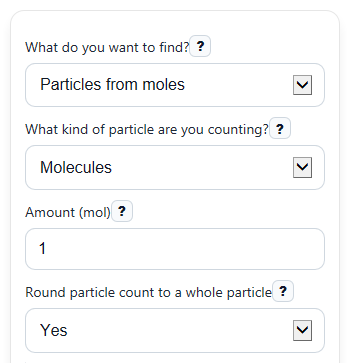
- Choose "What do you want to find?" to pick the conversion you need, such as particles from moles or mass from particles.
- Pick "What kind of particle are you counting?" so the counted entity matches your chemistry problem, then enter the visible required values like "Amount (mol)", "Number of particles", "Mass (g)", and "Molar mass (g/mol)".
- If you want classroom-style whole-number particle answers, set "Round particle count to a whole particle" and use Advanced options if you want to change big-number display or significant figures.
- Click Calculate, then check "How the calculator solved it" and "Particle label used" to make sure the path and counted entity match the wording of your problem.
Definitions
Avogadro constant: The fixed number of particles in 1 mole: 6.02214076 x 10^23 per mole [2].
Mole (mol): A chemistry counting unit, like a very large dozen, used for amount of substance.
Molar mass (g/mol): The mass of 1 mole of a substance, written in grams per mole.
Particles: The counted entities in the problem, such as atoms, molecules, ions, formula units, or electrons.
Formula unit: The simplest whole-number ratio of ions in an ionic compound, such as NaCl.
Scientific notation: A short way to write very large numbers, such as 6.02214076e23.
Common mistakes and quick fixes
Mistake: Choosing the wrong "What kind of particle are you counting?" value, such as molecules when the question is asking for atoms.
Fix: Match "What kind of particle are you counting?" to the exact entity in the problem before reading "Calculated result".
Mistake: Entering a total sample weight into "Molar mass (g/mol)" instead of the mass of 1 mole.
Fix: Put the sample's measured amount in "Mass (g)" and the substance's per-mole value in "Molar mass (g/mol)".
Mistake: Typing a negative value in "Number of particles" or "Mass (g)".
Fix: Use 0 or a positive number only, because counted particles and sample mass cannot be negative in this calculator.
Mistake: Forgetting that "Number of particles" can be entered in scientific notation.
Fix: Enter values like 3.01e23 if needed, then use "Equivalent particle count" and "How to show big numbers" to check the size makes sense.
Mistake: Rounding too early and getting a slightly off "Calculated result" for mass or moles.
Fix: Let the calculator keep full internal precision and use "Round particle count to a whole particle" only for the displayed particle answer.
Mistake: Reading "Equivalent amount (mol)" or "Equivalent mass" as the final answer when the chosen mode asks for something else.
Fix: Use "Calculated result" as your main answer, and treat the other outputs as check values.
Limitations & Key Assumptions / Boundary Conditions
- This calculator converts only among particles, moles, and mass for one stated counted entity at a time.
- The counted entity must match the chemistry question. For example, 1 mole of H2O means 1 mole of H2O molecules, not 1 mole of atoms.
- When mass is involved, results are only as accurate as the "Molar mass (g/mol)" value you enter.
- This tool does not break molecules or formula units into atoms or ions. If your problem asks for atoms inside a compound, you may need an extra stoichiometric step after the mole conversion.
- Negative values are not allowed for "Number of particles", "Mass (g)", or "Molar mass (g/mol)". Zero is allowed and returns zero where it makes sense.
- Displayed particle answers may be rounded if you choose that setting, but internal calculations should still use the unrounded value.
- Very large particle counts may be shown in scientific notation because plain-number form can become too long to read easily.
Methodology
Core idea
This calculator uses Avogadro's constant to move between particle count and moles, and it uses molar mass to move between moles and grams. The exact Avogadro constant is 6.02214076 x 10^23 mol^-1 [1].
Formulas used
N = n x N_A
n = N / N_A
n = m / M
m = n x M
N = (m / M) x N_A
m = (N / N_A) x M
Here, N is number of particles, n is amount in moles, m is mass in grams, M is molar mass in g/mol, and N_A is Avogadro's constant. These are the standard relationships used to connect mass, moles, and numbers of atoms or molecules [1].
How the calculator chooses the path
If your mode is particles from moles or moles from particles, it uses Avogadro's constant directly. If your mode is mass from moles or moles from mass, it uses molar mass directly. If your mode is particles from mass or mass from particles, it converts through moles as the middle step.
Worked mini-example
Suppose you want particles from mass for water, and you enter 18.015 g for "Mass (g)" and 18.015 g/mol for "Molar mass (g/mol)".
n = m / M = 18.015 / 18.015 = 1 mol
N = n x N_A = 1 x 6.02214076 x 10^23 = 6.02214076 x 10^23 particles
If "What kind of particle are you counting?" is set to molecules, that means 6.02214076 x 10^23 molecules of H2O.
Output notes
The main answer appears as "Calculated result" with the right unit for your chosen mode. The calculator also shows check values such as "Equivalent amount (mol)", "Equivalent particle count", or "Equivalent mass" when they help you follow the steps. The "Particle label used" output reminds you which entity was counted so you can catch a common chemistry mistake.
Assumptions and limits
This method assumes the entered molar mass is correct for the substance and that the counted entity has been chosen correctly. It does not automatically convert between molecules and atoms inside a formula, such as turning 1 mole of H2O molecules into 3 moles of atoms, because that needs an extra composition step outside the basic Avogadro conversion.