
Calculate atom economy from a balanced chemical reaction and see exactly how each reactant contributes to the chosen product mass.
Advanced options
How to use our Atom Economy Calculator
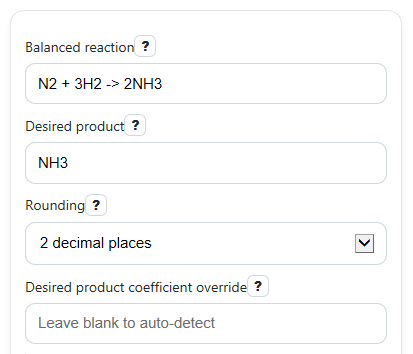
- Enter the full Balanced reaction with reactants, an arrow, and products, such as N2 + 3H2 -> 2NH3.
- Type the Desired product exactly as it appears on the product side, then choose Rounding for the number of decimal places you want.
- Leave Desired product coefficient override blank to use the equation automatically. If you enter a value, it must match the total coefficient for that product; repeated product terms are added together.
- Click Calculate and read Equation check first. Then use Mass breakdown to confirm the coefficients, molar masses, and weighted mass terms look reasonable for your reaction.
Definitions
Balanced reaction: A chemical equation where each element has the same number of atoms on the reactant side and product side.
Desired product: The product you care about when measuring atom economy.
Coefficient: The whole number placed before a formula, such as the 3 in 3H2. It tells how many units of that substance are used in the reaction.
Molar mass: The mass of 1 mole of a substance, found by adding the atomic masses of all atoms in its formula.
Chosen product mass term: The product coefficient multiplied by that product's molar mass, in g/mol reaction.
Total reactant mass term: The sum of coefficient times molar mass for all reactants, in g/mol reaction.
Atom economy: The percent of total reactant mass that becomes the chosen product in theory [1][2].
Waste share: 100% minus atom economy. It represents the theoretical share of reactant mass not ending up in the chosen product.
Common mistakes and quick fixes
Mistake: Entering a reaction in Balanced reaction that is not actually balanced, like H2 + O2 -> H2O.
Fix: Adjust the coefficients until Equation check says the atoms match on both sides, then recalculate.
Mistake: Typing a Desired product that is not on the product side of the reaction.
Fix: Enter the product formula exactly as written in the products, such as NH3 if the reaction ends with 2NH3.
Mistake: Using the wrong coefficient in Desired product coefficient override or entering 0 or a negative value.
Fix: Leave Desired product coefficient override blank unless you truly need it, or enter a positive coefficient that matches your intended product term.
Mistake: Reading Atom economy as actual lab yield.
Fix: Treat Atom economy as a theoretical mass-efficiency measure only. It shows how much reactant mass could end up in the chosen product, not how much product you actually made.
Mistake: Ignoring Mass breakdown and trusting the final percent without checking the chemistry.
Fix: Review Mass breakdown to make sure each reactant coefficient, molar mass, and weighted mass term matches your balanced equation.
Mistake: Confusing Waste share with leftover reactants from a real experiment.
Fix: Use Waste share as the theoretical percent of reactant mass not ending up in the chosen product in the balanced equation.
Limitations & Key Assumptions / Boundary Conditions
- The reaction must be entered in standard formula form with reactants, an arrow, and products. Missing arrows or empty sides cannot be calculated.
- Results are blocked if Equation check finds the reaction is unbalanced, because atom economy should be interpreted only for a balanced equation.
- The formula parser is intended for ordinary formulas with element symbols, whole-number subscripts, and simple parentheses. Hydrates, ionic charges, radicals, bracketed complexes, and deeply nested notation may not be supported.
- If the same product formula appears more than once on the product side, its coefficients are added automatically. Any Desired product coefficient override must match that total.
- Atom economy is a theoretical green-chemistry metric, not the same as percent yield. Real lab losses, side reactions, purity, and incomplete conversion are not included.
- Molar masses depend on the internal atomic-weight table and selected rounding settings, so small differences from a textbook or teacher key can occur.
Methodology
How the calculator works
The calculator reads the reaction, splits it into reactants and products, and parses each formula into element counts. It then multiplies each species coefficient by its molar mass to build the mass terms.
AE% = (ν product x M product) / (sum of (ν reactant x M reactant)) x 100
Waste% = 100 - AE%
M compound = sum of (element count x atomic mass)
What each part means
The numerator is the Chosen product mass term. It is the coefficient of the desired product times its molar mass.
The denominator is the Total reactant mass term. It adds the coefficient times molar mass for every reactant only. For a balanced equation, total reactant mass equals total product mass, so this matches the standard atom economy idea [1].
The calculator also performs an atom count on both sides. If the counts do not match, Equation check fails and the main percent results are not shown.
Mini example
For N2 + 3H2 -> 2NH3 with NH3 as the desired product:
M(N2) = 2 x 14.007 = 28.014 g/mol
M(H2) = 2 x 1.008 = 2.016 g/mol
M(NH3) = 14.007 + 3 x 1.008 = 17.031 g/mol
Chosen product mass term = 2 x 17.031 = 34.062 g/mol reaction
Total reactant mass term = 1 x 28.014 + 3 x 2.016 = 34.062 g/mol reaction
AE% = 34.062 / 34.062 x 100 = 100%
Waste% = 100 - 100 = 0%
This means all reactant mass ends up in the chosen product in the balanced equation, so the theoretical atom economy is as high as possible.
Assumptions used
The method assumes the reaction is correctly balanced, the formula syntax can be parsed, and molar masses come from a fixed internal atomic-weight table suitable for classroom calculations. Real process efficiency can differ because atom economy does not include conversion, separation losses, solvent use, or experimental yield [2].