
Enter your income, bills, savings goal, and a local rent to estimate a monthly rent budget before applying.
Advanced options
Table of contents
How to use our Rent Affordability Calculator
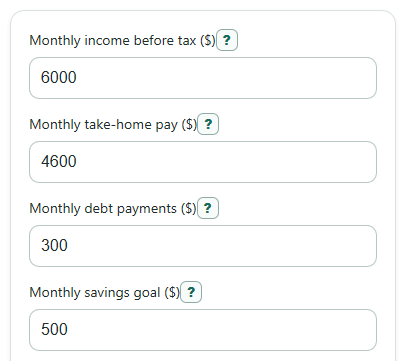
- Enter Monthly income before tax ($) from your gross monthly pay, not your paycheck deposit.
- Enter Monthly take-home pay ($), Monthly debt payments ($), Monthly savings goal ($), and Other monthly expenses ($) as monthly amounts.
- Open Advanced options if you want to change Rent share to test (percent of income before tax) or compare a real listing in Local rent to compare ($ per month).
- Choose Bedroom size for the comparison so the local rent result label matches the kind of unit you are checking.
- After calculating, sanity-check the result: Suggested monthly rent to stay on budget should not be higher than both rent cap numbers, and negative money left means the budget does not fit.
Definitions
Monthly income before tax ($): Your gross monthly income before taxes, insurance, retirement contributions, and other paycheck deductions.
Monthly take-home pay ($): The money that actually reaches your bank account each month after taxes and paycheck deductions.
Rent share to test (percent of income before tax): The percent of gross income used for the income-rule rent cap. A 30% housing-cost line is commonly used in rent burden measures [1].
Rent cap from the income rule: The rent limit found by multiplying gross monthly income by the selected rent share.
Rent cap from your take-home budget: The money left for rent after subtracting debts, savings goal, and other monthly expenses from take-home pay.
Suggested monthly rent to stay on budget: The lower of the income-rule cap and the take-home budget cap, with a floor of $0.
Local rent room in budget: Suggested monthly rent minus Local rent to compare ($ per month). Positive means the local rent is under budget; negative means it is over budget.
Monthly money left after the local rent: Take-home pay minus local rent, debts, savings goal, and other monthly expenses.
Common mistakes and quick fixes
Mistake: Entering take-home pay in Monthly income before tax ($).
Fix: Put gross pay in Monthly income before tax ($) and paycheck deposit money in Monthly take-home pay ($).
Mistake: Leaving Monthly debt payments ($) out because the payments feel small.
Fix: Add required loan, credit card, car, and student loan payments to Monthly debt payments ($).
Mistake: Using yearly expenses in Other monthly expenses ($).
Fix: Divide yearly costs by 12 before entering Other monthly expenses ($).
Mistake: Treating Monthly savings goal ($) as optional spending.
Fix: Enter the savings you really want to keep before rent, because it lowers the rent cap from your take-home budget.
Mistake: Reading a negative Local rent room in budget as extra room.
Fix: Negative Local rent room in budget means Local rent to compare ($ per month) is over your suggested budget by that amount.
Mistake: Ignoring Monthly money left after the local rent when a listing seems affordable by the income rule.
Fix: Check Monthly money left after the local rent to see if the listing still fits after debts, savings, and other expenses.
Limitations & Key Assumptions / Boundary Conditions
- The calculator uses monthly amounts. If you are paid weekly, every two weeks, or yearly, convert your income to a monthly estimate before entering it.
- The suggested rent is a planning number, not an approval decision. Landlords may use credit score, income rules, fees, deposits, cosigners, or local rules that are not included here.
- The local rent comparison uses the Local rent to compare ($ per month) that you enter. It does not pull live rent listings or official local rent data automatically.
- Utilities, parking, pet rent, renters insurance, move-in fees, and application fees should be included in Other monthly expenses ($) if they are not already part of the rent you enter.
- Monthly take-home pay ($) can be higher than Monthly income before tax ($), but that usually means one of the income fields was entered in the wrong place.
- If the rent cap from your take-home budget is negative, the suggested rent is floored at $0. The signed take-home budget cap still shows the real shortfall.
Methodology
How the rent target is calculated
The calculator checks rent two ways. First, it applies the selected rent share to Monthly income before tax ($). A 30% gross-income line is a common rent-burden reference point, but users can test 25%, 30%, or 35% [1]. Second, it checks how much take-home pay remains after the monthly costs you entered. A budget compares money coming in with money going out [2].
income_rule_rent_cap = monthly_gross_income * rent_share_percent / 100
take_home_budget_rent_cap = monthly_take_home_income - monthly_debt_payments - monthly_savings_goal - monthly_other_expenses
suggested_monthly_rent = max(0, min(income_rule_rent_cap, take_home_budget_rent_cap))
The main answer is the lower of the income-rule cap and the take-home budget cap. This keeps a high gross-income rule from hiding a tight monthly budget. The final suggestion is floored at $0 because a rent recommendation cannot be negative, but the take-home budget cap is still shown as a signed number so a shortfall is visible.
Local rent comparison
If Local rent to compare ($ per month) is entered, the calculator compares that rent with the suggested monthly rent and also shows monthly cash left after that local rent.
local_rent_vs_budget_gap = suggested_monthly_rent - local_rent_to_compare
money_left_after_local_rent = monthly_take_home_income - local_rent_to_compare - monthly_debt_payments - monthly_savings_goal - monthly_other_expenses
local_rent_income_percent = local_rent_to_compare / monthly_gross_income * 100
A positive Local rent room in budget means the local rent is below the suggested budget. A negative value means it is above the suggested budget by that amount. Monthly money left after the local rent is not clamped, so a negative value shows the size of the monthly gap.
Guide range and example
The stricter and stretch guide numbers use 25% and 35% of gross monthly income. They are context numbers, not the final recommendation.
rent_range_low = monthly_gross_income * 0.25
rent_range_high = monthly_gross_income * 0.35
Example: with Monthly income before tax ($) of $6,000 and a 30% rent share, the income-rule rent cap is $1,800. If Monthly take-home pay ($) is $4,600, Monthly debt payments ($) are $300, Monthly savings goal ($) is $500, and Other monthly expenses ($) are $1,800, the take-home budget rent cap is $2,000. The suggested monthly rent is $1,800 because it is the lower cap. If the Local rent to compare ($ per month) is $1,700, Local rent room in budget is $100 and Monthly money left after the local rent is $300.