
Calculate the new monthly rent, budget impact, and optional prorated first bill when a rent change starts mid-period.
Table of contents
How to use our Rent Increase Calculator
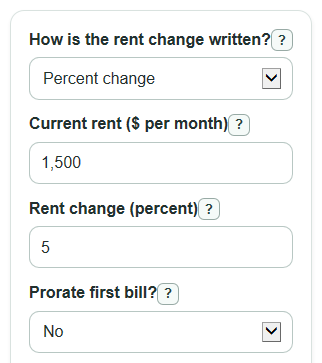
- Choose how your notice states the change in How is the rent change written?: percent change, $ change, or new rent amount.
- Enter Current rent ($ per month), then fill the matching change field: Rent change (percent), Rent change ($ per month), or New rent ($ per month).
- If the change starts in the middle of a monthly billing period, set Prorate first bill? to yes, then enter Billing period start date and Increase starts on.
- Click Calculate and read Ongoing new monthly rent first, then check Monthly rent change, Yearly rent change, and Rent change percent.
- Sanity-check the output: a 5 percent increase on $1,500 should raise rent by $75 per month, and a rent decrease should show negative change values.
Definitions
Current rent: The monthly rent before the change, excluding deposits and one-time fees.
Ongoing new monthly rent: The full monthly rent after the change takes effect for a whole billing period.
Monthly rent change: The new monthly rent minus the current monthly rent. A negative value means rent went down.
Rent change percent: The monthly change compared with the current rent. Percent change uses the old amount as the starting amount [2].
First prorated payment: A one-time bill that splits one monthly billing period between the old daily rent rate and the new daily rent rate.
Billing period start date: The first date of the monthly rent period that contains the increase date.
Common mistakes and quick fixes
Mistake: Putting a deposit, late fee, or one-time charge in Current rent ($ per month) .
Fix: Enter only the regular monthly rent before the change.
Mistake: Choosing Rent change (percent) but typing a dollar amount from the notice.
Fix: Change How is the rent change written? to $ change, then use Rent change ($ per month) .
Mistake: Forgetting that Monthly rent change can be negative when rent goes down.
Fix: Keep the negative sign if the new rent is lower; the calculator treats it as a rent decrease.
Mistake: Turning on Prorate first bill? but using the lease start date instead of Billing period start date .
Fix: Use the first day of the monthly billing period that contains Increase starts on .
Mistake: Reading First prorated payment as the new normal rent.
Fix: Use Ongoing new monthly rent for future full months; First prorated payment is only the split bill for that first period.
Limitations & Key Assumptions / Boundary Conditions
- This calculator does budget math only. It does not check local rent control rules, notice rules, lease terms, or whether an increase is allowed.
- Proration uses straight daily proration within one monthly billing period. Some leases or local rules may use a different method.
- The first billing period runs from Billing period start date to the same day number in the next month, or the last valid day of the next month when needed.
- Yearly rent change is the monthly change times 12. It assumes the new rent lasts for 12 full months.
- The calculator does not include utilities, fees, deposits, concessions, taxes, or rent credits unless they are already included in the monthly rent you enter.
- When Prorate first bill? is no, date fields are ignored and no first-bill split is calculated.
Methodology
How the rent change is calculated
The calculator first finds the full Ongoing new monthly rent. In percent mode, it adds the entered percent to the current rent. In $ change mode, it adds the entered dollar change. In compare mode, it compares the current rent with the entered new rent.
Percent mode: new_monthly_rent = current_rent * (1 + percent_change / 100)
Dollar mode: new_monthly_rent = current_rent + dollar_change
Compare mode: monthly_rent_change = new_rent - current_rent
After the new monthly rent is known, the signed monthly and yearly changes are calculated. For percent change, the change is divided by the current rent and multiplied by 100 [2].
monthly_rent_change = new_monthly_rent - current_rent
yearly_rent_change = monthly_rent_change * 12
rent_change_percent = (monthly_rent_change / current_rent) * 100
How the prorated first bill is calculated
If proration is turned on, the calculator builds one monthly billing period starting on Billing period start date. The next billing date is one month later, using the last valid day of the next month if the same day number does not exist.
billing_period_days = days_between(billing_period_start_date, next_billing_date)
old_rate_days = days_between(billing_period_start_date, increase_effective_date)
new_rate_days = billing_period_days - old_rate_days
first_prorated_payment = (current_rent / billing_period_days) * old_rate_days + (new_monthly_rent / billing_period_days) * new_rate_days
Mini-example
Suppose current rent is $1,500 per month and the notice says a 5 percent increase. The new monthly rent is $1,500 * (1 + 5 / 100) = $1,575. The monthly change is $75, and the yearly change is $900. If the billing period starts January 1 and the increase starts January 16, there are 15 days at the old rent and 16 days at the new rent in a 31-day period. The first prorated payment is ($1,500 / 31 * 15) + ($1,575 / 31 * 16), which is about $1,538.71.