
Calculate your front-end DTI from monthly income and housing costs, then see your dollar room under a target.
Table of contents
How to use our Front-End Debt-to-Income Calculator
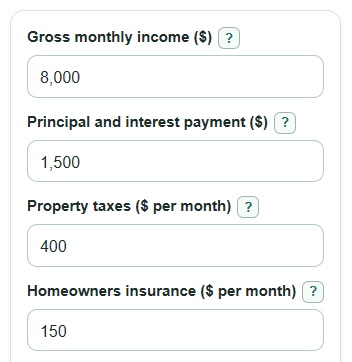
- Enter Gross monthly income as income before taxes and deductions, using a monthly amount.
- Enter the monthly housing pieces: Principal and interest payment, Property taxes, Homeowners insurance, and HOA dues.
- Open Advanced options to add Mortgage insurance, Other monthly debts, or a different Target front-end DTI.
- Select Calculate and read Front-end DTI first, then check Target check and Monthly room left at target.
- Sanity-check Total monthly housing cost against a loan estimate, listing sheet, or budget. If it only looks like principal and interest, add the missing taxes, insurance, HOA dues, or mortgage insurance.
Definitions
Gross monthly income: Income before taxes and deductions, measured in dollars per month.
Principal and interest payment: The loan payment for borrowed mortgage money and interest, before taxes, insurance, HOA dues, or mortgage insurance.
Property taxes: The monthly share of real estate taxes for the home. If you have a yearly number, divide by 12.
Homeowners insurance: The monthly share of the policy that protects the home. If you have a yearly premium, divide by 12.
HOA dues: Monthly homeowners association, condo, or similar community fees.
Mortgage insurance: Monthly PMI or MIP when it applies to the loan.
Front-end DTI: The percent of gross monthly income used by monthly housing costs only.
Back-end DTI check: A supporting percent that adds Other monthly debts to housing costs before dividing by gross monthly income.
Target front-end DTI: The planning percent used to calculate Max housing cost at target and Monthly room left at target.
Common mistakes and quick fixes
Mistake: Entering take-home pay in Gross monthly income.
Fix: Use income before taxes, retirement deductions, insurance deductions, and other paycheck deductions.
Mistake: Putting a full escrow payment in Principal and interest payment, then also entering Property taxes and Homeowners insurance.
Fix: Use only the mortgage principal and interest part in Principal and interest payment, or remove the duplicate tax and insurance amounts.
Mistake: Leaving HOA dues blank when the home has no HOA.
Fix: Enter 0 for HOA dues so the calculator knows the cost is zero.
Mistake: Forgetting Mortgage insurance when PMI or MIP applies.
Fix: Add the monthly amount in Mortgage insurance, or enter 0 if it does not apply.
Mistake: Adding Other monthly debts into the housing cost fields.
Fix: Put car loans, student loans, credit cards, and similar payments in Other monthly debts. Front-end DTI uses housing only.
Mistake: Reading Monthly room left at target as always positive.
Fix: A negative Monthly room left at target means the entered housing cost is over the target by that dollar amount each month.
Limitations & Key Assumptions / Boundary Conditions
- This calculator is for planning. It does not approve a mortgage or apply a lender's full underwriting rules.
- All housing inputs should be monthly amounts. Divide yearly taxes, yearly insurance, or yearly HOA dues by 12 before entering them.
- The calculator does not estimate Property taxes, Homeowners insurance, HOA dues, or Mortgage insurance for you. Missing items can make Front-end DTI look too low.
- Other monthly debts affect only Back-end DTI check. They are not part of Front-end DTI.
- Target front-end DTI is chosen by the user. A lender, loan program, or automated system may use a different target or allow exceptions.
- Gross monthly income can be handled differently for bonuses, commissions, self-employment, overtime, or seasonal work.
- Negative Monthly room left at target is intentional. It shows how far the housing cost is over the selected target each month.
Methodology
Housing cost total
The calculator adds the housing pieces you enter. Housing expense examples commonly include principal and interest, property taxes, homeowners insurance, PMI, and HOA fees [3].
total_housing_payment = principal_interest + property_taxes_monthly + home_insurance_monthly + hoa_dues_monthly + mortgage_insurance_monthly
Front-end DTI
Front-end DTI is the housing-only monthly cost divided by gross monthly income, then shown as a percent. Mortgage DTI ratios compare monthly obligations with income in loan analysis [1].
front_end_dti_percent = (total_housing_payment / gross_monthly_income) * 100
Target room
The selected target percent is converted to a decimal by dividing by 100. The calculator then finds the largest monthly housing cost that fits that target and subtracts your entered housing cost.
max_housing_payment = gross_monthly_income * (target_front_end_percent / 100)
housing_room_left = max_housing_payment - total_housing_payment
Monthly room left at target is signed. A positive value means the housing cost is under the target. A negative value means the housing cost is over the target.
Back-end check
Back-end DTI check adds Other monthly debts to the same housing cost before dividing by gross monthly income.
back_end_dti_percent = ((total_housing_payment + other_monthly_debts) / gross_monthly_income) * 100
Mini example
Suppose Gross monthly income is $8,000, Principal and interest payment is $1,500, Property taxes are $400, Homeowners insurance is $150, HOA dues are $50, Mortgage insurance is $0, Other monthly debts are $600, and Target front-end DTI is 28%.
The total monthly housing cost is $2,100. Front-end DTI is $2,100 divided by $8,000, times 100, which equals 26.25%. The target housing amount is $8,000 times 28%, or $2,240. Monthly room left at target is $2,240 minus $2,100, or $140. Back-end DTI check is ($2,100 + $600) divided by $8,000, times 100, which equals 33.75%.