
Enter monthly housing costs and gross income to see your housing expense ratio, target check, and monthly room or shortfall.
Advanced options
Table of contents
How to use our Housing Expense Ratio Calculator
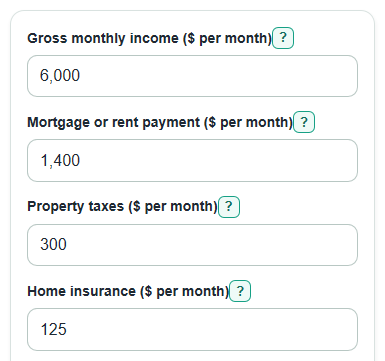
- Enter Gross monthly income using pay before taxes and other paycheck deductions.
- Enter Mortgage or rent payment, Property taxes, and Home insurance as monthly amounts.
- Set Target housing ratio to the percent you want to compare against, such as 28 for a common planning benchmark.
- Open Advanced options if you need to add Mortgage insurance, HOA dues, Other required housing fees, or Other monthly debts.
- Check that Total monthly housing cost matches what you would really pay each month before using the Housing ratio or Monthly room or shortfall.
Definitions
Housing expense ratio: The share of gross monthly income used for housing costs. It is also called the front-end ratio.
Gross monthly income: Income before taxes, insurance, retirement, and other paycheck deductions are taken out.
Total monthly housing cost: The monthly total of Mortgage or rent payment, Property taxes, Home insurance, Mortgage insurance, HOA dues, and Other required housing fees.
Target housing ratio: The percent of gross monthly income you choose as a planning limit for housing cost.
Monthly room or shortfall: The target dollar amount minus Total monthly housing cost. Positive means under target; negative means over target.
Total debt ratio: Housing cost plus Other monthly debts, divided by gross monthly income. This is related to debt-to-income ratio.
Common mistakes and quick fixes
Mistake: Entering take-home pay in Gross monthly income.
Fix: Use pay before taxes, insurance, retirement, and other deductions.
Mistake: Typing yearly Property taxes instead of a monthly amount.
Fix: Divide the yearly tax bill by 12 before entering Property taxes.
Mistake: Putting property taxes, insurance, and PMI all inside Mortgage or rent payment and also entering them again separately.
Fix: For a mortgage, use principal and interest in Mortgage or rent payment, then add Home insurance and Mortgage insurance only once.
Mistake: Leaving out HOA dues or Other required housing fees because they are not part of the loan payment.
Fix: Add any required monthly housing fee that you must pay to keep or live in the home.
Mistake: Treating Target check as a loan approval answer.
Fix: Use Target housing ratio as a planning number only; lenders may use different rules and other debts.
Mistake: Reading Monthly room or shortfall as always good news.
Fix: A positive value means room under the target; a negative value means the housing cost is over the target by that amount each month.
Limitations & Key Assumptions / Boundary Conditions
- The calculator uses monthly dollar amounts. If a bill is yearly, divide it by 12 before entering it.
- Gross monthly income should be before deductions. Using take-home pay will make the ratio look higher.
- The target percent is a planning benchmark you choose. It is not a promise of mortgage approval, rent approval, or affordability.
- The housing-only ratio does not include groceries, utilities, child care, transportation, savings, or emergency costs.
- Total debt ratio appears only when Other monthly debts is greater than $0, and it uses only the debt amount you enter.
- Actual lender calculations can differ because loan programs may count income, debts, taxes, insurance, and fees in specific ways.
Methodology
How the calculator adds housing cost
The calculator first adds the monthly housing items you enter. The housing expense ratio compares monthly housing costs with gross monthly income, which is income before deductions [3].
total_housing = main_housing_payment + property_taxes_monthly + home_insurance_monthly + mortgage_insurance_monthly + hoa_dues_monthly + other_housing_costs_monthly
How the ratio is calculated
The total is divided by Gross monthly income and changed to a percent. This is the housing expense ratio, also called the front-end ratio.
housing_expense_ratio_percent = (total_housing / gross_monthly_income) * 100
How the target comparison works
The target percent is converted to a decimal by dividing by 100. The calculator then finds the housing cost that matches the target and subtracts your entered housing cost.
max_housing_at_target = gross_monthly_income * (target_ratio_percent / 100)
monthly_room_vs_target = max_housing_at_target - total_housing
required_income_at_target = total_housing / (target_ratio_percent / 100)
A positive Monthly room or shortfall means the entered housing cost is below the target. A negative value means the entered housing cost is above the target by that many dollars per month.
Optional total debt ratio
If Other monthly debts is greater than $0, the calculator adds that debt to housing cost and divides by Gross monthly income. Lenders may review debt-to-income ratios, but limits and included debts can vary by loan and underwriting rules [1].
back_end_ratio_percent = ((total_housing + other_monthly_debts) / gross_monthly_income) * 100
Mini-example
If Gross monthly income is $6,000, Mortgage or rent payment is $1,400, Property taxes are $300, Home insurance is $100, and the Target housing ratio is 28%, then Total monthly housing cost is $1,800. The Housing ratio is 30.00%. The housing cost at the 28% target is $1,680, so Monthly room or shortfall is -$120. Income needed for this housing cost at a 28% target is about $6,428.57 per month.