
Estimate how long a portable power station can run your devices, or size a battery for a planned run time.
Advanced options
Table of contents
How to use our Portable Power Station Runtime Calculator
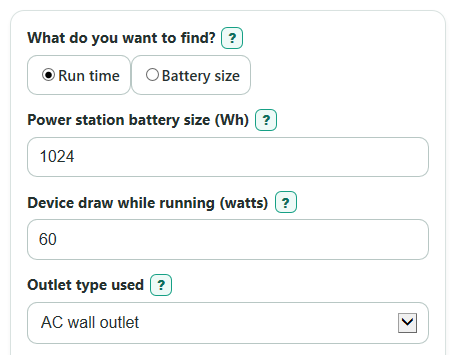
- Choose What do you want to find?: Run time if you know the Power station battery size, or Battery size if you know the Needed run time.
- Enter Device draw while running as the combined watts for devices used at the same time, then pick the Outlet type used.
- Open Advanced options if you want to change Battery kept in reserve, efficiency, Battery health or cold-weather capacity, Power station idle draw, or outlet limit checks.
- Click "Calculate" and read the main answer first, then check "Available battery energy", "Battery draw including idle" and "Suggested continuous outlet rating".
- Sanity-check the result by comparing Estimated run time with Nameplate-only run time; if the gap is huge, review reserve, efficiency, idle draw, and measured device watts.
Definitions
Watt (W): A unit of power, or how fast a device uses energy while it is running.
Watt-hour (Wh): A unit of energy. A 60 W device running for 1 hour uses 60 Wh.
Power station battery size: The rated stored energy of the power station, shown in Wh on most spec sheets.
Device draw while running: The combined running watts for all devices powered at the same time.
Outlet type used: The port path used by the device. AC wall outlets usually include inverter loss, while DC or USB ports often avoid that conversion.
Battery kept in reserve: The percent of rated battery energy you do not plan to use.
Efficiency: The conversion efficiency for the selected outlet. If you add separate battery-side idle draw, use an efficiency that excludes that same idle loss. If your measured overall efficiency already includes idle consumption, leave idle draw at zero.
Power station idle draw: Battery-side watts consumed by the station itself, added after calculating the device conversion loss. This is not power delivered through the outlet.
Running-watt margin: Station continuous outlet limit minus the running load. A negative value means the load is above the steady outlet limit.
Starting-watt margin: Station surge limit minus the largest starting draw. A negative value means the starting surge may be too high.
Common mistakes and quick fixes
Mistake: Using the outlet watt rating as Power station battery size.
Fix: Enter the battery energy in Wh for Power station battery size, not the maximum watts the outlet can supply.
Mistake: Entering a nameplate maximum for Device draw while running when the device cycles on and off.
Fix: Use a measured average for Device draw while running when you can, especially for a fridge, CPAP, or fan.
Mistake: Leaving Outlet type used on AC wall outlet while using USB-C or a 12 V DC port.
Fix: Match Outlet type used to the actual port because AC outlet efficiency and DC or USB efficiency use different loss factors.
Mistake: Treating Estimated run time as guaranteed down to the last minute.
Fix: Keep a Battery kept in reserve value and plan extra margin for cold weather, old batteries, or changing loads.
Mistake: Ignoring Station continuous outlet limit because Battery size needed looks large enough.
Fix: Enter Station continuous outlet limit and check Running-watt margin so the station can actually run the load.
Mistake: Forgetting motor startup power for a fridge, pump, or tool.
Fix: Enter Station surge limit and Largest starting draw at one time, then check Starting-watt margin.
Limitations & Key Assumptions / Boundary Conditions
- The result is a planning estimate, not a lab test. Real device watts can change with settings, temperature, compressor cycling, and battery state.
- AC outlet efficiency, DC or USB efficiency, Battery kept in reserve, and Battery health or cold-weather capacity are user assumptions. Change them if your manual or watt meter gives better numbers.
- Power station idle draw can matter a lot for small loads, especially when an AC inverter stays on for many hours.
- Station continuous outlet limit and Station surge limit checks are optional. If you leave them blank, the calculator estimates energy but cannot tell whether the outlet can run or start the device.
- Largest starting draw at one time must include the starting device plus other devices still running at that moment. Do not add every startup surge unless those starts can coincide.
- The calculator does not include solar charging, wall recharging during use, battery shutdown behavior, manufacturer hidden reserves, or very short surge timing differences.
Methodology
Core idea
The calculator separates energy from power. Energy in watt-hours decides how long a station can run a load. Power in watts decides whether the outlet can run or start that load.
Shared steps
First, the selected outlet efficiency is converted from percent to a decimal.
efficiency_decimal = selected outlet efficiency percent / 100
Convert device output watts to battery-side watts first, then add separate station self-consumption.
battery_draw_w = device_watts / efficiency_decimal + station_idle_watts
Run time mode
In "Run time", available battery energy accounts for health and reserve. Conversion losses and separate idle draw are included in battery draw.
available_battery_wh = battery_capacity_wh * (battery_health_percent / 100) * (1 - reserve_percent / 100)
Estimated runtime is available battery energy divided by total battery-side draw.
estimated_runtime_hours = available_battery_wh / battery_draw_w
It also shows the simple nameplate-only comparison.
ideal_no_loss_runtime_hours = battery_capacity_wh / device_watts
Battery size mode
When you choose Battery size, the calculator works backward from your Needed run time to the rated Wh you would need.
capacity_needed_wh = battery_draw_w * target_runtime_hours / ((battery_health_percent / 100) * (1 - reserve_percent / 100))
Device energy is output watts multiplied by runtime; station self-consumption and conversion losses are not energy delivered to the devices.
delivered_energy_wh = device_watts * time_hours
Outlet checks
The suggested continuous outlet rating adds the chosen cushion to the running load.
minimum_continuous_output_w = device_watts * (1 + power_cushion_percent / 100)
If a Station continuous outlet limit is entered, the running margin keeps its sign.
station_continuous_margin_w = station_continuous_watts - device_watts
If both Station surge limit and Largest starting draw at one time are entered, the starting margin also keeps its sign.
station_surge_margin_w = station_surge_watts - largest_starting_watts
Mini-example
For a 1024 Wh station, 60 W device load, 88% conversion efficiency, 10% reserve, full battery health and 0 W separate idle draw, available battery energy is 921.6 Wh and battery draw is 60/0.88 = 68.18 W. Runtime is 13.5168 hours. Adding 10 W battery-side idle draw raises battery draw to 78.18 W and reduces runtime to about 11.79 hours. Device outlet load remains 60 W; a 20% cushion still gives a 72 W suggested outlet rating.
Sources
Victron technical notes on output rating and efficiency distinguish outlet power, conversion loss and no-load self-consumption. This calculator uses a simplified constant-efficiency model; it is not a measured runtime prediction for a particular station.