
Estimate how long a battery bank can run a steady load before it reaches your chosen reserve charge.
Table of contents
How to use our Battery Bank Runtime Calculator
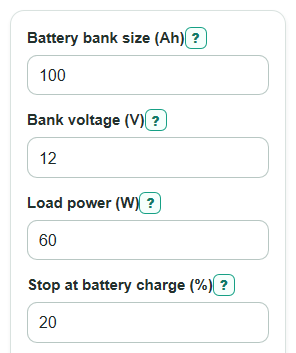
- Enter the total Battery bank size (Ah) for the whole bank and the matching Bank voltage (V).
- Enter Load power (W), then set Stop at battery charge (%) for the reserve you want to leave.
- Set Inverter efficiency (%) to 100 for a direct DC load, or use your inverter rating for an AC load.
- Open Advanced options if the bank is partly charged, aged, or powering a cycling load, then adjust Starting battery charge (%), Battery health (%), and Load on time (%).
- Check that Estimated runtime makes sense by comparing Average battery current with your wiring, fuse, and battery ratings.
Definitions
Amp-hour (Ah): A charge amount. For batteries, Ah only becomes an energy estimate when you also know the voltage.
Bank voltage (V): The nominal voltage of the whole battery bank, such as 12 V, 24 V, or 48 V.
Watt-hour (Wh): A unit of energy. One watt-hour means 1 watt used for 1 hour.
State of charge: The battery charge percent. The calculator uses Starting battery charge (%) and Stop at battery charge (%) to find the usable charge range.
Inverter efficiency (%): The percent of battery power that reaches an AC load after inverter losses.
Load on time (%): The percent of time the load is actually running. A fridge that runs 15 minutes each hour has about 25% load on time.
C-rate: Battery current divided by battery Ah size. A higher C-rate means the battery is being discharged harder.
Common mistakes and quick fixes
Mistake: Entering one battery's rating in Battery bank size (Ah) when the bank has batteries in parallel.
Fix: Add the Ah ratings for parallel batteries, and use the total bank Ah at the Bank voltage (V) you enter.
Mistake: Using a device's surge watts for Load power (W) when the device usually runs at a lower steady wattage.
Fix: Enter the average running watts, or use Load on time (%) for loads that cycle on and off.
Mistake: Setting Inverter efficiency (%) to 100 for an AC load that runs through an inverter.
Fix: Use 100 only for a direct DC load, or enter the inverter's efficiency percent if an inverter is used.
Mistake: Setting Starting battery charge (%) equal to or below Stop at battery charge (%).
Fix: Make Starting battery charge (%) higher than Stop at battery charge (%), because runtime needs usable charge between those two points.
Mistake: Leaving Battery health (%) at 100 for an older battery that no longer holds full capacity.
Fix: Lower Battery health (%) if the bank is worn, tested below rating, or has lost capacity with age.
Mistake: Treating Theoretical full-to-empty runtime as the safe planned runtime.
Fix: Use Estimated runtime for planning because it stops at your chosen Stop at battery charge (%).
Limitations & Key Assumptions / Boundary Conditions
- The estimate assumes a steady average load. Short motor starts, inverter surge limits, and changing device wattage can make real runtime different.
- The calculator uses nominal Bank voltage (V). Real battery voltage changes during discharge, so measured current can differ.
- Battery health (%) is a simple capacity multiplier. It does not model temperature, battery chemistry, cell imbalance, or detailed aging behavior.
- Lead-acid batteries may deliver less usable capacity at high current. The Battery draw compared with bank size output helps flag this, but the calculator does not automatically derate capacity.
- Inverter efficiency (%) is treated as one fixed number. Real inverters are less efficient at some loads and also may use idle power.
- The Theoretical full-to-empty runtime output is only a comparison. Regularly discharging many batteries to 0% can damage them or reduce life.
Methodology
How the calculator finds runtime
The calculator first converts the battery bank rating from amp-hours to watt-hours, because watt-hours are energy and can be compared directly with watts.
stored_energy_wh = battery_capacity_ah * bank_voltage_v
It then keeps only the energy between the starting charge and the stop charge, and adjusts that amount for battery health.
usable_energy_wh = stored_energy_wh * (battery_health_percent / 100) * ((starting_soc_percent - stop_soc_percent) / 100)
The load is adjusted for cycling and inverter loss. A load that is on half the time uses half its rated watts on average. An inverter efficiency below 100% means the battery must supply more power than the AC load receives.
average_battery_power_w = (load_power_w * (load_on_time_percent / 100)) / (inverter_efficiency_percent / 100)
Runtime is the usable energy divided by the average power pulled from the battery.
runtime_hours = usable_energy_wh / average_battery_power_w
The calculator also estimates average battery current and C-rate.
battery_current_a = average_battery_power_w / bank_voltage_v
c_rate = battery_current_a / battery_capacity_ah
For comparison, it also shows the theoretical full-to-empty runtime using the same battery health and average battery-side power.
full_to_empty_runtime_hours = (stored_energy_wh * (battery_health_percent / 100)) / average_battery_power_w
Worked mini-example
For a 100 Ah bank at 12 V, stored energy is 1,200 Wh. If it starts at 100%, stops at 20%, and battery health is 100%, usable energy is 960 Wh. A 60 W AC load through a 90% efficient inverter pulls about 66.67 W from the battery. Runtime is 960 / 66.67 = 14.4 hours, which is about 14 hours 24 minutes. Average battery current is 66.67 / 12 = 5.56 A, and the C-rate is 5.56 / 100 = 0.0556C.
Input checks
The calculator blocks blank, non-numeric, zero, negative, and out-of-range entries. It also requires Starting battery charge (%) to be higher than Stop at battery charge (%), because there is no usable charge range if the start point is already at or below the stop point.