
Estimate the generator running watts and starting watts needed for one or two RV air conditioners plus other loads.
Advanced options
Table of contents
How to use our RV Air Conditioner Generator Size Calculator
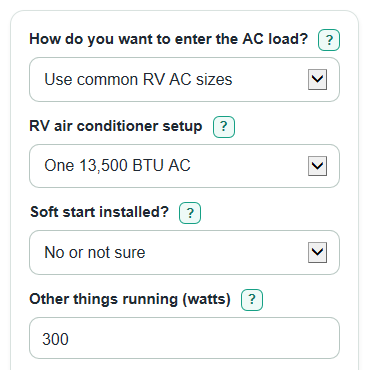
- Choose How do you want to enter the AC load?: use common RV AC sizes if you know the BTU size, or label watts if you have the AC watt ratings.
- Enter the AC details, Soft start installed?, and Other things running so the estimate includes loads used at the same time.
- Open Advanced options if you want to change Camping elevation, Extra safety buffer, or the two-AC start pattern.
- Click Calculate and compare both Minimum starting-watt rating needed and Minimum running-watt rating needed with the generator label.
- Sanity-check the result: if the recommended class seems small, recheck whether you entered total AC watts, included converter charging, and used the correct fuel rating.
Definitions
Running watts: The steady power needed after the air conditioner is already cooling.
Starting watts: The short burst of power needed when the compressor starts; generator labels may call this peak, surge, or starting watts.
BTU: A cooling-size rating for an air conditioner. Bigger BTU sizes usually need more watts.
Soft start: An added device that can reduce the compressor startup burst. The calculator treats it as an estimate, not a guarantee.
Other things running: The steady watts for non-AC loads used at the same time, such as converter charging, fridge controls, lights, TV, or chargers.
Safety buffer: Extra percent added above the estimated load to give room for heat, older equipment, and label differences.
Elevation derating: A reduction in usable generator output at higher camping elevation.
Common mistakes and quick fixes
Mistake: Using AC running watts from label when How do you want to enter the AC load? is set to common RV AC sizes.
Fix: Switch How do you want to enter the AC load? to label watts, or use RV air conditioner setup instead.
Mistake: Entering only one AC in AC running watts from label when two units can run together.
Fix: Enter the total steady AC watts in AC running watts from label and the highest total startup watts in Highest AC startup watts from label.
Mistake: Leaving Other things running out because the AC is the biggest load.
Fix: Add converter charging, fridge controls, lights, TV, and chargers to Other things running if they will be on with the AC.
Mistake: Choosing Yes for Soft start installed? because the AC starts gently sometimes.
Fix: Choose Yes only if a soft-start device is installed and working; otherwise choose No or not sure.
Mistake: Leaving Camping elevation at 0 when camping in the mountains.
Fix: Enter the campsite elevation in Camping elevation so the generator power loss is included.
Mistake: Using the Recommended generator class by starting watts alone.
Fix: Also check Minimum running-watt rating needed because a generator must pass both the surge rating and continuous rating.
Limitations & Key Assumptions / Boundary Conditions
- Preset RV AC loads are planning estimates. Use AC running watts from label and Highest AC startup watts from label when you have real label or measured data.
- The soft-start setting uses a 0.65 startup multiplier in preset mode only. Real soft-start performance depends on the device, installation, compressor, and weather.
- Camping elevation uses a simple derating rule above 3,300 feet and floors the usable output factor at 0.50. Always check the generator manual for the model you own.
- The recommendation checks common generator classes only. If no class passes, use the calculated minimum ratings to shop above the built-in list.
- If a generator has separate gasoline and propane ratings, compare against the rating for the fuel you will actually use.
- The calculator does not model every appliance cycling on and off, low-voltage shore-power issues, battery inverter limits, or campground wiring limits.
Methodology
What the calculator checks
The calculator checks two generator ratings because RV air conditioners have a steady load and a short compressor startup surge. Generator sizing should cover the highest power demand, which is often the AC startup surge plus other running loads [1].
run_total = run_per_ac * ac_count
start_per_ac_adjusted = start_per_ac * soft_start_factor
For preset mode, the planning values are 1,200 running and 2,400 starting watts for an 11,000 BTU AC, 1,500 running and 3,000 starting watts for a 13,500 BTU AC, and 1,700 running and 3,500 starting watts for a 15,000 BTU AC. Published RV AC watt tables show that running and starting watts vary by BTU size [2].
Startup load
For one AC, the startup AC load is the adjusted startup watts. For two ACs, the calculator uses the start pattern you choose.
if ac_count = 1: ac_start_total = start_per_ac_adjusted
if ac_count = 2 and ac_start_pattern = one_at_time: ac_start_total = start_per_ac_adjusted + run_per_ac
if ac_count = 2 and ac_start_pattern = together: ac_start_total = start_per_ac_adjusted * 2
In label-watts mode, the calculator uses the two label inputs directly and ignores the soft-start selection.
run_total = label_ac_running_watts
ac_start_total = label_ac_starting_watts
Buffer and elevation
The safety buffer is added to both the steady and startup checks. The elevation factor estimates lower usable generator output at higher campsites.
altitude_factor = max(0.50, 1 - 0.03 * max(0, camping_elevation_feet - 3300) / 1650)
buffer_factor = 1 + safety_buffer_percent / 100
minimum_running_watts = (run_total + other_running_watts) * buffer_factor / altitude_factor
minimum_starting_watts = (ac_start_total + other_running_watts) * buffer_factor / altitude_factor
Generator class choice
The calculator checks common classes from smallest to largest and picks the first one where both the running-watt rating and starting-watt rating pass.
class.running_watts >= minimum_running_watts and class.starting_watts >= minimum_starting_watts
Mini-example
For one 13,500 BTU AC, no soft start, 300 watts of other loads, 0 feet elevation, and a 20 percent buffer, the running check is (1,500 + 300) * 1.20 = 2,160 watts. The startup check is (3,000 + 300) * 1.20 = 3,960 watts. The smallest built-in class that passes both is 4,000 starting watts with 3,500 running watts.