
Use this pounds and ounces calculator to convert, add, or subtract weights and instantly see pounds and ounces, decimal pounds, and total ounces.
How to use our Pounds and Ounces Calculator
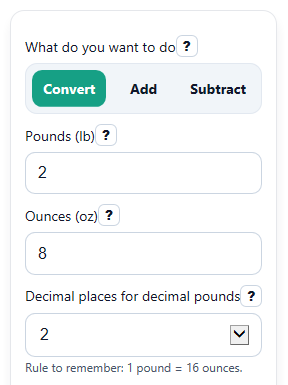
- Choose What do you want to do: Convert, Add, or Subtract.
- Enter the visible weight fields in Pounds (lb) and Ounces (oz), or the matching first and second weight fields for Add or Subtract.
- Pick Decimal places (decimal-pounds answer only) if you want only that result card rounded to 0, 1, 2, or 3 places.
- Click Calculate and read the main result in Answer in pounds and ounces, then check Answer in decimal pounds or Answer in total ounces if you need those formats.
- Sanity-check the result: if ounces you entered were 16 or more, the final Answer in pounds and ounces should carry extra ounces into pounds so the ounces part stays under 16.
Definitions
Pound (lb): A weight unit. One pound equals 16 ounces.
Ounce (oz): A smaller weight unit. Sixteen ounces make 1 pound.
Decimal pounds: The whole weight written as one number in pounds, such as 2.5 lb instead of 2 lb 8 oz.
Total ounces: The whole weight written only in ounces, such as 40 oz instead of 2 lb 8 oz.
Normalized pounds and ounces: A cleaned-up lb-and-oz answer where the ounces part is less than 16.
Negative result: In Subtract mode, this means the second weight is larger than the first, so the difference is below zero.
Common mistakes and quick fixes
Mistake: Typing a negative number into Pounds (lb) , Ounces (oz) , First weight pounds (lb) , or Second weight ounces (oz) .
Fix: Enter each typed weight part as 0 or more. If you want a negative answer, use What do you want to do set to Subtract and let the calculator show the signed result.
Mistake: In Convert mode, entering a decimal in Pounds (lb) and also adding extra Ounces (oz) , such as 2.5 lb and 8 oz.
Fix: Use either decimal pounds by itself in Pounds (lb) with 0 in Ounces (oz) , or enter whole pounds plus ounces, such as 2 lb and 8 oz.
Mistake: Thinking ounces must stay below 16 when typing Ounces (oz) or the first or second ounces fields.
Fix: You can enter 16 or more ounces. The calculator will carry the extra into pounds in Answer in pounds and ounces .
Mistake: Reading Answer in decimal pounds like it is pounds and ounces.
Fix: Treat Answer in decimal pounds as one number in pounds only. Use Answer in pounds and ounces if you need a split lb-and-oz answer.
Mistake: Being surprised when Answer in total ounces or Answer in decimal pounds is negative in Subtract mode.
Fix: A negative result means the second weight is larger than the first. Check the Note field for that meaning instead of changing the sign by hand.
Mistake: Choosing too few digits in Decimal places for decimal pounds and thinking the math changed.
Fix: That setting changes only how Answer in decimal pounds is shown. Use more decimal places if you want a closer rounded display.
Limitations & Key Assumptions / Boundary Conditions
- This calculator uses the exact rule 1 lb = 16 oz for ordinary pound-and-ounce conversions.
- Typed weight fields should be zero or more. Negative typed pounds or ounces are treated as invalid input.
- In Convert mode, using decimal Pounds (lb) together with nonzero Ounces (oz) can double-count part of the weight, so that combination should not be used.
- Decimal values are allowed for ounces, so small rounding may appear in the displayed ounces part when the input has many decimal places.
- Subtraction keeps negative answers on purpose. A negative result means the second weight is larger, not that the calculator failed.
- Decimal places for decimal pounds changes display rounding only. The underlying conversion rule stays the same.
Methodology
How the calculator works
The calculator first turns each weight into ounces, because ounces are easier to add, subtract, and convert cleanly.
total_oz = lb * 16 + oz
For Add mode, it adds the two ounce totals.
sum_oz = (lb1 * 16 + oz1) + (lb2 * 16 + oz2)
For Subtract mode, it subtracts the second ounce total from the first.
diff_oz = (lb1 * 16 + oz1) - (lb2 * 16 + oz2)
Then it converts the final ounce total back into pounds and ounces.
result_lb = trunc(abs(total_oz) / 16)
result_oz = abs(total_oz) - result_lb * 16
If the final total is negative, the calculator keeps the overall negative sign on the answer instead of changing it to zero. That helps show shortages or gaps clearly.
It also shows decimal pounds by dividing total ounces by 16.
decimal_lb = total_oz / 16
Mini example
Add 1 lb 12 oz and 0 lb 10 oz.
first_oz = 1 * 16 + 12 = 28
second_oz = 0 * 16 + 10 = 10
sum_oz = 28 + 10 = 38
38 oz = 2 lb 6 oz
decimal_lb = 38 / 16 = 2.375 lb
So the outputs are 2 lb 6 oz, 2.375 lb, and 38 oz.
Assumptions used
The calculator uses 16 ounces per pound, normalizes ounces so the final ounces part stays under 16, and rounds only the displayed decimal-pounds result to the number of places you choose.