
Convert US liquid quarts to pounds by choosing a common substance or entering a known density, so the weight matches what is actually in the container.
How to use our Quarts to Pounds Conversion Calculator
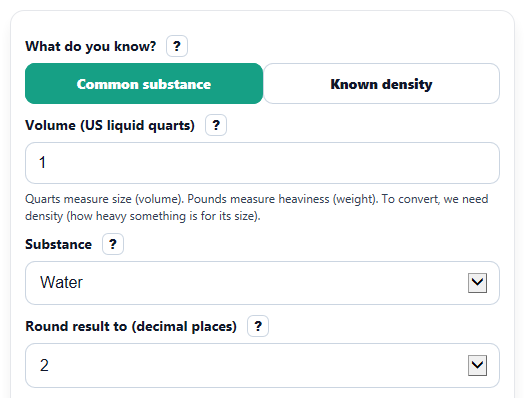
- Choose What do you know?: pick Common substance if you want a typical value for something like water or honey, or pick Known density if you already know the material's density.
- Enter Volume (US liquid quarts), then either choose a Substance or enter Density value and Density unit.
- If you want, change Round result to (decimal places) to control how many digits are shown.
- Click Calculate, then read Weight (lb) first and use Weight (oz) for smaller kitchen-style amounts.
- Sanity-check the answer by looking at Density used (lb per quart) and Assumption note; if those do not match your material, change the substance or enter a custom density.
Definitions
US liquid quart: A volume unit used for liquids in the US. This calculator uses US liquid quarts only, not dry quarts or Imperial quarts.
Density: How heavy something is for its size. Here, density is what lets the calculator turn volume into weight.
lb per quart (lb/qt): Pounds for each US liquid quart of a material. This is the direct density unit used in the main calculation.
lb per gallon: Pounds for each US gallon. The calculator converts this to lb per quart by dividing by 4.
g per mL: Grams per milliliter, a common science density unit. The calculator converts it to lb per quart before finding the weight.
kg per L: Kilograms per liter, another common density unit. The calculator converts it to lb per quart before finding the weight.
Weight (lb): The estimated weight in pounds for your entered volume and density.
Weight (oz): The same estimated weight shown in ounces, where 1 pound equals 16 ounces [1].
Density used (lb per quart): The actual density value the calculator used after any unit conversion, so you can check the assumption.
Common mistakes and quick fixes
Mistake: Entering dry quarts or Imperial quarts in Volume (US liquid quarts) .
Fix: Use only US liquid quarts in Volume (US liquid quarts) , or convert your volume first.
Mistake: Leaving What do you know? on Common substance when you really have a measured density.
Fix: Switch What do you know? to Known density so the calculator uses your own Density value and Density unit .
Mistake: Typing a number in Density value but picking the wrong Density unit .
Fix: Make sure Density unit matches your source exactly, such as lb per quart, lb per gallon, g per mL, or kg per L.
Mistake: Assuming the Weight (lb) for water also works for flour, sugar, oil, or honey.
Fix: Check the Substance field or the Assumption note , because different materials have different densities.
Mistake: Entering 0 or a negative number for Volume (US liquid quarts) or Density value .
Fix: Enter a value greater than 0 in both fields when they are required.
Mistake: Reading only Weight (oz) and missing the main result.
Fix: Start with Weight (lb) , then use Weight (oz) as the same estimate in smaller units.
Limitations & Key Assumptions / Boundary Conditions
- Results depend on density, so the answer changes by substance. The same number of quarts will not weigh the same for water, milk, flour, sugar, oil, and honey.
- In Common substance mode, the calculator uses a typical preset density, not a lab measurement for your exact brand, recipe, temperature, or moisture level.
- The calculator is built for US liquid quarts only. If your source uses dry quarts or Imperial quarts, convert first or the result will be wrong.
- In Known density mode, the result is only as accurate as the Density value and Density unit you enter.
- Preset food densities can vary in real life because packing, settling, air content, fat content, and temperature can change how much a quart weighs.
- Rounding changes only how the answer is displayed. Small differences in the last digit do not mean the material changed.
Methodology
How the calculator works
Quarts measure volume, but pounds measure weight, so the calculator must use density to connect them. Density means how heavy a material is for its size.
weight_lb = volume_qt x density_lb_per_qt
weight_oz = weight_lb x 16
Density unit conversions
If you enter density in a unit other than lb per quart, the calculator first converts it to pounds per quart.
density_lb_per_qt = density_lb_per_gal / 4
density_lb_per_qt = density_g_per_ml x 946.352946 / 453.59237
density_lb_per_qt = density_kg_per_l x 0.946352946 / 0.45359237
The conversion uses 1 US liquid quart = 0.946352946 L and 1 pound = 0.45359237 kg [1]. It also uses 1 gallon = 4 quarts and 1 pound = 16 ounces [1].
Worked mini-example
Suppose you enter 2 quarts of water. Using a water density of about 2.08635 lb per quart, the calculator multiplies volume by density.
weight_lb = 2 x 2.08635 = 4.1727 lb
weight_oz = 4.1727 x 16 = 66.7632 oz
With 3 decimal places, that shows as 4.173 lb and 66.763 oz.
Preset substances
In Common substance mode, the calculator uses a typical density for the chosen Substance. For water, the preset is close to the standard density of water near 1 g/mL [2]. Other presets are practical estimates for everyday use, not exact values for every product.
Assumptions behind the answer
The Assumption note tells you whether the result came from a preset substance or your own custom density. This matters because the same Volume (US liquid quarts) can give very different weights for different materials.
If the Density used (lb per quart) looks wrong for your material, switch substances or use Known density with your own value.
What can make real-life results differ
Real materials can vary with temperature, moisture, packing, air bubbles, and recipe differences. That is why this calculator gives an estimate based on the density assumption you selected, not a guaranteed measured weight for every situation.