
Convert watts, VA, and power factor for AC equipment sizing, with optional extra room for planning.
Advanced options
Table of contents
How to use our Watts to VA Calculator
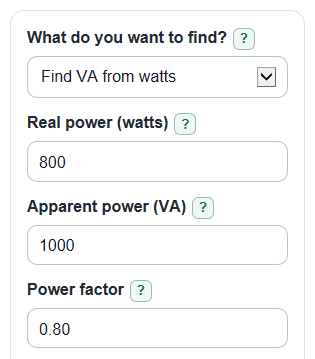
- Choose What do you want to find?: Find VA from watts, Find watts from VA, or Find power factor.
- Enter only the values needed for that choice, such as Real power (watts), Apparent power (VA), and Power factor.
- Use Extra room for sizing (percent) if you want a larger planning number for a UPS, inverter, generator, or transformer.
- Open Advanced options only if you want to change Number display or Power size display, such as showing kVA.
- Sanity-check the answer: if Power factor is 1, watts and VA should match; if Power factor is below 1, VA should be higher than watts.
Definitions
Real power (watts): The power a device actually uses to make heat, light, motion, sound, or computing work.
Apparent power (VA): The AC power size a source must be able to supply, based on voltage and current.
Power factor: Real power divided by apparent power. For this calculator, it must be greater than 0 and no more than 1 [1].
Extra room for sizing (percent): Optional added capacity for planning. It raises the planning size but does not change the exact VA answer.
kVA: Kilovolt-amps. One kVA equals 1000 VA.
Back-and-forth power (VAR): Reactive power in an AC circuit. It moves between the source and load instead of becoming useful work.
Common mistakes and quick fixes
Mistake: Entering 80 in Power factor instead of 0.80.
Fix: Use a decimal from greater than 0 to 1, so 80 percent is 0.80.
Mistake: Putting VA into Real power (watts) when using Find VA from watts.
Fix: Enter the device's watt rating in Real power (watts), then let the calculator find Apparent power.
Mistake: Leaving Apparent power (VA) at the default when using Find power factor for a different device.
Fix: Change Apparent power (VA) to the actual VA rating from the label, spec sheet, UPS, or power supply.
Mistake: Treating Extra room for sizing (percent) as part of the exact electrical formula.
Fix: Use Planning size with extra room as a planning number only; Apparent power is the exact VA result.
Mistake: Thinking Power size display changes the math.
Fix: Use Power size display only to change whether the result is shown in VA, kVA, or both.
Limitations & Key Assumptions / Boundary Conditions
- This calculator is for ordinary AC load sizing with power factor greater than 0 and no more than 1.
- It does not handle signed power flow, power being sent back to the grid, harmonic distortion, phase-angle studies, or detailed three-phase engineering checks.
- Extra room for sizing (percent) is only a planning add-on. It is not an electrical code rule or a promise that equipment will start every motor load.
- Manufacturer ratings can include surge rating, continuous rating, temperature limits, battery runtime, startup current, and efficiency, which are not included here.
- If a device has several loads, calculate each load or add the watt totals first, then use a power factor that fits the combined load.
- Very small rounding differences can happen because results are rounded for display.
Methodology
Core relationships
For AC sizing, watts are real power and VA is apparent power. Power factor connects the two; it is the ratio of watts to VA for the load [1].
S_va = P_w / PF
P_w = S_va * PF
PF = P_w / S_va
In these formulas, S_va is apparent power in VA, P_w is real power in watts, and PF is power factor. The calculator rejects a power factor of 0 or less, above 1, or a watts and VA pair that would create a power factor above 1.
kVA and planning size
Larger equipment is often labeled in kVA, so the calculator also converts VA to kVA.
S_kva = S_va / 1000
The extra-room result is a simple planning size. It starts with the exact apparent power, then adds the entered percent.
S_plan_va = S_va * (1 + extra_room_percent / 100)
Back-and-forth power
Reactive power is estimated from the power triangle relationship between apparent power, real power, and reactive power [2].
Q_var = sqrt(max(0, S_va^2 - P_w^2))
The max(0, ...) guard is used only to prevent a tiny negative number caused by rounding before taking the square root.
Mini-example
A device rated at 800 W with a power factor of 0.80 has S_va = 800 / 0.80 = 1000 VA. With 20 percent extra room, the planning size is 1000 * (1 + 20 / 100) = 1200 VA, which is 1.2 kVA.