
Convert a Unix timestamp to a readable date and time, or turn a date, time, and UTC offset into Unix time.
Table of contents
How to use our Unix Time Converter
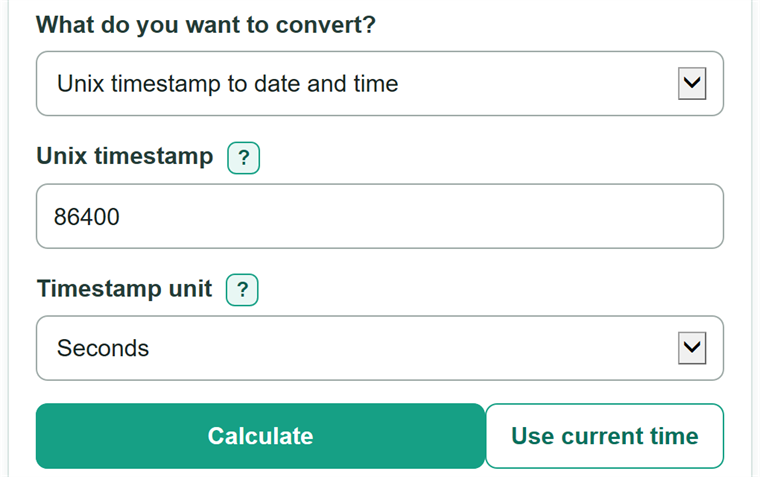
- Choose whether you want to convert a Unix timestamp or a date and time.
- For a timestamp, paste the number and select the source unit: seconds, milliseconds, or microseconds.
- For a date and time, enter the date, 24-hour time, and UTC offset from the source record, then choose the Unix output unit.
- Select Calculate to get the readable UTC time or the requested Unix timestamp, plus matching time formats.
- Check that the UTC date and time match the source record. If the year or day looks far off, verify the selected timestamp unit or UTC offset.
Definitions
Unix time: Time counted from the Unix epoch, 1970-01-01T00:00:00Z. Negative values are before that instant.
Unix epoch: The starting instant for Unix time: midnight UTC on January 1, 1970.
Timestamp unit: The scale of the source number. One second is 1,000 milliseconds or 1,000,000 microseconds.
UTC: Coordinated Universal Time, the shared global time basis used to identify an instant.
UTC offset: The signed difference between a local clock and UTC, such as -05:00 or +05:30. Z means +00:00.
ISO 8601 UTC: A copy-ready date and time such as 1970-01-02T00:00:00.123456Z. The final Z means UTC.
Browser-local date and time: The same instant shown in the timezone set on the browser or device. Its date can differ from the UTC date.
Common mistakes and quick fixes
Mistake: Selecting seconds for a timestamp that the source stores in milliseconds or microseconds.
Fix: Check What do you want to convert? and then recalculate. Check the API, log format, database field, or documentation and select the unit it names.
Mistake: Pasting commas, spaces, scientific notation, or a formula into Unix timestamp.
Fix: Enter one signed decimal number with no commas or spaces, such as 1704067200.123456.
Mistake: Entering a local date and time without the offset that applied at that moment.
Fix: Check What do you want to convert? and then recalculate. Copy Z or a complete signed offset, such as -05:00, from the original record or its timezone details.
Mistake: Using AM/PM time or entering 23:59:60.
Fix: Check What do you want to convert? and then recalculate. Use a 24-hour time from 00:00:00 through 23:59:59, with up to six fractional-second digits if needed.
Mistake: Sending browser-local time to a system that expects UTC.
Fix: Copy the ISO 8601 UTC value ending in Z when the receiving system requires a timezone-qualified UTC date and time.
Limitations & Key Assumptions / Boundary Conditions
- You must select seconds, milliseconds, or microseconds. The calculator does not guess a unit from the number of digits.
- Date-to-Unix conversion requires Z or a complete signed UTC offset. A city name alone cannot identify the correct daylight-saving offset for a past or future date.
- Browser-local time uses the timezone settings of the browser or device, so its calendar date can differ from UTC.
- Timestamp input allows up to 6 fractional digits in seconds, up to 3 in milliseconds, and no fractional digits in microseconds.
- Readable date formatting is limited to plus or minus 8,640,000,000,000,000 milliseconds from the Unix epoch.
- Leap-second text such as 23:59:60 is not accepted. Use the timestamp convention and normal clock value supplied by the source system.
Methodology
Conversion method
The calculator converts the active value to an exact whole number of microseconds from the Unix epoch. It keeps that value as integer decimal data, so microsecond digits are not lost through ordinary floating-point rounding.
timestamp_microseconds = timestamp_value * unit_scale_microseconds
For timestamp input, the scale is 1,000,000 microseconds per second, 1,000 microseconds per millisecond, or 1 microsecond per microsecond.
utc_microseconds = wall_clock_microseconds - utc_offset_microseconds
For date input, the calculator first reads the entered date and 24-hour clock time as calendar fields. It then subtracts the signed UTC offset. For example, 00:00 with an offset of +05:30 is 18:30 UTC on the previous calendar day.
unix_seconds = active_microseconds / 1000000
unix_milliseconds = active_microseconds / 1000
unix_microseconds = active_microseconds
Worked example
Enter 1970-01-02, 00:00:00.123456, and Z. The instant is one day plus 0.123456 seconds after the epoch. The Unix values are 86,400.123456 seconds, 86,400,123.456 milliseconds, and 86,400,123,456 microseconds.
Calendar and display rules
The calculator validates real calendar dates, complete signed offsets, and times from 00:00:00 through 23:59:59. UTC output ends in Z. Browser-local output formats the same instant using the timezone configured in the browser or device.