
Enter red, green, and blue values to get the matching six-digit HEX color code and optionally check its contrast against a background.
Table of contents
How to use our RGB to HEX Calculator
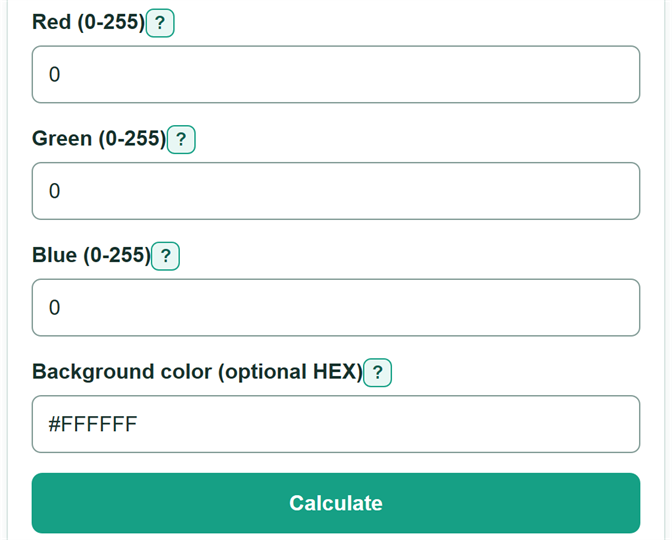
- Copy the red, green, and blue channel values from your color picker, CSS declaration, or design app.
- Enter each value in red, green, blue order using whole numbers from 0 through 255.
- If you want a text readability check, enter the six-digit HEX color behind the converted color in "Background color (optional HEX)".
- Select "Calculate" and copy the displayed HEX color code into your CSS, design tool, or document.
- Sanity-check the conversion: RGB 0, 0, 0 should be #000000, and RGB 255, 255, 255 should be #FFFFFF.
Definitions
RGB: A color described by red, green, and blue channel values. This calculator uses whole-number channels from 0 through 255.
HEX color code: A web color written as #RRGGBB, where the pairs give red, then green, then blue in base 16.
Base 16: A number system that uses 0 through 9 and A through F. For example, decimal 12 is 0C in base 16.
Leading zero: A zero kept at the start of a HEX pair so each channel always has two characters. For example, 12 becomes 0C, not C.
Contrast ratio: A comparison of the relative luminance of a foreground color and background color, written as a ratio such as 4.5:1.
WCAG AA and AAA: Web accessibility contrast levels. For text, AA requires at least 4.5:1 for normal text or 3:1 for large text; AAA requires 7:1 for normal text or 4.5:1 for large text. [1]
Common mistakes and quick fixes
Mistake: Copying the channels in blue, green, red order or swapping red and blue.
Fix: Enter the values in red, green, blue order, matching the labels from top to bottom.
Mistake: Entering a percentage or a fractional channel value such as 12.5.
Fix: Use the whole-number RGB values from 0 through 255. Do not round a fractional value unless your source tells you to do so.
Mistake: Entering a channel below 0 or above 255.
Fix: Each standard 8-bit RGB channel must be a whole number from 0 through 255.
Mistake: Using #FFF, an eight-digit color, or a color name as the background.
Fix: Enter exactly six HEX digits, with or without one leading #, such as #FFFFFF.
Mistake: Assuming a contrast pass applies to every font size.
Fix: Read the specific normal-text or large-text AA or AAA result for the text you plan to use.
Limitations & Key Assumptions / Boundary Conditions
- The converter accepts only standard 8-bit RGB channels: whole numbers from 0 through 255.
- The background check accepts only a six-digit HEX color, with an optional leading #. It does not accept three-digit shorthand or eight-digit colors with transparency.
- The contrast calculation assumes solid, fully opaque foreground and background colors. Gradients, images, overlays, shadows, and transparency can change the color seen by the reader.
- A large-text pass does not mean the same colors pass for normal text. Text size and weight still matter under WCAG criteria.
- Contrast ratio measures lightness difference. It does not assess font choice, text size, line spacing, color vision differences, or surrounding content.
Methodology
RGB to HEX conversion
Each entered channel is converted from a decimal whole number to a two-character uppercase base-16 pair. The pairs remain in red, green, blue order, and a leading zero is kept when needed.
HEX = "#" + red_pair + green_pair + blue_pair
For example, RGB 12, 34, 56 becomes #0C2238 because 12 becomes 0C, 34 becomes 22, and 56 becomes 38 in base 16.
Optional contrast calculation
If a background color is entered, the calculator converts both colors from sRGB channel values to linear values before finding relative luminance. It then divides the lighter luminance plus 0.05 by the darker luminance plus 0.05, following the WCAG relative-luminance method. [1]
srgb = channel / 255
linear = srgb / 12.92 if srgb <= 0.04045; otherwise ((srgb + 0.055) / 1.055)^2.4
luminance = 0.2126 * red_linear + 0.7152 * green_linear + 0.0722 * blue_linear
contrast_ratio = (lighter_luminance + 0.05) / (darker_luminance + 0.05)
Identical colors have a ratio of 1:1. Black (#000000) on white (#FFFFFF) has a ratio of 21:1. The calculator compares the ratio with WCAG AA and AAA text thresholds and reports each text-size category separately. [1]