
Compare a seller credit with the same price cut to see cash due, payment savings, break-even time, and usable credit.
Advanced options
Table of contents
How to use our Seller Credit vs Price Reduction Calculator
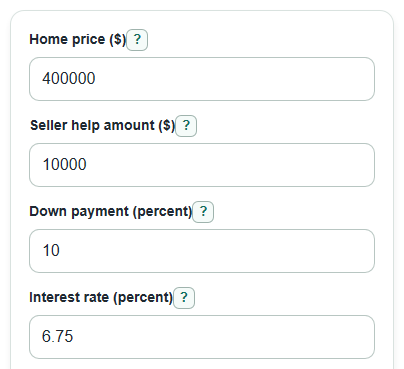
- Enter the Home price ($) and the Seller help amount ($) you want to compare.
- Enter your Down payment (percent), Interest rate (percent), and choose a Credit limit check.
- Open Advanced options if you want to change Loan term (years), Estimated closing costs (percent of price), Custom credit limit (percent of price), or Property tax rate (percent per year, optional).
- Select Calculate, then compare Cash due with seller credit, Cash due with price cut, and Months for the price cut to catch up.
- Sanity-check the result: if Requested credit not used in this estimate is above $0, ask your lender whether the full credit is allowed before relying on the credit option.
Definitions
Seller credit: Money the seller agrees to pay toward your closing costs instead of lowering the price.
Price cut: A lower purchase price. It usually lowers the loan amount and the monthly principal-and-interest payment.
Cash due with seller credit: Estimated down payment plus closing costs, minus the usable seller credit.
Usable seller credit: The part of the requested credit that fits inside estimated closing costs and any selected credit limit check.
Closing costs: Loan and purchase costs due at closing, separate from the down payment. A Loan Estimate lists estimated cash to close and seller credits [2].
Principal and interest: The loan repayment part of a mortgage payment. It excludes taxes, insurance, HOA dues, and mortgage insurance.
Break-even months: The number of months it takes the price cut's monthly payment savings to make up the credit's upfront cash advantage.
Common mistakes and quick fixes
Mistake: Entering a down payment dollar amount in Down payment (percent) .
Fix: Enter the percent of the price you plan to put down, such as 10 for 10%.
Mistake: Treating Seller help amount ($) as automatically usable as a credit.
Fix: Check Usable seller credit in this estimate and Requested credit not used in this estimate ; the credit can be capped by closing costs or the selected Credit limit check .
Mistake: Leaving Custom credit limit (percent of price) as a guess when Credit limit check is set to Custom limit percent.
Fix: Use the percent your lender gave you, or switch Credit limit check to a preset option.
Mistake: Reading Monthly payment saved by the price cut as the full monthly housing cost change.
Fix: Use it as principal and interest only; taxes, insurance, HOA dues, and mortgage insurance are not included.
Mistake: Using a rough Estimated closing costs (percent of price) after you already have a Loan Estimate.
Fix: Replace the estimate with a percent that matches your real closing cost number as closely as possible.
Mistake: Ignoring a negative Extra cash saved now by taking the credit .
Fix: Treat a negative value as a sign that the price cut needs less cash at closing in this estimate.
Limitations & Key Assumptions / Boundary Conditions
- This calculator compares one seller help amount as either a credit or an equal price cut. It does not model a smaller credit plus a smaller price cut.
- Monthly payment results include principal and interest only. Taxes, insurance, HOA dues, mortgage insurance, points, and rate buydowns are excluded.
- Conventional primary-home caps follow Fannie Mae: 3% above 90% LTV/CLTV, 6% from 75.01% through 90%, and 9% at 75% or less. The cap uses the lower of price or appraisal [1]. Using down payment as a shortcut assumes appraisal at least equals price and no second mortgage. Other interested-party credits also consume the allowance. A lower appraisal or other financing can change both the tier and cap; this tool does not model those cases.
- The FHA preset uses 6% of sales price, subject to eligible costs [3]. Enter costs the credit is actually allowed to cover. Custom limits use your entered percent of price; No limit check skips the percentage cap but still limits credit to those costs. Credits do not fund the down payment.
- Seller net advantage is before other selling costs, such as agent commissions, transfer taxes, repairs, payoff amounts, liens, and local fees.
- Property tax savings are optional and rough. Local assessment rules can make the real tax change smaller, delayed, or different from the simple percent estimate.
- Both options keep the same down-payment percentage, interest rate and term. This is not a loan-eligibility check; FHA minimum investment, loan limits and financed upfront mortgage insurance are not modeled. Closing costs scale with price here, although some real fees are fixed. Break-even compares cash payments only, not remaining loan balance, equity or investment returns.
Methodology
Scenario setup
The calculator builds two scenarios. In the seller credit scenario, the price stays at Home price ($). In the price-cut scenario, the scenario price is Home price ($) minus Seller help amount ($).
reduced_price = home_price - seller_help_amount
loan_amount = scenario_price * (1 - down_payment_percent / 100)
Payment calculation
The monthly payment is principal and interest only. The number of payments is the loan term in years times 12.
monthly_rate = interest_rate_percent / 100 / 12
number_of_payments = loan_term_years * 12
if monthly_rate = 0: payment = loan_amount / number_of_payments
otherwise: payment = loan_amount * monthly_rate * (1 + monthly_rate)^number_of_payments / ((1 + monthly_rate)^number_of_payments - 1)
Credit cap and cash due
Estimated closing costs are a percent of the scenario price. For the credit scenario, the usable credit is the smaller of the requested seller help, estimated closing costs on the original price, and any selected credit limit. Conventional primary home uses the simplified 3%, 6%, or 9% interested party contribution tiers based on down payment percent [1].
estimated_closing_costs_on_original_price = home_price * closing_cost_percent / 100
usable_seller_credit = min(seller_help_amount, estimated_closing_costs_on_original_price, credit_limit_if_any)
cash_to_close_with_credit = home_price * down_payment_percent / 100 + estimated_closing_costs_on_original_price - usable_seller_credit
cash_to_close_with_price_cut = reduced_price * down_payment_percent / 100 + reduced_price * closing_cost_percent / 100
Tradeoff results
The calculator keeps signed differences. A positive upfront cash result means the seller credit needs less cash at closing. A negative result means the price cut needs less cash at closing.
upfront_cash_saved_by_credit = cash_to_close_with_price_cut - cash_to_close_with_credit
monthly_payment_saved_by_price_cut = monthly_payment_with_credit_price - monthly_payment_with_price_cut
break_even_months = upfront_cash_saved_by_credit / monthly_payment_saved_by_price_cut
Break-even months are shown only when the credit saves cash now and the price cut saves money each month. If the price cut already needs less cash at closing, the calculator does not show a numeric break-even month.
Mini-example
For a $400,000 home, $10,000 seller help, 10% down, 6.75% interest, a 30-year loan, and 3% closing costs, the usable seller credit is $10,000. Cash due is $42,000 with the credit and $50,700 with the price cut, so the credit saves $8,700 at closing. The price cut lowers principal-and-interest payment by about $58.37 per month, so the break-even time is about 149 months.
Seller and tax extras
Seller net advantage compares the original price minus the usable credit with the reduced price. It is positive when the seller keeps more under the credit structure before other selling costs.
seller_net_advantage_credit = (home_price - usable_seller_credit) - (home_price - seller_help_amount)
If Property tax rate (percent per year, optional) is entered, yearly property tax savings are estimated from the price cut amount.
yearly_property_tax_saved_by_price_cut = seller_help_amount * property_tax_rate_percent / 100