
Compare your locked mortgage rate with a lower quote to see the break-even time, monthly savings, and planned savings after the fee.
Advanced options
Table of contents
How to use our Mortgage Rate Lock Break-Even Calculator
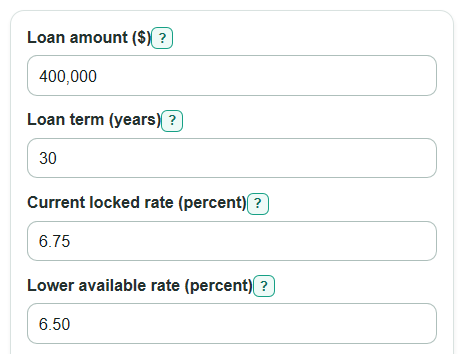
- Enter the Loan amount ($), Loan term (years), Current locked rate (percent), Lower available rate (percent), and Fee to change the lock ($).
- Open Advanced options if you want the calculator to test your real plan, then enter How long you expect to keep this loan (months) and choose a Planned savings method.
- Click Calculate and read Break-even time first. If it is longer than your planned time in the loan, the fee may not pay back soon enough.
- Check Savings by your planned time. A positive number means the lower-rate option is ahead by that month after the fee; a negative number means it is still behind.
- Sanity-check the result by comparing Monthly payment drop with Fee included. A tiny monthly drop with a large fee should usually show a long break-even time.
Definitions
Mortgage rate lock: An agreement that keeps your mortgage interest rate from changing between the offer and closing if you close within the stated time frame and your application does not change [1].
Current locked rate (percent): The annual interest rate you already locked or are comparing against.
Lower available rate (percent): The annual interest rate you could get by breaking the lock, using a float-down, or relocking.
Fee to change the lock ($): The extra cost paid only because you choose the lower-rate option.
Break-even time: The number of months of payment savings needed to recover the fee.
Monthly payment drop: The current locked principal-and-interest payment minus the lower-rate principal-and-interest payment.
Payment plus loan balance: A planned savings method that counts payments made and the remaining loan balance at your planned month.
Percentage points: The direct difference between two rates. A move from 6.75 percent to 6.50 percent is a 0.25 percentage point drop.
Common mistakes and quick fixes
Mistake: Using the home price in Loan amount ($) instead of the mortgage balance being financed.
Fix: Enter the loan amount from your quote or Loan Estimate, not the purchase price before the down payment.
Mistake: Entering the rate cut in Lower available rate (percent) , such as 0.25, instead of the new full rate.
Fix: If your Current locked rate (percent) is 6.75 and the new quote is 6.50, enter 6.50.
Mistake: Leaving lender costs out of Fee to change the lock ($) because the fee is rolled into closing costs.
Fix: Include costs that happen only because you choose the lower-rate option, even if you do not pay them upfront.
Mistake: Reading Full-term savings after fee as your likely savings when you expect to refinance or sell soon.
Fix: Use How long you expect to keep this loan (months) and focus on Savings by your planned time .
Mistake: Choosing Payment-only under Planned savings method when the remaining loan balance matters to your decision.
Fix: Use Payment plus loan balance if you want the planned savings to count both payments made and the balance still owed.
Mistake: Treating Break-even time as a lender approval or rate-lock guarantee.
Fix: Use it as a math check, then confirm lock rules, expiration dates, and fees with your lender before deciding.
Limitations & Key Assumptions / Boundary Conditions
- The calculator compares fixed-rate principal-and-interest payments only. It does not include property taxes, homeowners insurance, HOA dues, mortgage insurance, escrow changes, or lender credits unless you include them in Fee to change the lock ($).
- The lower-rate option is treated as the same loan amount and same loan term as the locked-rate option. If points, credits, down payment, or loan type change, compare the full lender quotes.
- Break-even time is based on monthly payment savings. It does not account for tax deductions, investment returns, inflation, or cash you could use elsewhere.
- For Savings by your planned time, months longer than the loan term are capped at the full loan term because there are no scheduled payments after payoff.
- If Lower available rate (percent) is not lower than Current locked rate (percent), there is no payment break-even from the rate change.
- Rate locks, float-downs, relocks, and extensions depend on lender rules, timing, and your loan application. Confirm the actual fee, lock expiration, and quote terms before acting.
Methodology
Payment math
The calculator first converts the annual rate to a monthly rate and the loan term to a number of monthly payments. It then computes the fixed monthly principal-and-interest payment for the locked rate and the lower rate.
monthly_rate = annual_rate_percent / 100 / 12
number_of_payments = loan_term_years * 12
monthly_payment = loan_amount * monthly_rate * (1 + monthly_rate)^number_of_payments / ((1 + monthly_rate)^number_of_payments - 1)
If the monthly rate is 0, the payment is the loan amount divided by the number of payments.
Savings calculations
The monthly payment drop is the locked payment minus the lower-rate payment. A positive value means the lower available rate lowers the monthly principal-and-interest payment.
monthly_payment_savings = locked_monthly_payment - better_monthly_payment
The payment-only break-even divides the fee by the monthly payment savings. If the fee is $0 and the lower rate is lower, break-even is 0 months. If monthly payment savings is 0 or negative, no payment break-even exists.
break_even_months = change_fee_dollars / monthly_payment_savings
Full-term savings subtracts the fee from the payment savings over the whole loan term.
full_term_net_savings = locked_monthly_payment * number_of_payments - (better_monthly_payment * number_of_payments + change_fee_dollars)
Planned-time check
For planned savings, the calculator uses the smaller of your planned months and the full loan term. The payment-only method counts cash-flow savings through that month.
planned_net_savings = monthly_payment_savings * months_used - change_fee_dollars
The payment plus loan balance method also estimates the balance still owed at that month for each rate.
remaining_balance = loan_amount * (1 + monthly_rate)^months_used - monthly_payment * (((1 + monthly_rate)^months_used - 1) / monthly_rate)
planned_net_savings = (locked_monthly_payment * months_used + locked_remaining_balance) - (better_monthly_payment * months_used + better_remaining_balance + change_fee_dollars)
If the monthly rate is 0, remaining balance is the loan amount minus payments made, floored at $0 because a paid-off loan cannot have a negative balance.
Rate drop needed
The calculator estimates Rate drop needed by your planned time by searching for the lower rate that makes planned net savings equal $0. The search is bounded from 0 percent to the current locked rate, and it uses the selected Planned savings method.
needed_rate_drop_pct_points = locked_rate_pct - break_even_rate_pct
Mini-example
For a $400,000 loan, 30-year term, 6.75 percent locked rate, 6.50 percent lower rate, $1,000 fee, and 60 planned months, the estimated locked payment is $2,594.39 per month and the lower-rate payment is $2,528.27 per month. The monthly payment drop is $66.12, so the payment-only break-even is about 15.12 months. Using the payment plus loan balance method at 60 months, planned net savings is about $4,026.15 after the fee.