
Check if your car loan is upside down and see how a trade-in gap could change your next car loan.
Advanced options
Table of contents
How to use our Negative Equity Car Loan Calculator
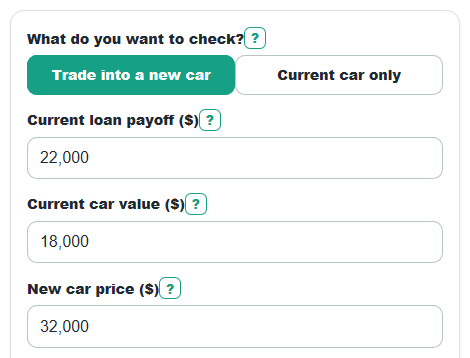
- Choose What do you want to check? Use Current car only for a quick equity check, or Trade into a new car to estimate the next loan.
- Enter Current loan payoff ($) from your lender and Current car value ($) from a realistic trade-in offer or pricing estimate.
- For trade-in mode, enter New car price ($), Cash down payment ($), New loan APR (%), and New loan term (months).
- Open Advanced options only if you want to include Sales tax rate (%), Fees and add-ons financed ($), Extra paid each month ($), or a Loan-to-value target (%).
- Sanity-check the results: Current car equity should equal car value minus payoff, and Day-one loan-to-value over 100% means the new loan starts higher than the new car price.
Definitions
Negative equity: The loan payoff is higher than the car value, so you owe more than the car is worth.
Current car equity: Current car value ($) minus Current loan payoff ($). A positive number can lower the next loan; a negative number can raise it.
Amount upside down: The part of the payoff that is above the car value. It is shown as 0 when the car value is at least the payoff.
APR: Annual percentage rate, the yearly rate used to estimate interest on the new loan payment.
Loan-to-value: The loan amount compared with the New car price ($). A Day-one loan-to-value above 100% means the loan starts larger than the entered car price.
Amount financed: The estimated loan balance after price, tax, financed fees, down payment, and current car equity are included.
Common mistakes and quick fixes
Mistake: Using an old balance for Current loan payoff ($).
Fix: Ask the lender for the current payoff amount and enter that number in Current loan payoff ($).
Mistake: Entering a private-sale price in Current car value ($) when you plan to trade at a dealer.
Fix: Use a realistic trade-in offer or cash offer for Current car value ($).
Mistake: Adding the trade-in value to Cash down payment ($).
Fix: Put only cash you will pay up front in Cash down payment ($); the calculator handles Current car value ($) separately.
Mistake: Leaving New loan APR (%) blank because the rate might be 0%.
Fix: Enter 0 in New loan APR (%) only if the loan is truly 0% APR; otherwise enter the offered APR.
Mistake: Forgetting Fees and add-ons financed ($) when warranties, dealer fees, or registration costs are rolled into the loan.
Fix: Add only financed items to Fees and add-ons financed ($), not costs you pay in cash.
Mistake: Treating Monthly change from the current car equity as a total loan cost.
Fix: Read Monthly change from the current car equity as the estimated payment difference per month, then check Estimated total interest for interest cost.
Limitations & Key Assumptions / Boundary Conditions
- The calculator estimates loan math only. Dealer offers, lender approvals, insurance, maintenance, title rules, and rebates can change the real deal.
- Current car value ($) is only as good as the estimate you enter. A dealer trade-in offer may be lower than a private-sale value.
- Current loan payoff ($) should come from the lender because payoff can include daily interest or fees that are not shown on an old balance.
- Sales tax rate (%) is applied to New car price ($) only. Some states tax trade-ins, rebates, fees, or leases differently.
- Estimated total interest assumes the APR stays fixed and payments are made monthly. Late payments, skipped payments, or variable rates are not modeled.
- Extra paid each month ($) is treated as a steady extra payment every month until payoff. One-time extra payments are not modeled.
- If the estimated new amount financed is 0 or less, payment, interest, payoff months, LTV, and cash-to-target are shown as 0 where appropriate because cash and trade equity cover the estimate.
Methodology
Core equity check
The first result keeps the sign because it tells you whether the current car helps or hurts the next loan. Negative equity is commonly described as owing more on the car than it is worth [2].
equity_amount = current_car_value - current_payoff
negative_equity_gap = max(current_payoff - current_car_value, 0)
Trade-in loan estimate
In trade-in mode, the calculator first estimates tax, then compares a clean new-car loan with the loan that includes the current car equity or gap.
tax_amount = new_vehicle_price * sales_tax_rate / 100
clean_loan_amount = new_vehicle_price + tax_amount + fees_and_addons - down_payment
new_loan_amount = new_vehicle_price + tax_amount + fees_and_addons - down_payment - equity_amount
This formula handles both directions. Positive equity is subtracted from the new loan. Negative equity is subtracted as a negative number, which adds the gap to the new loan.
Monthly payment and interest
The monthly rate is the New loan APR (%) divided by 100 and then divided by 12 months per year.
monthly_rate = annual_apr / 100 / 12
if monthly_rate = 0, payment = principal / loan_term_months
if monthly_rate > 0, payment = principal * monthly_rate / (1 - (1 + monthly_rate)^(-loan_term_months))
Principal is the larger of the estimated loan amount and 0. The same payment formula is used for the clean loan and the loan with current car equity included.
monthly_payment_change = payment_on_new_loan_amount - payment_on_clean_loan_amount
For Extra paid each month ($), the calculator runs a month-by-month payoff loop. Interest is added first, then the payment is applied. The final payment can be smaller than the scheduled payment.
interest = balance * monthly_rate
actual_payment = min(regular_payment + extra_monthly_payment, balance + interest)
balance = balance + interest - actual_payment
Loan-to-value and target cash
Day-one loan-to-value compares the estimated new loan amount with New car price ($). The target cash result estimates how much extra upfront cash would be needed to reach the selected Loan-to-value target (%).
day_one_ltv = max(new_loan_amount, 0) / new_vehicle_price * 100
cash_to_ltv_target = max(max(new_loan_amount, 0) - (ltv_target_percent / 100 * new_vehicle_price), 0)
Mini-example
If Current loan payoff ($) is $22,000 and Current car value ($) is $18,000, Current car equity is -$4,000 and Amount upside down is $4,000. With a $32,000 new car, $2,000 down, 0% tax, no financed fees, 6% APR, and a 60-month term, the clean loan is $30,000 but the loan with the old car included is $34,000. The estimated payment is about $657.32 per month, which is about $77.33 more than the clean-loan payment.
Calculation choices
Money inputs are parsed after removing commas and spaces. Required blank values cause an error, and a blank New loan APR (%) is not treated as 0. Dollar results are rounded for display, but internal calculations keep full precision until the final output.