
Calculate LED strip lumens, brightness per foot, or needed strip length using reel specs, dimmer setting, and diffuser loss.
Table of contents
How to use our LED Strip Lumens Calculator
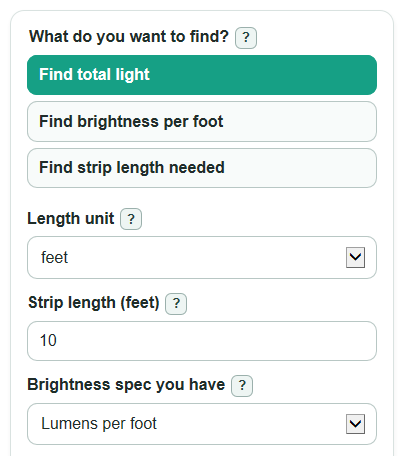
- Choose What do you want to find?: total light, brightness per foot, or strip length needed.
- Set Length unit, then enter Strip length or Light you want, depending on the mode.
- Pick Brightness spec you have and fill only the matching brightness fields, such as Strip brightness, Reel light output, and Reel length.
- Open Advanced options if you want Delivered light after adjustments, a Target check, or power results from Strip power rating.
- Sanity-check the answer: higher Dimmer setting raises delivered light, higher Light lost in cover or diffuser lowers it, and Brightness per foot should match the strip listing after unit conversion.
Definitions
Lumens: A measure of light output. Use lumens to compare how much light you get, while watts describe power use [1].
Lumens per foot: LED strip brightness normalized to one foot, shown as lm/ft. It helps compare strips with different reel lengths [2].
Lumens per meter: LED strip brightness normalized to one meter, shown as lm/m.
Delivered light after adjustments: Rated lumens after the Dimmer setting and Light lost in cover or diffuser are applied.
Foot-candle: Light spread over an area. In this calculator, 1 foot-candle means 1 lumen per square foot.
Extra power supply room: Added wattage above the estimated strip load so the power supply is not sized right at the limit.
Common mistakes and quick fixes
Mistake: Entering the full reel in Strip length when you will cut and install a shorter piece.
Fix: Use the actual installed Strip length, not the package length.
Mistake: Leaving Brightness spec you have on Lumens per foot while typing a lumens-per-meter value into Strip brightness.
Fix: Match Brightness spec you have to the unit printed on the listing before entering Strip brightness.
Mistake: Using watts in Reel light output because the package shows power clearly.
Fix: Reel light output must be lumens; put watts in Strip power rating only if you want the power estimate.
Mistake: Treating Delivered light after adjustments as the same as rated lumens when Dimmer setting is below 100 or Light lost in cover or diffuser is above 0.
Fix: Use Delivered light after adjustments for a covered or dimmed installation.
Mistake: Filling Area being lit but leaving Light target blank, then expecting a Target check.
Fix: Enter both Area being lit and Light target to get Delivered light on the area and Light above or below target.
Mistake: Reading a negative Light above or below target as a calculator error.
Fix: Negative means the delivered light is below the target; add length, choose a brighter strip, reduce loss, or lower the target.
Limitations & Key Assumptions / Boundary Conditions
- Results use rated lumens from the product listing or data sheet. Real output can change with heat, LED quality, color, voltage drop, wiring, and age.
- Light lost in cover or diffuser is a user-entered estimate. Different covers and lenses can block different amounts of light.
- The Target check spreads delivered lumens evenly over Area being lit. It does not model beam angle, distance, shadows, wall color, reflections, or under-cabinet aiming.
- Power estimates use the entered Strip power rating and installed length. They do not check voltage, amperage limits, connector ratings, or voltage drop along a long run.
- If Dimmer setting is 0 percent or Light lost in cover or diffuser is 100 percent or more, the setup delivers no light and strip length needed cannot be calculated.
- For strips sold by reel total lumens, Reel length must describe the same full reel used for Reel light output.
Methodology
How the calculator normalizes strip brightness
The calculator first converts any entered length to feet using the international foot relationship, 1 ft = 0.3048 m.
length_ft = length_value when Length unit is feet
length_ft = length_value * 3.280839895013123 when Length unit is meters
Then it converts the selected Brightness spec you have into brightness per foot. Hidden brightness inputs are not used.
b_ft = lumens_per_foot
b_ft = lumens_per_meter / 3.280839895013123
b_ft = reel_total_lumens / reel_length_ft
b_m = b_ft * 3.280839895013123
How each mode is solved
For Find total light, the rated total is strip brightness times installed length.
raw_lumens = b_ft * length_ft
For Find brightness per foot, the rated brightness is total light divided by installed length.
b_ft = known_total_lumens / length_ft
For Find strip length needed, the calculator divides the desired delivered lumens by brightness after dimmer and loss adjustments.
adjustment_factor = (dimmer_percent / 100) * (1 - light_loss_percent / 100)
needed_length_ft = target_total_lumens / (b_ft * adjustment_factor)
For total light and brightness modes, delivered light is the rated lumens after the same adjustment factor.
delivered_lumens = raw_lumens * adjustment_factor
Target and power checks
If Area being lit and Light target are both entered, the calculator compares delivered lumens with the target lumens for that area.
target_lumens = lit_area_sqft * target_footcandles
delivered_footcandles = delivered_lumens / lit_area_sqft
target_light_gap_lumens = delivered_lumens - target_lumens
A positive Light above or below target means the plan is above the target. A negative value means it is below the target.
If Strip power rating is entered, the calculator estimates strip load and then adds Extra power supply room.
watts_per_foot = watts_per_meter / 3.280839895013123 when Power rating unit is watts per meter
power_watts = length_ft * watts_per_foot
recommended_power_supply_watts = power_watts * (1 + driver_headroom_percent / 100)
Mini example
Suppose a 5 meter strip is rated at 900 lm/m, the dimmer is 80 percent, and a diffuser loses 10 percent. Rated light is 5 * 900 = 4500 lumens. The adjustment factor is 0.80 * 0.90 = 0.72, so delivered light is 4500 * 0.72 = 3240 lumens. Over 100 square feet, that is 3240 / 100 = 32.4 foot-candles. Against a 30 foot-candle target, the gap is 3240 - 3000 = 240 lumens.
Number formatting
Auto number format uses normal decimals for ordinary-sized values and switches to scientific notation only for very large or very small values. Normal decimals and Scientific notation force the selected display style.