
Convert lumens, watts, and lumens per watt, then check energy cost and a fixture watt limit.
Table of contents
How to use our Lumens to Watts Calculator
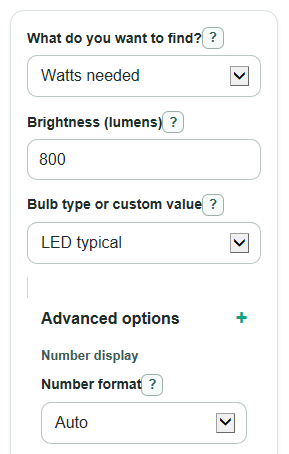
- Choose What do you want to find?: Watts needed, Lumens made, or Efficiency (lumens per watt).
- Enter the visible values for that choice, such as Brightness, Power used, and Bulb type or custom value.
- If you pick Custom light per watt, enter Light per watt from the bulb label or lighting plan.
- Open Advanced options if you want Number format, Use time, Electricity price, Estimate length, or Fixture max power checks.
- After you calculate, sanity-check the answer: for the same Brightness, a higher Light per watt should give lower Watts needed.
Definitions
Lumens: A measure of brightness. More lumens means a brighter light [1].
Watts: A measure of electric power use. For bulbs, lower watts means less power draw, not less brightness by itself.
Light per watt: Lumens per watt, written lm/W. It tells how much brightness a bulb makes from each watt, so higher is more efficient [3].
Kilowatt-hour: A billing unit for electricity. A 1,000 watt device running for 1 hour uses 1 kWh.
Fixture max power: The maximum real watt draw allowed by a lamp or fixture. It should be compared with actual watts, not equivalent watts.
Equivalent watts: A shopping phrase that compares brightness to an old incandescent bulb. It is not the bulb's real power use.
Common mistakes and quick fixes
Mistake: Typing old-style equivalent watts into Power used.
Fix: Use the real Power used printed on the bulb label, not the "60 W equivalent" wording.
Mistake: Leaving Brightness blank when What do you want to find? is Watts needed.
Fix: Enter Brightness in lumens, such as 800 for a common household bulb.
Mistake: Picking Bulb type or custom value as Custom light per watt but leaving Light per watt blank.
Fix: Enter a positive Light per watt value, such as 90, or choose a preset bulb type.
Mistake: Using Fixture max power to compare against equivalent watts.
Fix: Compare Fixture max power only to actual Watts needed or actual Power used.
Mistake: Treating Estimated electricity cost as the full cost of owning the bulb.
Fix: Estimated electricity cost uses Use time, Electricity price, and Estimate length only; add purchase price separately if needed.
Limitations & Key Assumptions / Boundary Conditions
- Bulb type presets are starter values. Real bulbs can have different Light per watt values, so use the package lumens and watts when you have them.
- The calculator assumes steady power use. Dimming, smart controls, ballasts, drivers, and temperature can change real energy use.
- Estimated electricity cost uses only energy use. It does not include bulb price, taxes, fees, demand charges, or replacement cost.
- Fixture max power is checked against actual watts only. It does not check heat buildup, enclosed-fixture rules, bulb shape, socket type, or local electrical code.
- Very large or very small lighting systems may need manufacturer photometric data instead of simple lumens-per-watt math.
Methodology
Core idea
The calculator uses luminous efficacy, which is light output divided by electric power. In the UI this is called Light per watt. Lumens are the brightness number shoppers should compare, while watts describe energy use [1][2].
watts = lumens / efficacy_lm_per_watt
lumens = watts * efficacy_lm_per_watt
efficacy_lm_per_watt = lumens / watts
Energy and fixture checks
When energy fields are filled in, the calculator uses the actual watts from the selected mode. It does not use old equivalent watts.
energy_kwh = watts * hours_per_day * days / 1000
cost = energy_kwh * electricity_rate
fixture_headroom = fixture_max_watts - actual_watts
A positive fixture_headroom means the bulb is under the entered Fixture max power. A negative value means the estimated actual watt draw is over that limit.
Mini example
For an 800 lumen bulb with Light per watt of 90 lm/W, watts = 800 / 90 = 8.8889 W, shown as about 8.89 W. If it runs 3 hours per day for 365 days, energy_kwh = 8.8889 * 3 * 365 / 1000 = 9.7333 kWh. At $0.17 per kWh, cost = 9.7333 * 0.17 = $1.65.
Preset values
The preset Light per watt values are editable estimates: LED typical 90 lm/W, LED efficient 110 lm/W, CFL 55 lm/W, halogen 20 lm/W, incandescent 13.3 lm/W, and fluorescent tube 75 lm/W. If a bulb label gives both lumens and watts, calculating Light per watt from that label is usually the better choice.