
Convert kilowatts to watts, and optionally check energy use and cost if the device runs for a set time.
Advanced options
Table of contents
How to use our Kilowatts to Watts Converter
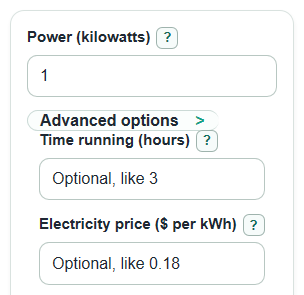
- Enter the value in Power (kilowatts). Decimals and commas are okay, such as 2.5 or 1,250.5.
- Click Calculate to see Power in watts and Power entered.
- Open Advanced options only if you also want energy or cost. Enter Time running (hours) for kWh and Wh.
- Enter Electricity price ($ per kWh) only if you want Estimated electricity cost. Use the price from your bill when possible.
- Sanity-check the result: 1 kW should equal 1,000 W, so 2.5 kW should be near 2,500 W. If you expected kWh, use the time option.
Definitions
Power (kilowatts): The power amount entered in kilowatts, abbreviated kW. Power means how fast energy is used or made.
Power in watts: The same power amount written in watts, abbreviated W.
Kilowatt: A unit of power equal to 1,000 watts.
Watt: A unit of power. In SI units, one watt is one joule per second.
Time running (hours): The number of hours the device runs at the entered power.
Energy used over that time: Energy in kilowatt-hours, abbreviated kWh. It equals kilowatts multiplied by hours.
Electricity price ($ per kWh): The price paid for each kilowatt-hour of energy.
Common mistakes and quick fixes
Mistake: Putting a watt value into Power (kilowatts) , such as entering 2500 for a 2,500 W heater.
Fix: Enter 2.5 in Power (kilowatts) , or remember that Power in watts will be 1,000 times the kW value.
Mistake: Expecting Power in watts to show energy used on an electric bill.
Fix: Use Time running (hours) to show Energy used over that time in kWh.
Mistake: Entering Electricity price ($ per kWh) but leaving Time running (hours) blank.
Fix: Add Time running (hours) so the calculator can show Estimated electricity cost .
Mistake: Typing text or unit letters into Power (kilowatts) , such as 2.5 kW.
Fix: Type numbers only in Power (kilowatts) ; the unit is already part of the label.
Mistake: Treating a negative Power entered value as an error.
Fix: Negative power is allowed for signed power flow; Power vs energy note helps explain that the sign follows your entered direction.
Limitations & Key Assumptions / Boundary Conditions
- The main conversion assumes the standard metric meaning of kilo: 1 kilowatt equals 1,000 watts.
- Power (kilowatts) is power at one moment or a steady power rating. Real devices may cycle on and off or change power while running.
- Energy used over that time assumes the entered power stays constant for all of Time running (hours).
- Estimated electricity cost is a simple energy charge estimate. It does not include taxes, fixed fees, tiered rates, demand charges, or time-of-use pricing.
- Negative power is kept signed. It can be useful for exported power or reverse flow, but the meaning depends on your sign convention.
- Very large values may be blocked if they cannot be handled safely as finite numbers.
Methodology
Conversion rule
The converter uses the standard base-10 metric relationship between kilowatts and watts: one kilowatt is 1,000 watts.
power_w = power_kw * 1000
The reverse check is:
power_kw = power_w / 1000
Optional time and cost checks
If Time running (hours) is entered, the calculator also changes power into energy over time.
energy_kwh = power_kw * time_hours
energy_wh = power_w * time_hours
If both Time running (hours) and Electricity price ($ per kWh) are entered, the calculator estimates cost.
estimated_cost = energy_kwh * electricity_rate
Mini example
For a 2.5 kW heater, the watt result is 2.5 * 1,000 = 2,500 W. If it runs for 3 hours, energy is 2.5 * 3 = 7.5 kWh, or 7,500 Wh. At $0.18 per kWh, the estimated cost is 7.5 * 0.18 = $1.35.
Calculation choices
The calculator strips commas and spaces before reading numbers, keeps negative power values signed, and only shows energy or cost outputs when the needed optional inputs are present and valid.