
Calculate a minimum hydronic expansion tank size and check whether the measured tank pre-charge matches the cold fill pressure.
Table of contents
How to use our Hydronic Expansion Tank Size and Precharge Calculator
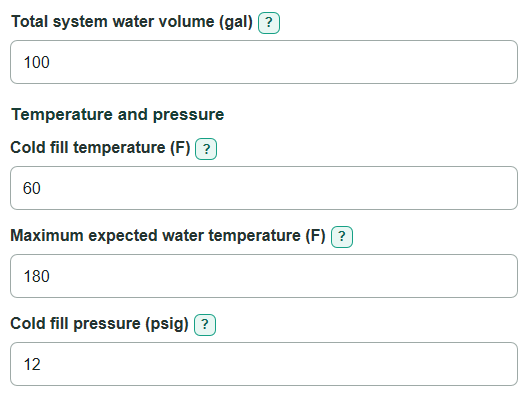
- Enter the Total system water volume in gallons, including the boiler, piping, buffer tank, and heat emitters.
- Enter the Cold fill temperature before heating and the highest planned Maximum expected water temperature.
- Copy the cold gauge or fill-valve setting into Cold fill pressure, then copy the stamped safety limit into Relief valve setting.
- Optionally enter Measured tank pre-charge (optional) only after the tank is isolated and its water side is at zero pressure.
- Click Calculate, then choose a tank with total volume and rated acceptance volume at least as large as the results. Do not round the minimum tank volume down.
Definitions
Acceptance volume: The amount of expanded water a tank can take in as the system heats up.
Cold fill pressure: The gauge pressure in the cold, filled hydronic loop. This calculator uses it as the target tank air pre-charge.
Gauge pressure (psig): Pressure measured above local atmospheric pressure. Boiler gauges normally show gauge pressure; the calculation converts it to absolute pressure internally. [1]
Relief valve setting: The pressure stamped on the boiler relief valve. It is a safety limit, not the normal running pressure.
Tank pre-charge: The air pressure on the tank side before system water enters the tank. Check or adjust it only with the tank isolated and water-side pressure at zero.
Water expansion volume: The estimated increase in system water volume between the cold fill temperature and maximum expected water temperature.
Common mistakes and quick fixes
Mistake: Leaving boiler, piping, buffer, or emitter water out of Total system water volume.
Fix: Add all closed-loop water content from manuals, schedules, and pipe-volume information before entering Total system water volume.
Mistake: Entering the room thermostat setting as Maximum expected water temperature.
Fix: Use the highest loop-water setpoint, boiler high limit, or design supply-water temperature for Maximum expected water temperature.
Mistake: Treating Relief valve setting as the normal operating pressure.
Fix: Copy the pressure stamped on the relief valve into Relief valve setting, and enter the cold gauge or fill-valve setting as Cold fill pressure.
Mistake: Using a pre-charge reading from a tank that is still connected to a pressurized water system.
Fix: Isolate the tank and reduce water-side pressure to zero before measuring Measured tank pre-charge (optional).
Mistake: Selecting a tank only because its name or total volume sounds large enough.
Fix: Check that the tank meets both Minimum total tank volume and Required acceptance volume at the applicable pressure rating.
Limitations & Key Assumptions / Boundary Conditions
- This is a simplified sizing calculation for closed hydronic systems containing liquid water only. It does not calculate glycol mixtures.
- Temperatures must be from 32 F through 200 F, and the maximum expected water temperature must be higher than the cold fill temperature.
- The relief valve setting is used as the upper pressure boundary for the simplified minimum tank-volume calculation. Actual tank selection must also meet the manufacturer's pressure, temperature, installation, and acceptance-volume ratings.
- Total system water volume must include all water-filled equipment and piping. An incomplete volume makes the tank-size result too small.
- The target pre-charge equals the entered cold fill pressure in this calculation. Follow the tank and boiler instructions when commissioning or servicing equipment.
- This calculator is not for domestic water-heater expansion tanks or open hydronic systems.
Methodology
Calculation method
The calculator estimates how much liquid water expands between the entered cold and maximum temperatures. It converts temperatures to degrees C internally, uses a liquid-water density correlation to find the relative volume increase, and multiplies that increase by Total system water volume. NIST water-property data can be used to check the temperature-dependent water behavior used by this simplified estimate. [2]
cold_temperature_c = (cold_fill_temperature_f - 32) * 5 / 9
maximum_temperature_c = (maximum_temperature_f - 32) * 5 / 9
water_expansion_fraction = (cold_water_density / hot_water_density) - 1
water_expansion_volume_gal = system_water_volume_gal * water_expansion_fraction
Users enter gauge pressure, but the tank calculation needs absolute pressure. The calculator adds 14.6959 psi, the standard atmospheric-pressure value, to both entered pressures. [1]
cold_absolute_pressure_psi = cold_fill_pressure_psig + 14.6959
maximum_absolute_pressure_psi = relief_valve_setting_psig + 14.6959
tank_acceptance_fraction = 1 - (cold_absolute_pressure_psi / maximum_absolute_pressure_psi)
required_acceptance_volume_gal = water_expansion_volume_gal
minimum_tank_volume_gal = required_acceptance_volume_gal / tank_acceptance_fraction
target_precharge_psig = cold_fill_pressure_psig
precharge_gap_psi = measured_precharge_psig - target_precharge_psig
Worked example
For 100 gal of water heated from 60 F to 180 F, with 12 psig cold fill pressure and a 30 psig relief valve, the calculation gives about 2.94 gal of water expansion and required acceptance volume. The acceptance fraction is about 0.403, so the simplified minimum total tank volume is about 7.3 gal. The target pre-charge is 12 psig. If the isolated tank measures 8 psig, the measured pre-charge compared with target is -4 psi, meaning it is 4 psi below target.
Calculation boundaries
The calculation blocks a relief valve setting at or below cold fill pressure because that would produce zero or negative usable tank acceptance. It also blocks a maximum temperature at or below the cold temperature. A blank measured pre-charge is left out of the service check rather than treated as zero.