
Estimate fixture count, rated lumens, maintained foot-candles, lux, and LED watts for a hotel guest-room area.
Table of contents
How to use our Hotel Room Lighting Calculator
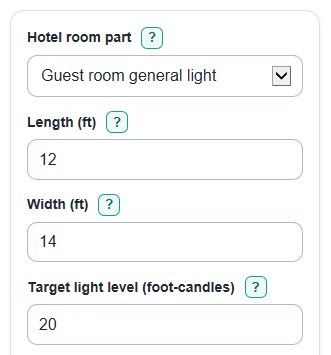
- Choose the Hotel room part that best matches the area you are planning, such as general guest-room light, a desk area, a vanity, or an entry path.
- Enter Length (ft) and Width (ft) for only the area being lit, then check that Area used looks like the real floor or task area.
- Enter Target light level (foot-candles) and Lumens per fixture (lm); lumens are light made by the bulb or fixture, while foot-candles are light landing on the surface.
- Open Advanced options if you want to change Room finish, Light loss setting, LED efficiency (lumens per watt), or Number display.
- Click Calculate, then sanity-check the result by comparing Estimated light after rounding with your Target light level (foot-candles) and checking whether the fixture count seems practical for the room.
Definitions
Lumens per fixture (lm): The rated light output from one bulb or fixture. Lumens are light made by the source, not power use.
Target light level (foot-candles): The light you want to land on the surface. One foot-candle means one lumen per square foot [1].
Lux: The metric unit for light landing on a surface. One lux means one lumen per square meter [1].
Rated lumens to plan for: The total fixture lumens needed before room finish and light-loss reductions are applied.
Estimated light after rounding: The maintained light level after the fixture count is rounded up to whole fixtures.
Room finish: A preset for how much light the room surfaces reflect. Light finishes reflect more light; dark finishes absorb more light.
Light loss setting: A preset that allows for dirt, aging, shades, lenses, and diffuser losses.
LED efficiency (lumens per watt): How many lumens an LED fixture makes for each watt of power. Higher values need fewer watts for the same lumens.
Common mistakes and quick fixes
Mistake: Entering the whole guest room in Length (ft) and Width (ft) when you only want to light a desk or vanity zone.
Fix: Use Length (ft) and Width (ft) for the specific Hotel room part you selected.
Mistake: Putting watts into Lumens per fixture (lm).
Fix: Use the rated lumen value from the bulb or fixture label, and use LED efficiency (lumens per watt) only for the power estimate.
Mistake: Treating Target light level (foot-candles) as total lumens.
Fix: Enter the light level wanted on each square foot; the calculator turns that into Rated lumens to plan for.
Mistake: Leaving Room finish on Mixed finishes for a room with dark walls, dark carpet, or heavy shades.
Fix: Change Room finish to Mostly dark finishes so the fixture count allows for more absorbed light.
Mistake: Reading Rated lumens to plan for as the final light on the surface.
Fix: Use Estimated light after rounding to see the maintained foot-candles after whole fixtures, Room finish, and Light loss setting are applied.
Limitations & Key Assumptions / Boundary Conditions
- The room finish coefficients are simplified planning presets: 0.65 for mostly light finishes, 0.55 for mixed finishes, and 0.45 for mostly dark finishes.
- The light loss settings are simplified presets: 0.90 for clean rooms, 0.80 for normal hotel rooms, and 0.70 for dusty rooms or older fixtures.
- The calculator estimates average maintained light on the entered area. It does not model glare, shadows, beam spread, fixture spacing, mounting height, or wall-wash effects.
- Fixture photometric files, manufacturer spacing tables, local energy codes, bathroom safety rules, and accessibility needs can change the final design.
- Very small areas can give a valid task-zone result, but that result should not be used as the whole-room lighting plan.
- Estimated LED power uses installed rated lumens divided by LED efficiency (lumens per watt). Actual watts can differ from the fixture label because of drivers, dimming, controls, and product tolerances.
Methodology
Calculation steps
The calculator uses a simplified lumen method. It first finds the area, then finds how many maintained lumens should land on that area, then increases the rated fixture lumens to allow for room finish and light loss.
area_ft2 = length_ft * width_ft
maintained_lumens = target_fc * area_ft2
A foot-candle is one lumen per square foot, so multiplying foot-candles by square feet gives maintained lumens on the surface [1].
cu = 0.65 for light, 0.55 for mixed, 0.45 for dark
llf = 0.90 for clean, 0.80 for normal, 0.70 for dusty
rated_lumens_needed = maintained_lumens / (cu * llf)
The fixture count is rounded up because a plan normally uses whole fixtures, not part of a fixture.
fixtures_needed = ceil(rated_lumens_needed / fixture_lumens)
installed_lumens = fixtures_needed * fixture_lumens
estimated_light_fc = (installed_lumens * cu * llf) / area_ft2
estimated_light_lx = estimated_light_fc * 10.7639
estimated_led_power_w = installed_lumens / led_efficacy_lpw
Worked example
For a 12 ft by 14 ft guest-room area, the area is 168 sq ft. With a 20 fc target, the maintained light goal is 3,360 lumens on the room surfaces. With mixed finishes, cu is 0.55. With normal light loss, llf is 0.80. The rated lumens needed are 3,360 / (0.55 * 0.80) = 7,636.36 lm. If each fixture is rated at 800 lm, the count is ceil(7,636.36 / 800) = 10 fixtures. Installed rated lumens are 8,000 lm, estimated light after rounding is (8,000 * 0.55 * 0.80) / 168 = 20.95 fc, and estimated LED power at 100 lm/W is 80 W.
Number display
Auto number display uses regular comma-formatted numbers for everyday values. It switches to scientific notation only when an absolute value is at least 1,000,000 or when it is greater than 0 and less than 0.001. Scientific notation uses 4 significant figures and trims trailing zeros.