
Convert a metal hardness value to comparable scales using a material-family-first lookup that shows supported results and clear caution notes.
Advanced options
Table matching
Results display
Table of contents
How to use our Hardness Conversion Calculator
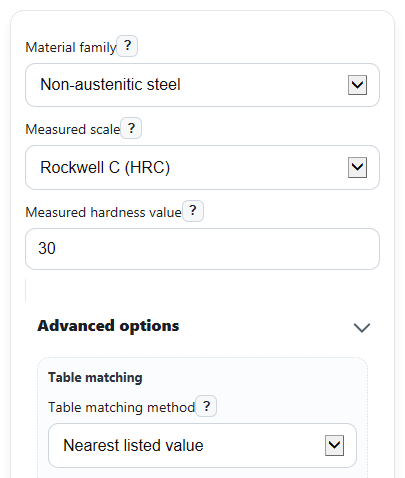
- Choose the correct Material family first, because the available conversions depend on the metal group and sometimes even on product form.
- Select the Measured scale from your test report, then enter the number in Measured hardness value without typing the scale letters again.
- If needed, open Advanced options and choose Table matching method. Use nearest listed value for a practical lookup, or exact listed value only if you want results only when your number appears in the table.
- Click Calculate, then read Converted hardness values first and check Table value used plus Difference from your entry to see how closely the lookup matched your number.
- Sanity-check the result by confirming the converted scales make sense for your chosen Material family and by reading the Important note before using the values in a spec or comparison.
Definitions
Material family: The metal group the conversion table applies to, such as non-austenitic steel, copper, or wrought aluminum.
Measured scale: The hardness scale already used on your part or test report, such as HRC, HRB, HBW, HV, or HK.
Measured hardness value: The numeric hardness reading from the source test. Enter the number only.
Table matching method: How the calculator picks a source-table row. Exact uses only a listed value. Nearest uses the closest listed value.
Converted hardness values: Comparable hardness numbers read from other scale columns in the same material-family row.
Table value used: The listed source value from the table row actually used for the lookup.
Difference from your entry: Entered value minus table value used. A positive number means your entry was above the matched row. A negative number means it was below.
Rockwell, Brinell, Vickers, and Knoop: Standard hardness test scales for metals. They are related, but they are not identical measurements [1].
Common mistakes and quick fixes
Mistake: Picking the wrong Material family , such as using non-austenitic steel for stainless sheet data.
Fix: Match Material family to the actual alloy group and form listed on the test report or material spec.
Mistake: Typing letters like HRC or HBW into Measured hardness value .
Fix: Put the letters in Measured scale and enter numbers only in Measured hardness value .
Mistake: Choosing a Measured scale that is not supported for the selected Material family .
Fix: Change Measured scale or pick the correct Material family , then review Scales available for this material family .
Mistake: Expecting an exact result when the entered number falls between listed table values.
Fix: Check Table matching method . Use nearest listed value if you want the closest row, and read Difference from your entry to judge the gap.
Mistake: Treating Converted hardness values as the same as a direct test on the target scale.
Fix: Use Converted hardness values for comparison only, and read Important note before using them for acceptance or certification.
Mistake: Thinking hidden scales mean the calculator failed.
Fix: If you want to see why some scales are missing, change Show unsupported scales to show unsupported scales with notes.
Limitations & Key Assumptions / Boundary Conditions
- This tool follows a material-family-first lookup approach and should only be used for the selected family shown in the input.
- Conversions are approximate comparison values, not a substitute for a direct hardness test on the target scale.
- Results depend on discrete listed table rows, so nearest-match mode may use a value slightly above or below your entry.
- If Measured scale is not covered for the chosen Material family, the calculator should block the lookup instead of guessing.
- Some material families have limited scale coverage, so missing target scales do not mean zero or failure; they mean no supported table entry is available in this tool.
- Plate-only and sheet-only stainless selections should be read literally and not assumed to represent all forms of austenitic stainless steel.
- This page is limited to the loaded demo subset of material-family tables described in the calculator contract, so unsupported scale families are intentionally not fabricated.
Methodology
How the calculator works
The calculator uses a table lookup, not a universal physics formula. It first selects the conversion table for your Material family, then finds the row that matches your Measured scale and Measured hardness value. The values in the other supported columns of that same row become the Converted hardness values.
matched row = exact row or nearest row in the selected material-family table
converted value on target scale = value from the same matched row, target-scale column
Difference from your entry
If nearest matching is allowed, the calculator also shows how far your typed number was from the row it used.
input_gap = entered_value - matched_source_value
A positive gap means your entry was higher than the table row used. A negative gap means the matched row was higher than your entry.
Mini example
Suppose you choose Material family = non-austenitic steel, Measured scale = HRC, and Measured hardness value = 30.2. In nearest mode, if the closest listed HRC row is 30, then Table value used is 30 and the gap is 0.2. The calculator then reports the values from the HRC 30 row in the other supported scale columns.
input_gap = 30.2 - 30 = 0.2
In exact-only mode, that same 30.2 entry would return no conversion unless 30.2 exists as a listed source value in the selected table.
Why material family matters
Hardness scales are standardized test systems, but a number from one scale does not translate the same way for every metal. Good hardness practice treats scales as measurement methods, not as perfectly interchangeable properties [2][2]. That is why this calculator starts with Material family and does not invent values for unsupported combinations.
Assumptions used here
This tool follows the calculator contract's table-based conversion method and reports only supported target scales for the chosen family. Because the source tables are discrete and conversions are approximate, real test results can differ from converted values, especially near range limits, between listed rows, or when the selected family does not exactly match the tested material form.