
Add, subtract, or convert lengths in feet and inches and get a clean mixed answer plus inches, decimal feet, centimeters, and meters.
How to use our Feet and Inches Calculator
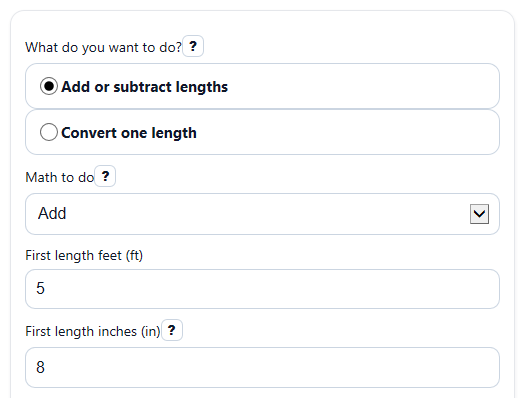
- Choose What do you want to do? Pick Add or subtract lengths to combine two measurements, or Convert one length to change one measurement into other units.
- Enter the visible length fields exactly as labeled, such as First length feet (ft) and First length inches (in). You can type decimal inches like 8.5.
- If needed, choose Math to do and set Round inches to for how precise the mixed feet-and-inches answer should be.
- Click Calculate, then read Feet and inches first. Use Total inches, Decimal feet, Centimeters, and Meters when you need the same length in a different form.
- Sanity-check the result: the inches part in Feet and inches should stay under 12 in size after cleanup, and a negative answer in subtract mode means the second length is longer than the first.
Definitions
Feet and inches: A mixed length written with both units, such as 5 ft 8 in.
Total inches: The whole length written in inches only.
Decimal feet: The whole length written in feet with a decimal, such as 5.75 ft.
Round inches to: How precise the inches part should be in the mixed answer.
Subtract second from first: Takes the second length away from the first length. A negative result means the second one is larger.
Centimeters: A metric length unit. This calculator uses 2.54 centimeters per inch.
Meters: A metric length unit equal to 100 centimeters.
Common mistakes and quick fixes
Mistake: Leaving a visible field blank, such as First length inches (in) or Length feet (ft) .
Fix: Fill in every visible number field for the mode you picked before you click Calculate.
Mistake: Typing words or symbols into First length inches (in) or Second length inches (in) , like 7 in or eight.
Fix: Enter numbers only. Decimals like 7.5 are fine, but text is not.
Mistake: Forgetting to change Math to do when you want a difference instead of a sum.
Fix: Choose Subtract second from first if you want to compare the first length against the second.
Mistake: Thinking a negative Feet and inches or negative Total inches is an error.
Fix: In subtract mode, a negative result means the second length is longer than the first.
Mistake: Being surprised when 14 entered in Length inches (in) does not stay written as 14 inches in the mixed answer.
Fix: Read Feet and inches as a cleaned-up form. Values of 12 inches or more are automatically carried into feet.
Mistake: Using Round inches to set to 1 inch when you need a more exact mixed result.
Fix: Pick 0.1 inch or 0.01 inch if you want the Feet and inches output to keep more detail.
Limitations & Key Assumptions / Boundary Conditions
- The calculator is designed for two tasks only: adding or subtracting two lengths, or converting one length.
- It treats feet and inches as exact length units with 12 inches in 1 foot.
- The mixed Feet and inches output is rounded using your Round inches to choice, so that display can look slightly different from the unrounded conversions.
- Decimal inches are supported, but non-numeric text entries are not.
- Negative results are allowed only as valid math outcomes, mainly in subtract mode where the second length is larger than the first.
- The tool does not work with fraction-style inch entry such as 3 1/2 in unless you convert that value to a decimal first.
- Real measuring projects can still differ because tape reading, cutting, and human input mistakes are outside the calculation.
Methodology
How the calculator works
The calculator first changes each entered length into inches, because one unit is easier to add, subtract, and convert consistently.
total_inches = feet * 12 + inches
In Add or subtract lengths mode, it converts both lengths to inches and then either adds them or subtracts the second from the first.
result_inches = first_total_inches +/- second_total_inches
After that, it turns the inch total back into a mixed feet-and-inches answer. The inches part is rounded to your selected precision, then cleaned up again so the inches part stays below 12 in size.
feet_part = trunc(result_inches / 12)
inches_part = result_inches - feet_part * 12
The same inch total is also shown in other units.
decimal_feet = total_inches / 12
cm = total_inches * 2.54
m = decimal_feet * 0.3048
Mini example
Add 5 ft 8 in and 2 ft 7 in.
first_total_inches = 5 * 12 + 8 = 68
second_total_inches = 2 * 12 + 7 = 31
result_inches = 68 + 31 = 99
decimal_feet = 99 / 12 = 8.25
The mixed answer becomes 8 ft 3 in, because 99 inches is 8 groups of 12 inches with 3 inches left over.
Negative results
If you subtract and get a negative answer, that does not mean the math failed. It means the second length is longer than the first. For example, if the result is -31 inches, the converted outputs stay negative too.
Assumptions used
This method assumes 12 inches per foot, 2.54 centimeters per inch, and 0.3048 meters per foot. It also assumes the numbers you enter are the exact lengths you want to compare or convert.