
Compare avalanche, snowball, or custom debt payoff orders using balances, APRs, minimum payments, extra payment, and a start date.
Table of contents
How to use our Debt Payoff Order Calculator
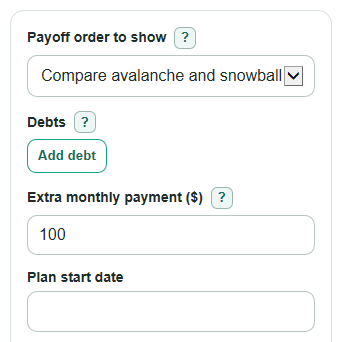
- In Debts, enter each debt name, balance, APR, minimum payment, and custom order number if you want to test your own order.
- Choose Payoff order to show: compare avalanche and snowball, show one method, or use your custom order numbers.
- Enter Extra monthly payment as the amount you can pay above all listed minimum payments, then check the Plan start date.
- Click Calculate and read Pay this debt first, Time until all listed debts are paid, Total interest paid with this order, and the avalanche versus snowball comparison.
- Sanity-check the result by making sure every Debts minimum payment matches your bills and that the total monthly payment is an amount you can repeat each month.
Definitions
APR: Annual percentage rate, or the yearly interest rate used to estimate monthly interest.
Minimum payment: The required monthly payment shown on your bill, before any extra money you choose to add.
Avalanche: A payoff order that targets the highest APR first, then rolls freed-up payments to the next target; this often saves interest compared with lower-rate-first orders [1].
Snowball: A payoff order that targets the smallest balance first, which can create an earlier first payoff but may cost more interest [1].
Extra monthly payment: Money paid on top of all listed minimum payments each month.
Rollover: When a debt is paid off, its old minimum payment stays in the monthly budget and moves to the next debt.
Debt-free month: The estimated month when all debts entered in this calculator reach a $0 balance in the simplified monthly model.
Common mistakes and quick fixes
Mistake: Entering the payment you want to make as the Debts minimum payment.
Fix: In Debts, enter the required monthly minimum from the bill, then put extra money in Extra monthly payment.
Mistake: Leaving APR blank or typing a monthly rate instead of a yearly rate.
Fix: In Debts, enter APR as the yearly interest rate, such as 19.99 for a 19.99% APR.
Mistake: Choosing Custom order but giving two Debts the same custom order number.
Fix: Use clear order numbers like 1, 2, and 3 so Pay this debt first matches the order you meant.
Mistake: Putting a negative value in Extra monthly payment because you expect to pay less than the minimums.
Fix: Use 0 for no extra payment, and lower the Debts minimum payment only if your bill really allows it.
Mistake: Reading Estimated debt-free month as a lender payoff quote.
Fix: Use Plan start date for planning only, and ask the lender for the exact payoff amount if you are ready to pay a debt in full.
Limitations & Key Assumptions / Boundary Conditions
- The calculator uses a simplified monthly interest model. Many real debts use daily interest, statement cycles, grace periods, or payoff quotes that can differ from this estimate.
- APR, balance, and minimum payment are treated as fixed unless you change the inputs. Variable-rate cards, new purchases, late fees, and skipped payments are not modeled.
- The plan assumes you can keep paying the same total monthly budget: the sum of the original minimum payments plus Extra monthly payment.
- If the entered payments do not cover growing interest, or if payoff takes more than 600 months, the calculator stops instead of showing a weak long-range estimate.
- Custom order is only as clear as the custom order numbers in Debts. Duplicate or missing order numbers can still be sorted, but the result may not match your intended priority.
- Estimated debt-free month is a planning label from Plan start date, not a promise from a lender.
Methodology
How the monthly estimate works
The calculator simulates the debts one month at a time. For each active debt, it adds one month of interest before applying payments.
monthly_interest = current_balance * (apr_percent / 100 / 12)
The monthly budget is kept constant so paid-off minimum payments roll to the next debt.
monthly_budget = total_original_minimum_payments + extra_payment
Each month, the calculator first pays up to the original minimum payment on every active debt. Any remaining budget goes to the current target debt. If that debt is paid off, leftover money in the same month moves to the next target.
How the payoff order is chosen
Avalanche sorts debts by highest APR first, then smaller balance, then name. Snowball sorts debts by smallest balance first, then higher APR, then name. Custom order sorts by the custom order number first, then higher APR, then smaller balance, then name. These tie-breaks keep the result consistent when two debts are similar.
interest_saved_by_avalanche = snowball_total_interest - avalanche_total_interest
A positive Interest saved by avalanche instead of snowball means the avalanche plan paid less total interest. First paid-off debt timing compares the first payoff month for avalanche and snowball so you can see the quick-win tradeoff.
Mini example
Suppose Debts has Small with a $500 balance, 0% APR, and $50 minimum payment, plus Large with a $1,000 balance, 0% APR, and $50 minimum payment. If Extra monthly payment is $100, the total monthly budget is $200. With snowball, Small is the first target. It is paid off in month 4, and all freed-up money then goes to Large. Because both APRs are 0%, Total interest paid with this order is $0, and all listed debts are paid in 8 months.