
Enter your debts, extra monthly payment, and start date to see a debt snowball payoff plan and cost comparison.
Advanced options
Table of contents
How to use our Debt Snowball Calculator
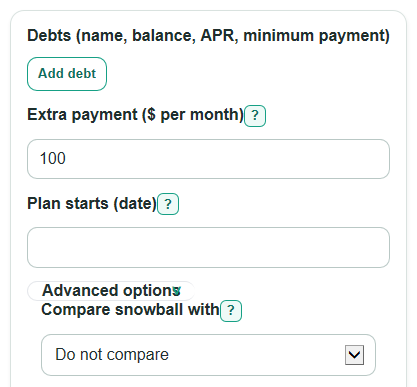
- In Debts (name, balance, APR, minimum payment), enter each debt from your statement with its current balance, yearly APR, and required monthly payment.
- Enter Extra payment ($ per month) as the money you can pay above all minimum payments, then choose Plan starts (date) for the month labels.
- Open Advanced options only if you want to use Compare snowball with or change Use leftover money in the same month?.
- Click Calculate, then review Time until all debts are paid off, Total interest paid, First debt paid off after, and Payoff order.
- Sanity-check the result by confirming that your total monthly budget equals all minimum payments plus the extra payment, and read any Plan warning before using the schedule.
Definitions
Debt snowball: A payoff method that targets the smallest starting balance first, then rolls that freed payment into the next debt.
APR: The yearly interest rate for a debt. The calculator converts APR to a monthly planning rate by dividing by 12.
Minimum payment: The required monthly payment for a debt before any extra payment is added.
Extra payment: Money you can pay each month above all minimum payments.
Payoff order: The order debts are targeted. Snowball uses smallest starting balance first, with higher APR and then row order used to break ties.
Highest APR first: A comparison method that targets the highest yearly interest rate first instead of the smallest balance first.
Same-month leftover: Money left in a month after a debt is paid off. If enabled, it is sent to the next target debt in that same month.
Common mistakes and quick fixes
Mistake: Entering the promotional rate instead of the current yearly rate in Debts (name, balance, APR, minimum payment) .
Fix: Use the APR from your latest statement, and enter it as a percent such as 19.99.
Mistake: Putting only the target debt payment in Extra payment ($ per month) .
Fix: Enter only the money above all required minimum payments, since the calculator already adds each minimum payment.
Mistake: Leaving a tiny or missing minimum payment in Debts (name, balance, APR, minimum payment) when the lender requires one.
Fix: Enter the required monthly minimum from the statement so non-target debts are handled correctly.
Mistake: Expecting Estimated debt-free month to match an exact credit card statement date.
Fix: Use Plan starts (date) as the first payment month and treat the month as an estimate, not a billing-cycle promise.
Mistake: Comparing plans without checking Use leftover money in the same month? .
Fix: Choose the setting that matches how you will pay; using leftover money right away can shorten the final schedule.
Mistake: Reading Interest saved by highest APR first as snowball savings.
Fix: A positive value means highest-APR-first costs less interest than the snowball plan.
Limitations & Key Assumptions / Boundary Conditions
- The calculator uses a monthly APR divided by 12 planning model. Real credit card issuers may use daily balances, purchases, payment timing, and compounding rules.
- The monthly payment budget stays fixed as original minimum payments plus Extra payment ($ per month). It does not model changing required minimums over time.
- The plan assumes no new purchases, cash advances, late fees, annual fees, balance transfer fees, skipped payments, or changed APRs.
- Balances under $0.005 are treated as paid for stopping the simulation and showing results.
- If a non-target debt's minimum payment is less than its monthly interest, that debt may grow until it becomes the target. The calculator still runs and shows a Plan warning.
- If the entered payments cannot pay off the debts within 600 months, the calculator stops instead of showing an unreliable payoff plan.
- Estimated debt-free month is based on monthly payment cycles from Plan starts (date), not exact lender due dates.
Methodology
How the snowball plan is built
The calculator first reads each row in Debts (name, balance, APR, minimum payment). The snowball plan targets the smallest starting balance first. If two debts have the same balance, the higher APR goes first, then the earlier row goes first. This matches the common snowball idea of clearing smaller debts first, while the optional highest-APR-first comparison follows the cost-focused avalanche idea [2].
monthly_interest = balance_start_of_month * (apr_percent / 100) / 12
monthly_budget = sum(all_entered_minimum_payments) + extra_payment
snowball_order = starting_balance ascending, then apr_percent descending, then entered_row_order ascending
Monthly payoff loop
For each month, the calculator adds interest to each active debt, pays non-target debts up to their entered minimum payment, and sends the remaining budget to the current target debt. Payments are capped at the amount owed, so the final payment can be smaller than the planned monthly budget.
remaining_budget = monthly_budget - payments_to_non_target_debts
target_payment = min(remaining_budget, current_target_balance)
If Use leftover money in the same month? is set to yes, leftover budget after paying off one target is sent to the next target in the same month. If it is set to no, that leftover waits until the next monthly cycle.
Totals and comparison
Total interest is the sum of all monthly interest added during the simulated plan. Total amount paid is starting balances plus total interest. If Compare snowball with is set to highest APR first, the calculator runs the same loop again with debts sorted by APR from highest to lowest.
total_interest = sum(all_monthly_interest)
total_paid = sum(starting_balances) + total_interest
comparison_interest_savings = snowball_total_interest - highest_apr_first_total_interest
comparison_months_saved = snowball_months - highest_apr_first_months
A positive Interest saved by highest APR first means the highest-APR-first plan costs less interest than snowball. A positive Months saved by highest APR first means it finishes sooner.
Mini example
Suppose Card A has a $1,000 balance, 12% APR, and $50 minimum payment. Loan B has a $2,000 balance, 0% APR, and $50 minimum payment. With a $100 extra payment, the monthly budget is $200. Card A is first because it has the smaller starting balance.
first_month_card_a_interest = 1000 * (12 / 100) / 12 = 10
With same-month leftover turned on, this example pays off all debts in 16 months, pays about $40.11 in interest, and pays about $3,040.11 total. The first debt is paid off after 7 months.
Calculation notes
The calculator stops when all balances are below one half cent or when 600 months have been simulated. Credit card interest on real statements can be based on daily balances, so this monthly model is best for planning and comparing payoff choices, not matching every penny on a lender statement [1].
Sources
- How does my credit card company calculate the amount of interest I owe? | Consumer Financial Protection Bureau - Consumerfinance
- Debt snowball method vs. debt avalanche method: Which is right for you? - Fidelity
- Get Down with Debt Snowball - Nerdwallet
- Debt Snowball Strategy: How Does It Work? - Experian