
Use this calculator to turn your veterinarian's cephalexin dose rate into a per-dose amount, daily total, and a practical tablet or liquid match.
How to use our Cephalexin For Dogs Dosage Calculator
- Enter Dog weight, choose the matching Weight unit, and type the vet-directed Dose rate (mg/kg).
- Pick How often, then choose Medication form and the exact Strength on the label from your bottle, box, or prescription label.
- If you want a supply estimate, enter Days of treatment; if you leave it blank, the calculator will still show dose and daily results.
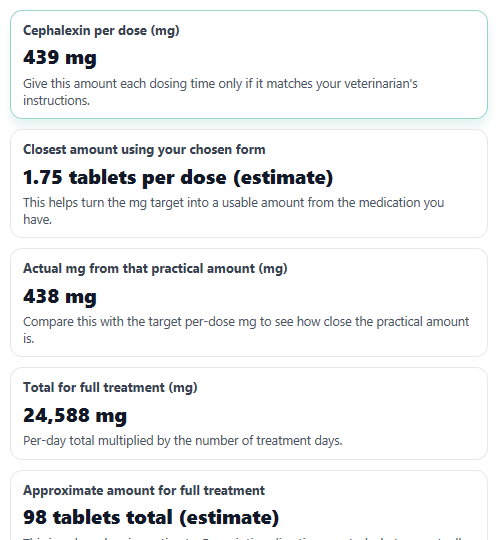
- Click Calculate, then read Cephalexin per dose first, followed by Closest amount using your chosen form, Actual mg from that practical amount, and Difference from target.
- Sanity-check the result: make sure the chosen form matches what you actually have, and if Difference from target looks larger than you expected, ask your veterinarian or pharmacist before giving the dose.
Definitions
Dog weight: Your dog's current body weight. The calculator converts pounds to kilograms when needed.
Dose rate (mg/kg): How many milligrams of cephalexin are intended for each kilogram of body weight.
How often: The time between doses, such as every 12 hours. This decides how many doses happen in one day.
Medication form: Whether you are matching the dose to a tablet or capsule, or to a liquid suspension.
Strength on the label: The amount of drug in one tablet or capsule, or the liquid concentration such as 125 mg per 5 mL.
Cephalexin per dose: The target amount to give each time.
Difference from target: Actual mg from the practical tablet, capsule, or liquid amount minus the target dose. Negative means below target. Positive means above target.
Total for full treatment: The estimated total milligrams needed across all treatment days you entered.
Common mistakes and quick fixes
Mistake: Typing a number in Dog weight but leaving the wrong Weight unit selected.
Fix: If the weight is in pounds, choose lb. If the weight is in kilograms, choose kg before you calculate.
Mistake: Leaving Dose rate (mg/kg) blank or entering the total mg from a prescription instead of the mg per kg rate.
Fix: Enter the veterinarian-directed rate in mg/kg only. The calculator will turn that into Cephalexin per dose .
Mistake: Picking the wrong How often , such as Every 24 hours when the directions were Every 12 hours.
Fix: Match the schedule exactly so Cephalexin per day and Total for full treatment are correct.
Mistake: Choosing Medication form as tablet when you actually have liquid, or picking the wrong Strength on the label .
Fix: Read the bottle or package and select the exact form and strength before trusting Closest amount using your chosen form .
Mistake: Treating Closest amount using your chosen form as an exact prescription match even when Difference from target is not close to zero.
Fix: Compare the practical amount with Actual mg from that practical amount . If the gap is not acceptable, ask for a different strength or liquid.
Mistake: Entering 0, a negative number, or a guessed value for Days of treatment .
Fix: Leave Days of treatment blank unless you know the planned length, or enter the exact positive number of days your veterinarian told you to use.
Limitations & Key Assumptions / Boundary Conditions
- This tool estimates math from the values you enter. It does not choose a safe dose rate, infection plan, or treatment length for your dog.
- Results depend on the veterinarian-directed Dose rate (mg/kg) and How often. Different infections, culture results, kidney problems, age, and other medicines can change the real regimen.
- Tablet matching is a practical estimate. Some capsules are not meant to be split, and not every tablet can be divided accurately into quarters.
- Liquid results are shown in mL, but real measuring accuracy depends on the syringe or device used.
- If Days of treatment is blank, course totals are not shown. If it is entered, totals are planning estimates only.
- The selected Strength on the label can make the practical amount closer or farther from the target dose. A different strength may fit better.
- Use only medication specifically approved or prescribed for your dog. Human leftovers, expired medication, or a different product form can lead to the wrong dose or unsafe treatment.
Methodology
How the calculator works
The calculator first converts body weight to kilograms when needed, because the dose rate is entered in mg per kg. It then finds the target amount for each dose, multiplies by the number of doses per day, and finally converts that target into either tablets or mL based on the form you selected.
weight_kg = weight_value / 2.2046226218
dose_mg = weight_kg x dose_rate
doses_per_day = 24 / hours_between_doses
daily_mg = dose_mg x doses_per_day
Form matching
For liquid, the calculator uses the concentration from the selected bottle strength. For tablets or capsules, it finds the nearest quarter-tablet estimate so you can see whether the chosen strength is a close practical match.
mL_per_dose = dose_mg / concentration_mg_per_mL
tablets_exact = dose_mg / tablet_strength_mg
tablets_practical = round(tablets_exact x 4) / 4
actual_mg_from_form = practical_units x strength_per_unit_mg
dose_difference_mg = actual_mg_from_form - dose_mg
Course totals
If you enter Days of treatment, the calculator estimates the total amount needed for the full course.
course_total_mg = daily_mg x days_of_treatment
course_total_units = practical_units_per_dose x doses_per_day x days_of_treatment
Mini example
Suppose a dog weighs 44 lb, the entered Dose rate (mg/kg) is 22, and How often is every 12 hours. First convert 44 lb to about 20 kg. Then 20 x 22 = about 440 mg per dose. With every 12 hours, that is 2 doses per day, so the daily total is about 880 mg. If you choose a 250 mg tablet or capsule, the nearest quarter-tablet estimate is 1.75 tablets, which gives 437.5 mg. The difference from target is about -2.5 mg, meaning the practical amount is slightly below the target.
Assumptions used
This calculator uses 1 lb = 0.45359237 kg for conversion. Liquid strengths are treated as 25 mg/mL for 125 mg per 5 mL and 50 mg/mL for 250 mg per 5 mL. Capsule and tablet strength examples are practical matching tools only, and veterinary directions override calculator estimates [1].