
Use the breeding date to estimate your rabbit's kindling date, likely due-date window, nest box date, and how far along the pregnancy is today.
How to use our Rabbit Gestation Calculator
- Enter the Breeding date using the mating date you want to track. If there were multiple breedings, use the earliest confirmed date when you want the broadest likely window.
- Choose Gestation length to use. Pick Likely window (29 to 33 days) for the most practical planning view, Average only (31 days) for one date, or Custom length if you have a specific number of days to use.
- If you picked Custom length, enter Custom gestation length (days). Then click Calculate.
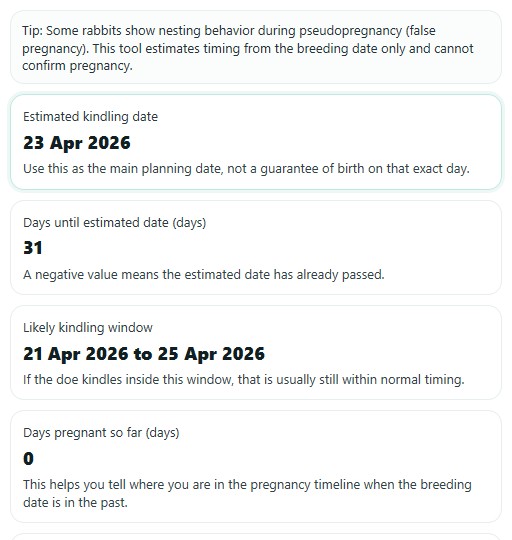
- Read Estimated kindling date first, then check Likely kindling window, Nest box date, and Days pregnant so far to plan your timeline.
- Sanity-check the result: make sure Nest box date is 28 days after the breeding date and that Days until estimated date is negative only when the estimate has already passed.
Definitions
Breeding date: The date the doe was mated. All timeline results count forward from this date.
Gestation length: The number of days from breeding to kindling, which means giving birth.
Estimated kindling date: The best single-date estimate based on the timing option you chose.
Likely kindling window: A date range that shows the earlier and later likely dates instead of only one day.
Days pregnant so far: How many whole days have passed since the breeding date up to today.
Days until estimated date: How many whole days remain until the estimate, or how many days past it you are if the value is negative.
Nest box date: A planning checkpoint set to day 28 after breeding so the nest box can be placed before kindling.
Custom gestation length (days): Your own day count for breeds, lines, or records that you want to follow instead of the standard estimate.
Common mistakes and quick fixes
Mistake: Entering a future Breeding date .
Fix: Use today or an earlier date. This tool counts forward from the breeding date, so future dates should be corrected before you calculate.
Mistake: Choosing Custom length but leaving Custom gestation length (days) blank.
Fix: Type a day value before clicking Calculate. The custom mode cannot estimate Estimated kindling date without that number.
Mistake: Typing an unrealistic number in Custom gestation length (days) , such as 0, a negative number, or something far outside normal rabbit timing.
Fix: Enter a positive rabbit-focused value in the allowed range. If you are unsure, switch Gestation length to use to Likely window (29 to 33 days) .
Mistake: Reading Estimated kindling date as a guaranteed birth date.
Fix: Use Likely kindling window for planning, and treat the single estimated date as your main checkpoint instead of a promise of the exact day.
Mistake: Thinking a negative Days until estimated date means the calculator is broken.
Fix: A negative value means the estimated date has already passed. Check the Important note and confirm that the Breeding date was entered correctly.
Mistake: Using signs like nesting behavior to confirm pregnancy based only on the timeline.
Fix: Use the dates here for planning, but remember the Important note may remind you that timing alone does not confirm a true pregnancy.
Limitations & Key Assumptions / Boundary Conditions
- This tool estimates timing from the entered breeding date only. It does not confirm pregnancy or predict litter size.
- The standard planning window here uses 29 to 33 days, with a single-date estimate at 31 days. Real kindling can differ.
- If you choose Custom gestation length (days), the result follows your number and does not also guarantee the standard window.
- Days pregnant so far and Days until estimated date use your device's local date, so results can shift by a day around midnight or time-zone changes.
- If the breeding date is very old, the calculator still returns dates, but those dates should be treated as historical estimates from the date entered.
- Signs that look like pregnancy can happen without a true pregnancy, so timeline results should be used for planning rather than proof.
Methodology
How the calculator works
The calculator starts with the Breeding date and adds a set number of days based on the timing method you choose.
Estimated kindling date = Breeding date + 31 days
Likely kindling window = Breeding date + 29 days to Breeding date + 33 days
Custom estimated kindling date = Breeding date + Custom gestation length (days)
Days pregnant so far = floor((today local date - Breeding date) / 1 day)
Days until estimated date = floor((Estimated kindling date - today local date) / 1 day)
Nest box date = Breeding date + 28 days
What each mode shows
If you choose Likely window (29 to 33 days), the calculator shows both the main estimate at 31 days and the likely earlier-to-later date range. If you choose Average only (31 days), it shows the single-date estimate without a standard window. If you choose Custom length, it uses only your custom day count for the estimate so the page does not imply that the usual range still applies.
Mini example
Example: if the Breeding date is April 1, 2026, the 31-day estimate is May 2, 2026, the likely window is April 30, 2026 through May 4, 2026, and the Nest box date is April 29, 2026.
Assumptions and limits
This method uses calendar date arithmetic, so it handles leap years and month-end rollovers automatically. It also keeps signed results for Days until estimated date, which means a negative number simply shows that the estimate has already passed. The date outputs are planning estimates based on the breeding date entered, and real timing can vary between does or breeding situations. Nest box timing is shown as day 28 after breeding, which is a common planning checkpoint [2].