
Estimate a car repair bill from parts, labor, tax, fees, and a shop quote you want to check.
Table of contents
How to use our Car Repair Cost Calculator
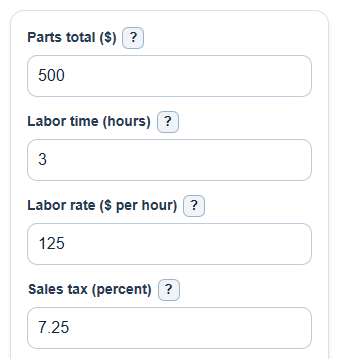
- Enter the Parts total, Labor time, and Labor rate from your written estimate, or use your best local numbers.
- Enter Sales tax as a percent, such as 7.25, and add the Shop quote to check if you want to compare a real quote.
- Open Advanced options if you need to add a Diagnostic fee, Extra shop fees, choose What gets taxed, or set a Cushion for hidden work.
- Click Calculate, then read Estimated repair total first and Shop quote compared with this estimate second; a positive gap means the quote is higher, and a negative gap means it is lower.
- Sanity-check the result by comparing Labor cost with the labor line on the estimate and checking whether Estimated tax matches the tax rules shown on the quote.
Definitions
Parts total: The price of replacement parts before labor, tax, and shop fees.
Labor time: The repair time in hours. Shops may use a standard job time rather than the exact time a mechanic spends on the car.
Labor rate: The shop's charge per labor hour. This rate is multiplied by labor time to get Labor cost.
Sales tax: The tax percent used on the taxable part of the repair. Enter the percent number, not a decimal.
What gets taxed: The part of the estimate used to calculate tax, such as parts only or everything before tax.
Shop quote compared with this estimate: The shop quote minus the calculator's estimated repair total. Positive means the quote is higher; negative means it is lower.
Cushion for hidden work: An extra planning percent added after the estimate to help budget for possible hidden work.
Common mistakes and quick fixes
Mistake: Entering the full shop quote in Parts total instead of only the parts line.
Fix: Put only the parts amount in Parts total and put the full quote in Shop quote to check .
Mistake: Typing a monthly or daily pay number in Labor rate instead of the shop's price per hour.
Fix: Use the hourly rate shown on the estimate or ask the shop for its Labor rate .
Mistake: Entering Sales tax as 0.0725 instead of 7.25.
Fix: Enter the percent number, so 7.25 percent is typed as 7.25.
Mistake: Leaving What gets taxed on Parts only when your estimate taxes labor, fees, or the full repair.
Fix: Change What gets taxed to match the tax line on the written estimate.
Mistake: Putting a diagnostic charge into both Diagnostic fee and Extra shop fees .
Fix: Count each charge once; use Diagnostic fee for diagnosis and Extra shop fees for supplies, disposal, towing, or similar fees.
Mistake: Treating Planning total with cushion as the exact amount the shop will charge.
Fix: Use Planning total with cushion for budgeting only, and use the written estimate or final invoice for the actual charge.
Limitations & Key Assumptions / Boundary Conditions
- This calculator uses transparent line-item math. It does not know your vehicle, location, warranty terms, insurance rules, or a shop's internal labor guide.
- Sales tax rules vary by state, city, repair type, and quote structure. Use What gets taxed to match the written estimate when possible.
- Hidden damage, teardown findings, required calibration, sublet work, disposal rules, and parts availability can change the final bill after inspection.
- The Cushion for hidden work is only a budget buffer. It is not proof that extra work is needed.
- The calculator allows a $0 result if all cost inputs are 0, but that usually means you have not entered a real repair cost yet.
- The Shop quote compared with this estimate keeps the sign. A negative value can be valid if the shop quote is below your itemized estimate.
Methodology
Calculation steps
The calculator builds the estimate from the same main pieces commonly found on repair estimates: parts, labor, taxes, and fees [1]. Labor is based on repair time multiplied by the shop's hourly labor rate [2].
labor_cost = labor_hours * labor_rate
base_before_tax = parts_cost + labor_cost + diagnostic_fee + extra_fees
The tax base depends on What gets taxed.
tax_base = 0 when tax_mode is none
tax_base = parts_cost when tax_mode is parts_only
tax_base = parts_cost + extra_fees when tax_mode is parts_and_fees
tax_base = base_before_tax when tax_mode is all
tax_amount = tax_base * sales_tax_percent / 100
estimated_total = base_before_tax + tax_amount
quote_gap = shop_quote - estimated_total
planning_total_with_cushion = estimated_total * (1 + cushion_percent / 100)
fees_before_tax = diagnostic_fee + extra_fees
Mini-example
If Parts total is $500, Labor time is 3 hours, Labor rate is $125 per hour, Sales tax is 7.25 percent, and What gets taxed is Parts only, labor cost is $375 and tax is $36.25. With no diagnostic or extra fees, the estimated repair total is $911.25. If the Shop quote to check is $1,000, the quote gap is $88.75, meaning the quote is $88.75 higher than this itemized estimate. With a 10 percent cushion, the planning total is $1,002.38.
How to read the signed gap
The quote gap is not clamped to zero. A positive gap means the shop quote is higher than the calculator's estimate. A negative gap means the quote is lower than the calculator's estimate, which can happen when the shop has a lower labor rate, discounted parts, fewer taxable items, or missing charges that you should ask about.