
Estimate the starting payment, later payment, payment jump, remaining balance, and total interest for an interest-only mortgage.
Advanced options
Table of contents
How to use our Interest Only Mortgage Calculator
- Enter the Loan amount ($), Interest-only rate (%), Interest-only period (years), Total loan term (years), and Rate after interest-only period (%).
- Open Advanced options if you want to add Extra paid toward the loan each month during interest-only period ($), Monthly taxes, insurance, and HOA ($), or a Monthly budget after interest-only period ($).
- Click Calculate to see the first monthly amount, the later monthly amount, the payment change, the balance after the interest-only period, and estimated total interest.
- Check the Payment change after interest-only period and Payment change percent. If they look too high, test a shorter interest-only period, a lower loan amount, or extra principal.
- Compare Regular fixed-loan payment for comparison with the first monthly amount to see how much the interest-only structure lowers the starting payment.
Definitions
Interest-only mortgage: A mortgage where the required payment covers interest for a set period, so the loan balance does not go down unless you pay extra principal. After that period, monthly payments usually rise because principal repayment begins [1].
Loan amount ($): The mortgage balance being borrowed, not the home price unless there is no down payment.
Interest-only rate (%): The yearly interest rate used during the interest-only period.
Interest-only period (years): The number of years when the required loan payment does not include scheduled principal repayment.
Rate after interest-only period (%): The yearly rate used for the principal-and-interest payoff period. For some adjustable-rate mortgages, this rate can change over time [2].
Extra paid toward the loan each month during interest-only period ($): Optional principal paid on top of the required interest-only charge.
Payment change after interest-only period: The later monthly amount minus the first monthly amount. Positive means the payment rises.
Budget gap after interest-only period: The later monthly amount minus your entered budget. Positive means it is over budget.
Common mistakes and quick fixes
Mistake: Entering the home price in Loan amount ($) when you have a down payment.
Fix: Enter the mortgage balance you plan to borrow in Loan amount ($).
Mistake: Leaving Interest-only rate (%) or Rate after interest-only period (%) blank because you are not sure what the future rate will be.
Fix: Enter your best estimate, then run a higher Rate after interest-only period (%) to test payment risk.
Mistake: Setting Interest-only period (years) equal to Total loan term (years).
Fix: Make Total loan term (years) longer than Interest-only period (years) so there is time to repay principal.
Mistake: Putting taxes or insurance into Loan amount ($).
Fix: Put those monthly costs in Monthly taxes, insurance, and HOA ($) instead.
Mistake: Treating Extra paid toward the loan each month during interest-only period ($) as an extra fee.
Fix: Use that field only for extra principal you plan to pay toward reducing the loan balance.
Mistake: Reading a negative Budget gap after interest-only period as bad news.
Fix: A negative Budget gap after interest-only period means the later monthly amount is under your Monthly budget after interest-only period ($).
Limitations & Key Assumptions / Boundary Conditions
- The calculator estimates monthly payments. It does not quote a lender payment or check loan approval.
- It assumes monthly compounding and monthly payments, using 12 months per year.
- Interest-only period (years) and Total loan term (years) are treated as whole years for clarity.
- Monthly taxes, insurance, and HOA ($) are included in monthly budget totals, but they are not included in Estimated total interest.
- The calculation does not include closing costs, lender fees, mortgage insurance changes, escrow changes, late fees, refinance costs, income taxes, or property appreciation.
- If your loan is adjustable, the actual Rate after interest-only period (%) may be different from your estimate, and future rate caps or resets are not modeled.
- Extra principal is applied after each month of interest during the interest-only period. If it pays off the balance early, the later loan payment is set to $0.
Methodology
Core monthly rates
The calculator first changes each yearly percent rate into a monthly decimal rate.
monthly_rate = annual_rate_percent / 100 / 12
Interest-only period
The first required interest-only loan charge is based on the starting balance and the interest-only monthly rate.
first_io_interest = loan_amount * io_monthly_rate
For each interest-only month, interest is added to Estimated total interest, then any extra principal is applied to reduce the balance. Extra principal is capped so it cannot reduce the balance below $0.
interest = balance * io_monthly_rate
extra_paid = min(extra_principal_io, balance)
balance = balance - extra_paid
Payment after the interest-only period
The remaining months are the total term months minus the interest-only months.
payoff_months = total_term_years * 12 - io_years * 12
If the later rate is 0%, the later loan payment is the remaining balance divided by the payoff months.
later_loan_payment = balance_after_io / payoff_months
If the later rate is above 0%, the calculator uses the standard fixed-payment loan formula.
later_loan_payment = balance_after_io * (post_monthly_rate * (1 + post_monthly_rate)^payoff_months) / ((1 + post_monthly_rate)^payoff_months - 1)
Later payoff period interest is the total of those later loan payments minus the balance being repaid.
later_interest = later_loan_payment * payoff_months - balance_after_io
Budget totals and comparisons
The first monthly amount includes the first interest-only charge, the first month's extra principal if entered, and monthly housing costs if entered.
first_month_total_payment = first_io_interest + min(extra_principal_io, loan_amount) + monthly_housing_costs
The later monthly amount includes the later principal-and-interest loan payment and the same monthly housing costs.
after_io_total_payment = later_loan_payment + monthly_housing_costs
The payment jump is signed. A positive value means the later amount is higher. A negative value means the later amount is lower.
payment_jump = after_io_total_payment - first_month_total_payment
payment_jump_percent = payment_jump / first_month_total_payment * 100
The regular fixed-loan comparison uses the same amortizing payment formula over the full loan term, with the starting loan amount and the interest-only rate.
standard_fixed_payment_same_term = fixed_payment(loan_amount, io_rate, total_term_years * 12)
If a monthly budget is entered, the budget gap is also signed. Positive means over budget. Negative means under budget.
budget_gap_after_io = after_io_total_payment - post_io_budget
Mini-example
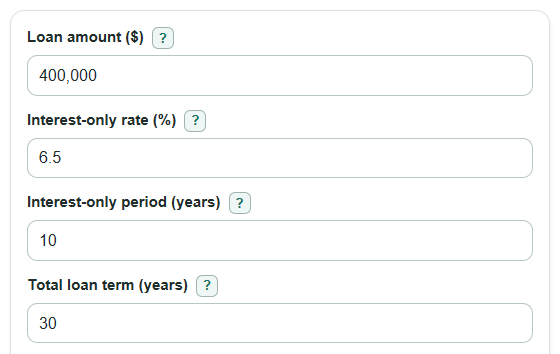
For a $400,000 loan at 6.5% with a 10-year interest-only period, a 30-year total term, no extra principal, no housing costs, and a 6.5% later rate, the first monthly amount is $2,166.67. The balance after the interest-only period is still $400,000. The later monthly amount is about $2,982.29, so the payment change is about $815.63, or 37.64%. Estimated total interest is about $575,750.21.