
Estimate ARM payments, capped rate changes, payment shock, and interest through your planned sell or refinance month.
Table of contents
How to use our Adjustable Rate Mortgage Calculator
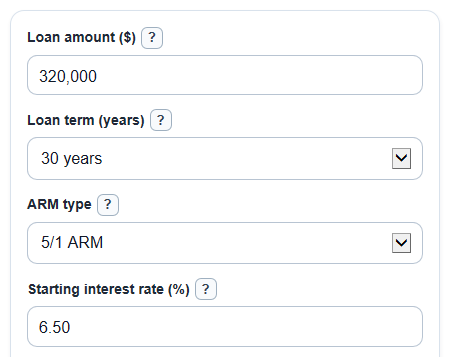
- Enter Loan amount ($), Loan term (years), ARM type, Starting interest rate (%), and Expected rate change each reset (percentage points).
- Open Advanced options if you know the caps, Lowest allowed rate (%), Planned sell or refinance month, or a Fixed-rate offer to compare (%).
- Click Calculate to see the Starting monthly payment, Expected payment after first reset, Highest possible payment from caps, and planned-month totals.
- Sanity-check the Rate path note: make sure the fixed period, reset timing, caps, and Planned sell or refinance month match the loan quote you are comparing.
- If you entered a Fixed-rate offer to compare (%), use Interest saved vs fixed-rate offer as a same-time-period comparison, not a full home affordability result.
Definitions
ARM: An adjustable rate mortgage has an interest rate that can change after an early fixed period, unlike a fixed-rate loan where the rate stays the same for the full term [2].
Fixed period: The first part of the ARM when the Starting interest rate (%) stays the same. In a 5/1 ARM, the fixed period is 5 years.
Adjustment period: How often the rate can reset after the fixed period. A 5/1 ARM usually resets every 12 months, while a 5/6 ARM resets every 6 months.
Rate cap: A rule that limits how much the ARM rate can change. This calculator uses First change cap (percentage points), Later change cap (percentage points), and Lifetime cap above starting rate (percentage points) [1].
Rate floor: The Lowest allowed rate (%). If expected rate changes would push the ARM below this number, the calculator uses the floor instead.
Principal and interest: The loan payment part that repays the amount borrowed and the interest charge. It does not include property taxes, insurance, PMI, or HOA dues.
Payment shock: The Possible increase from starting payment. It compares the stress-test payment with the starting payment.
Planned sell or refinance month: The month when you want to check the estimated balance and interest paid, such as month 60 at the end of year 5.
Common mistakes and quick fixes
Mistake: Entering the home price in Loan amount ($).
Fix: Use only the amount borrowed after your down payment.
Mistake: Reading ARM type as the full loan length instead of the fixed period and reset timing.
Fix: For ARM type, 5/1 ARM means 5 fixed years, then yearly resets; 5/6 ARM means 5 fixed years, then resets every 6 months.
Mistake: Typing 0.065 in Starting interest rate (%) when you mean 6.5 percent.
Fix: Enter 6.50, because the field already means percent.
Mistake: Mixing up Expected rate change each reset (percentage points) with the full new rate.
Fix: Enter the change only. If the rate may move from 6.50% to 6.75%, enter 0.25.
Mistake: Leaving First change cap (percentage points), Later change cap (percentage points), or Lifetime cap above starting rate (percentage points) at defaults when your loan quote uses different caps.
Fix: Copy the caps from the lender's ARM disclosure so Highest possible payment from caps is based on your loan.
Mistake: Treating Interest saved vs fixed-rate offer as a guarantee.
Fix: Use it as a planned-period estimate through Planned sell or refinance month, and compare it with closing costs, refinance risk, and how long you may really keep the loan.
Limitations & Key Assumptions / Boundary Conditions
- The calculator shows principal and interest only. It does not include property taxes, homeowners insurance, PMI, HOA dues, points, lender fees, or closing costs.
- The Expected rate change each reset (percentage points) is a simple path chosen by you. It is not a forecast of the market index, margin, or lender pricing.
- Rate caps and the Lowest allowed rate (%) should match your ARM paperwork. Different caps can change the Highest possible payment from caps by a lot.
- The worst-case payment uses rates rising as fast as the caps allow until the lifetime cap is reached. Real ARM rates can rise, fall, or stay flat.
- Planned sell or refinance results assume you make the scheduled monthly payment on time and do not make extra principal payments.
- The fixed-rate comparison uses the same loan amount, term, and planned month. It compares interest only, not monthly payment comfort or refinance costs.
- Rounding can cause a few cents of difference from a lender's amortization schedule, especially in the final payment or after rate resets.
Methodology
How the payment is set
The calculator treats the loan as a monthly principal and interest mortgage. It sets a payment at the start of the loan, then recalculates the payment at each ARM reset so the remaining balance is scheduled to reach zero by the original loan end date.
monthly_rate = annual_rate / 12 / 100
payment = balance * monthly_rate / (1 - (1 + monthly_rate)^(-months_left))
if monthly_rate = 0, payment = balance / months_left
How ARM timing is read
The first number in ARM type gives the fixed years. The second number gives how often the rate can change after that. Many ARMs have a fixed starting period and are recalculated after that period [3].
fixed_months = fixed_years * 12
reset_interval_months = 12 for x/1 ARM and 6 for x/6 ARM
How the expected rate path is built
At each reset, the calculator applies your Expected rate change each reset (percentage points), then limits that change using the first or later cap. It also applies the Lowest allowed rate (%) and the lifetime maximum rate.
move_cap = first_change_cap_points for the first reset, otherwise later_change_cap_points
capped_move = min(max(expected_move, -move_cap), move_cap)
new_rate = min(max(previous_rate + capped_move, rate_floor_percent), initial_rate_percent + lifetime_cap_points)
How the worst-case payment is found
The Highest possible payment from caps ignores the expected move and instead lets the rate rise as fast as the caps allow. This creates a stress test for the payment.
worst_new_rate = min(previous_worst_rate + move_cap, initial_rate_percent + lifetime_cap_points)
worst_new_rate = max(worst_new_rate, rate_floor_percent)
payment_shock = largest_possible_pi_payment - initial_pi_payment
How balance and interest are updated
For each month, the calculator adds that month's interest, subtracts the actual payment, and tracks total interest. If the last payment would be bigger than the remaining payoff amount, it uses the smaller final payment.
interest_for_month = balance * annual_rate / 12 / 100
actual_payment = min(scheduled_payment, balance + interest_for_month)
new_balance = balance + interest_for_month - actual_payment
Fixed-rate comparison
If Fixed-rate offer to compare (%) is entered, the calculator runs a separate fixed-rate loan with the same Loan amount ($), Loan term (years), and Planned sell or refinance month. It compares interest paid through that same month.
interest_saved_vs_fixed = fixed_interest_paid_by_planned_month - arm_interest_paid_by_planned_month
Mini-example
For a $100,000 loan, 30-year term, 5/1 ARM, 6.00% starting rate, 1.00 percentage point expected rise at each reset, 2/1/5 caps, 0.00% floor, planned month 60, and a 7.00% fixed-rate offer, the starting monthly payment is about $599.55. The expected payment after the first reset is about $657.69, the highest possible capped payment is about $916.72, and the possible increase from the starting payment is about $317.17. At month 60, the balance is about $93,054.36 and the ARM has paid about $29,027.39 of interest. Compared with the 7.00% fixed-rate offer over the same 60 months, the ARM saves about $5,022.35 of interest.
Sources
- What are rate caps with an adjustable-rate mortgage (ARM), and how do they work? | Consumer Financial Protection Bureau - Consumerfinance
- What is the difference between a fixed-rate and adjustable-rate mortgage (ARM) loan? | Consumer Financial Protection Bureau - Consumerfinance
- If I am considering an adjustable-rate mortgage (ARM), what should I look out for in the fine print? | Consumer Financial Protection Bureau - Consumerfinance