
Calculate light loss factor from design loss factors or measured light readings, then estimate maintained light and starting light needs.
Table of contents
How to use our Light Loss Factor Calculator
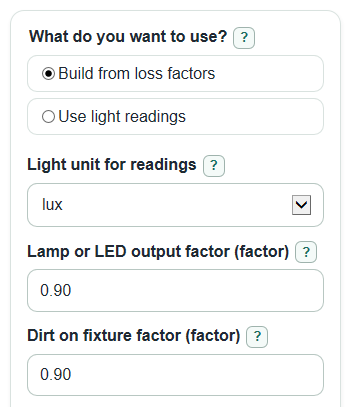
- Choose What do you want to use?: Build from loss factors or Use light readings.
- If using loss factors, enter Lamp or LED output factor and Dirt on fixture factor; use Advanced options for extra factors or project checks.
- If using readings, choose Light unit for readings, then enter Starting light reading and Maintained light reading in the same unit.
- Click Calculate and read Light loss factor first; 0.80 means about 80% remains and about 20% is lost.
- Sanity-check Total light lost: a negative value usually means the later reading was higher or the measurement setup changed.
Definitions
Light loss factor: A multiplier for the light expected to remain after time and conditions are included; lighting references describe LLF as a factor used after a given period and under given conditions [1].
Total light lost: The percent of starting light not maintained. For example, an LLF of 0.80 gives 20% total light lost.
Lamp or LED output factor: The remaining light output from the lamp or LED over time, entered as a decimal factor such as 0.90.
Dirt on fixture factor: The remaining light after dirt on the fixture is considered. A smaller value means more loss from dirt.
Room surface dirt factor: An optional factor for light lost because dirty ceilings or walls reflect less light back into the room.
Driver or ballast factor: An optional factor for how the driver or ballast changes actual light output from the rated value.
Maintained light: The light level after losses are included, using the selected unit of lux or footcandles.
Common mistakes and quick fixes
Mistake: Entering 90 in Lamp or LED output factor when you mean 90%.
Fix: Enter 0.90 in Lamp or LED output factor because factors use decimals, not percent numbers.
Mistake: Mixing lux and footcandles in Starting light reading and Maintained light reading.
Fix: Set Light unit for readings once, then enter both readings in that same unit.
Mistake: Using a zero or blank Starting light reading in Use light readings mode.
Fix: Enter a Starting light reading greater than 0 so Light loss factor can be divided correctly.
Mistake: Leaving Room surface dirt factor, Driver or ballast factor, or Other light loss factor blank when you meant no extra loss.
Fix: Use 1.00 for any optional factor that should make no change.
Mistake: Treating a negative Total light lost as a calculator error.
Fix: Check Maintained light reading; a higher later reading can make Total light lost negative, which means measured light increased.
Limitations & Key Assumptions / Boundary Conditions
- Factors are treated as independent multipliers. Real lighting systems can have interactions that need photometric software or a lighting designer.
- Use the same meter, sensor position, height, and unit for Starting light reading and Maintained light reading when using measurement mode.
- Values above 1.00 are allowed for factors because some project documents use gain factors, but they increase light instead of reducing it.
- Factor causing the biggest loss is meaningful only in Build from loss factors mode, where the smallest entered factor has the largest single effect.
- Starting light needed for your target is a quick planning check. It does not choose fixtures, spacing, mounting height, reflectance, glare control, or code compliance.
- If Light loss factor is zero or not finite, the target check cannot divide by it and the calculator will not report a starting-light-needed value.
Methodology
How the main value is calculated
Light loss factor is handled as a decimal multiplier. A value of 0.80 means about 80% of the starting light is expected to remain, so about 20% is lost. TxDOT describes LLF as a depreciation factor based on fixture light output decreasing with time [3].
In Build from loss factors mode, the calculator multiplies the required factors and any optional factors that are entered. Optional factors use 1.00 by default, which means no added change.
LLF = LLD * LDD * RSDD * DF * OF
LLD is Lamp or LED output factor, LDD is Dirt on fixture factor, RSDD is Room surface dirt factor, DF is Driver or ballast factor, and OF is Other light loss factor.
In Use light readings mode, the calculator divides the later reading by the starting reading. Both readings must use the selected Light unit for readings.
LLF = maintained_light / initial_light
Other outputs
Total light lost is calculated from the LLF and is not clamped to zero. A negative percent can happen when the maintained reading is higher than the starting reading.
loss_percent = (1 - LLF) * 100
If Starting light to project is entered, the maintained-light estimate is the starting light multiplied by LLF.
maintained_light_estimate = starting_light_check * LLF
If Target maintained light is entered, the calculator divides the target by LLF to estimate the starting light needed.
starting_light_needed = target_maintained_light / LLF
Mini-example
Suppose Lamp or LED output factor is 0.88, Dirt on fixture factor is 0.85, Room surface dirt factor is 0.95, Driver or ballast factor is 0.98, and Other light loss factor is 0.97.
LLF = 0.88 * 0.85 * 0.95 * 0.98 * 0.97 = 0.67549636
loss_percent = (1 - 0.67549636) * 100 = 32.450364%
With Starting light to project = 500 lux, maintained light is 337.74818 lux. With Target maintained light = 300 lux, starting light needed is about 444.11786 lux.
Calculation notes
The calculator strips commas and spaces before reading light values, so 1,250 and 1250 are treated the same. The selected number format changes display only; it does not change the stored calculation.