
Plan aquarium lighting by tank size, depth, goal, light time, and a clear PAR target.
Table of contents
How to use our Aquarium Lighting Calculator
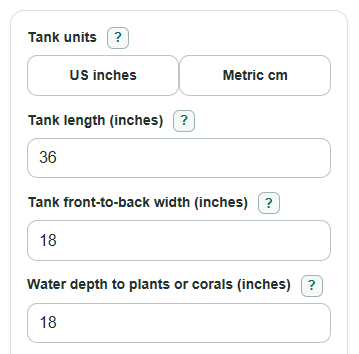
- Choose Tank units, then enter Tank length, Tank front-to-back width, and Water depth to plants or corals.
- Pick What are you lighting? and enter the Full-bright light time you actually run each day.
- Open Advanced options only if you need Water clarity loss setting, Use my own target PAR, Extra surface PAR cushion, or Number display.
- Click Calculate and use Target PAR at plants or corals first, then check Estimated PAR needed near the water surface for fixture or PAR-meter planning.
- Sanity-check the answer: if the Planning note warns about a long light time or very high surface PAR, shorten the schedule, lower the target, or plan slow acclimation.
Definitions
PAR: Photosynthetically active radiation, or usable light for photosynthesis, usually treated as light in the 400 to 700 nm band.
umol/m^2/s: Micromoles of photons per square meter per second. This is the common unit for PAR at one moment.
Daily light amount: The total usable light delivered during the full-bright part of the day, shown as mol/m^2/day.
Water clarity loss setting: A rough light-loss rate that makes deeper plants or corals need more surface PAR.
Surface PAR: The estimated PAR near the water surface before the calculator applies depth loss.
Photoperiod: The number of hours per day the light is on at the brightness that matters for growth.
Common mistakes and quick fixes
Mistake: Using Tank length and Tank front-to-back width from the outside glass when the tank has thick glass or a large rim.
Fix: Measure the inside water area when you want Estimated water volume and Light coverage to shop for to be closer.
Mistake: Entering total tank height for Water depth to plants or corals instead of the depth to the plant tops, coral, or substrate you care about.
Fix: Measure from the water surface down to that growing spot, because this changes Estimated PAR needed near the water surface .
Mistake: Counting dim ramp-up, moonlight, or blue-only viewing time as Full-bright light time .
Fix: Enter only the hours at normal growing brightness so Daily light amount at that spot is not too high.
Mistake: Picking What are you lighting? as a high-light goal just because the fixture can get bright.
Fix: Choose the closest real tank goal, or use Use my own target PAR if you have a care-guide value or PAR meter target.
Mistake: Choosing Water clarity loss setting as very clear when the lid is dirty, the water is tinted, or floating plants block light.
Fix: Use tinted or cloudy water, enter a Custom light loss rate , or add Extra surface PAR cushion .
Limitations & Key Assumptions / Boundary Conditions
- PAR is a better planning measure than watts or lumens, but this calculator still estimates light. A PAR meter reading at the real plant or coral position is more reliable.
- The depth model only handles light loss in water. Fixture height, beam angle, lens design, shadows, tank braces, dirty covers, floating plants, rockwork, and glass lids can change real PAR.
- The preset PAR ranges are beginner planning targets. Species choice, coral placement, CO2, nutrients, flow, acclimation, and algae pressure can change the best target.
- Estimated water volume is for a simple rectangular water box. Substrate, rock, decor, filters, and equipment lower the real water volume.
- Estimated PAR needed near the water surface is not a promise that a fixture will work. Fixture maps, mounting height, spread, and dimmer settings still matter.
- The water clarity loss rates are rough assumptions: 0.10, 0.25, and 0.60 per meter. Use Custom light loss rate if you have a better value.
Methodology
What the calculator solves
The calculator starts with a target PAR range for the selected tank goal. If Use my own target PAR has a number, that number replaces the preset low and high ends. The main result is Target PAR at plants or corals, because plants and corals respond to usable light at their position, not to fixture watts.
Core formulas
US gallons = Tank length * Tank front-to-back width * Water depth to plants or corals / 231
liters = gallons * 3.785411784
metric liters = Tank length * Tank front-to-back width * Water depth to plants or corals / 1000
gallons = liters / 3.785411784
daily_light_low = target_low * Full-bright light time * 0.0036
daily_light_high = target_high * Full-bright light time * 0.0036
The factor 0.0036 comes from 3600 seconds per hour divided by 1,000,000 umol per mol.
Depth-aware surface PAR
The calculator converts depth to meters, then uses an exponential water-loss model. In US mode, depth in meters equals inches times 0.0254. In metric mode, depth in meters equals centimeters divided by 100.
par_at_depth = surface_par * exp(-loss_rate_per_m * depth_m)
surface_low = target_low * exp(loss_rate_per_m * depth_m) * (1 + Extra surface PAR cushion / 100)
surface_high = target_high * exp(loss_rate_per_m * depth_m) * (1 + Extra surface PAR cushion / 100)
depth_loss_percent = (1 - exp(-loss_rate_per_m * depth_m)) * 100
The built-in loss rates are 0.10 per meter for very clear water, 0.25 per meter for normal clear aquarium water, and 0.60 per meter for tinted or cloudy water. If Water clarity loss setting is custom, the calculator uses Custom light loss rate instead.
Worked mini-example
For a 36 by 18 inch tank with 18 inches of water depth, a medium planted goal, 8 full-bright hours, and normal clear water, the preset target is 50 to 80 umol/m^2/s. The daily light amount is 50 * 8 * 0.0036 to 80 * 8 * 0.0036, or 1.44 to 2.304 mol/m^2/day. The depth is 18 * 0.0254 = 0.4572 m, so the estimated surface range is about 56.1 to 89.7 umol/m^2/s before any extra cushion. The simple rectangular volume is about 50.5 gallons, or about 191.1 liters.
How to read the results
Target PAR at plants or corals is the main growth target. Daily light amount at that spot rises when either PAR or full-bright hours rise. Estimated PAR needed near the water surface is higher than the target at depth because the model subtracts light through the water. Light coverage to shop for keeps the entered tank footprint in the same unit system you chose.