
Calculate LED density, spacing, and estimated LED count so you can compare strip listings or plan a measured install.
Advanced options
Table of contents
How to use our LED Strip Density Calculator
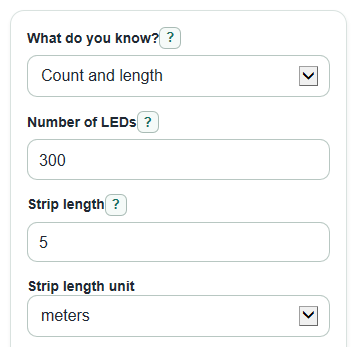
- Choose What do you know? based on the pair of values you already have: count and length, density and length, or spacing and length.
- Enter the visible required fields, including Strip length and the matching unit selector, using only the lit strip length.
- Open Advanced options only if you measured first-to-last LED centers, want to test Target max LED spacing, or need a different Number format.
- Select Calculate, then read Main answer first and use the density, spacing, and estimated count cards for unit conversions and planning.
- Sanity-check the result: a 60 LEDs per meter strip should show about 16.7 mm spacing, and a 5 meter strip at that density should be about 300 LEDs.
Definitions
LED density: The number of LED chips on a strip for each meter or foot of length. Higher density means the LEDs are closer together.
Center-to-center LED spacing: The gap from the center of one LED chip to the center of the next LED chip.
Estimated LEDs on this length: The calculated LED count for the strip length you entered. A real cut strip may need a whole number or a cut-mark adjustment.
Full strip length: The total lit length used in most product listings, not including loose wires or connectors.
First-to-last LED centers: A measured span from the middle of the first LED chip to the middle of the last LED chip.
Target max LED spacing: Your chosen largest acceptable center-to-center LED gap, in millimeters, for a project check.
Common mistakes and quick fixes
Mistake: Entering color channels in Number of LEDs, such as counting RGB as 3 LEDs.
Fix: Use Number of LEDs as the count of physical LED chips on the strip.
Mistake: Using total cable length for Strip length.
Fix: Use only the lit strip length and pick the correct Strip length unit.
Mistake: Leaving How was count-and-length measured? on Full strip length after measuring from the first LED center to the last LED center.
Fix: Choose First-to-last LED centers when your length measurement starts and ends at LED centers.
Mistake: Mixing LED density with the wrong LED density unit.
Fix: If the listing says LEDs per meter, choose LEDs per meter; if it says LEDs per foot, choose LEDs per foot.
Mistake: Measuring LED spacing from edge to edge instead of center to center.
Fix: For LED spacing, measure from the middle of one LED chip to the middle of the next chip and choose the matching LED spacing unit.
Mistake: Treating Target max LED spacing as a universal diffuser rule.
Fix: Use Target max LED spacing only as your own project check; diffuser depth, cover material, and viewing distance can still change the look.
Limitations & Key Assumptions / Boundary Conditions
- The calculator assumes LEDs are evenly spaced along the strip.
- It compares spacing to your Target max LED spacing only; it does not predict spotting, diffuser performance, brightness, voltage drop, heat, or color quality.
- Estimated LEDs on this length can be fractional because the math is continuous. Real strips use whole LED chips and may be limited by cut marks.
- Count and length mode depends on the selected measurement basis. Full strip length and first-to-last LED centers use different formulas.
- Product listings may round density values, so a hand count can differ slightly from the listing.
- Very short strips or strips with only a few LEDs can show large percentage changes from one extra LED.
Methodology
How the calculator chooses the answer
The calculator converts the entered strip length to meters first. It then computes LED density in LEDs per meter, converts that to LEDs per foot, and computes center-to-center spacing. Main answer changes by mode: count and length returns density, density and length returns estimated LED count, and spacing and length returns density and count.
length_m = length_value * unit_to_meter
The length conversion factor is 1 for meters, 0.3048 for feet, 0.0254 for inches, and 0.001 for millimeters. The inch-based spacing conversion uses 25.4 millimeters per inch.
Count and length mode
Use the full-length formula when the count and length come from a product listing.
density_m = led_count / length_m
If you measured from the center of the first LED to the center of the last LED, there are one fewer gaps than LEDs, so the calculator uses this formula instead.
density_m = (led_count - 1) / length_m
Density, spacing, and count
Once density in LEDs per meter is known, spacing and other units come from these formulas.
spacing_mm = 1000 / density_m
density_ft = density_m * 0.3048
estimated_count = density_m * length_m
When spacing is the known input, the calculator converts spacing to millimeters first, then reverses the spacing formula.
density_m = 1000 / spacing_mm
Target spacing check
If Target max LED spacing is filled in, the calculator compares the calculated spacing with your target.
meets_target = spacing_mm <= target_spacing_mm
Mini-example
For 300 LEDs over a 5 meter full strip, density is 300 / 5 = 60 LEDs per meter. Spacing is 1000 / 60 = 16.6667 mm, which is about 0.656 inches. The density in LEDs per foot is 60 * 0.3048 = 18.288 LEDs per foot.
Validation and rounding
Visible required numbers must be greater than 0 and finite. In first-to-last LED centers mode, Number of LEDs must be at least 2. The calculator strips commas and spaces before parsing. Display rounding changes only how results are shown; it does not change the underlying calculations.