
Find the safe LED strip cut mark that best fits your space before you cut.
Advanced options
Table of contents
How to use our LED Strip Cutting Calculator
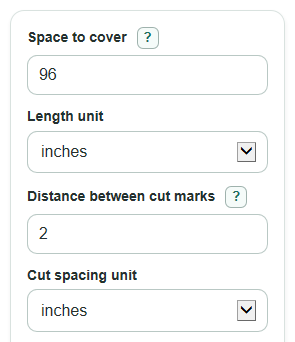
- Enter the Space to cover, then choose the matching Length unit.
- Enter the real Distance between cut marks from the strip label, datasheet, or a careful measurement, then choose the Cut spacing unit.
- Pick Fit choice: Do not go over for a strip that must stay inside the space, Closest length for the smallest error, or At least this long when a short strip is worse than extra length.
- Open Advanced options only if you want Available strip on hand, Strip power (watts per foot), Strip voltage (V), or Extra power room (percent) results.
- After calculating, sanity-check the Cut mark count from the start against the printed cut marks on your strip before cutting.
Definitions
Safe cut length: The final strip length at a valid cut mark, shown in the same unit as Space to cover.
Distance between cut marks: The repeat length from one safe cut line to the next on the LED strip.
Fit choice: The rule used to pick the cut mark: stay under the space, choose the closest mark, or go at least as long as the space.
How the cut fits: The signed difference between the safe cut length and the space to cover. Positive means longer. Negative means shorter.
Cut mark count from the start: The number of cut-spacing intervals to count from the starting end before cutting.
Extra power room (percent): Spare power capacity added to the estimated strip watts when sizing a power supply.
Common mistakes and quick fixes
Mistake: Using the strip length you wish existed for Distance between cut marks .
Fix: Use the actual spacing between safe cut marks from the product specs or by measuring mark to mark.
Mistake: Picking the wrong Fit choice for a tight channel or cabinet edge.
Fix: Use Do not go over if extra strip cannot fit; use At least this long only when extra length is acceptable.
Mistake: Mixing Space to cover in feet with Length unit set to inches.
Fix: Check both Length unit and Cut spacing unit before trusting the Safe cut length .
Mistake: Treating a negative How the cut fits value as an error.
Fix: Read the sign: negative means the cut strip is short by that amount, and positive means it is long by that amount.
Mistake: Entering Strip power (watts per foot) but leaving Strip voltage (V) blank or zero.
Fix: Enter the voltage printed on the strip or power supply so the amp estimates can be calculated.
Mistake: Ignoring a negative Strip left after this cut value.
Fix: A negative leftover means the Available strip on hand is not long enough for the planned cut.
Limitations & Key Assumptions / Boundary Conditions
- The result assumes the strip can be cut at evenly spaced safe cut marks. If your strip has mixed spacing, use the exact spacing for the section you plan to cut.
- The calculator does not tell you where solder pads, connectors, waterproof coating, or diffuser hardware will land. Check the physical strip before cutting.
- Power results use the entered Strip power (watts per foot) times the cut length. Real power can vary by LED type, brightness setting, controller losses, and supply voltage drop.
- Suggested power supply rating is a planning estimate, not a product approval. Follow the strip maker's instructions if they require a larger margin.
- A Safe cut length of 0 can happen when Fit choice is Do not go over and the space is shorter than one cut interval.
- The calculator rounds to a cut mark mathematically. It cannot confirm that the printed mark is undamaged or that cutting will preserve warranty coverage.
Methodology
How the cut mark is chosen
LED strips should be cut only at designated cut points, so the calculator converts your lengths to meters and then rounds to a valid cut interval instead of any exact length [1].
meters = value * unit_factor
The unit factors are 0.0254 meter per inch, 0.3048 meter per foot, 0.001 meter per millimeter, 0.01 meter per centimeter, and 1 meter per meter.
ratio = desired_m / spacing_m
k = floor(ratio) for Do not go over
k = round(ratio) for Closest length, with exact halfway ties going shorter
k = ceil(ratio) for At least this long
The interval count k is the Cut mark count from the start.
Length and fit results
cut_m = k * spacing_m
fit_m = cut_m - desired_m
The calculator shows Safe cut length and How the cut fits in the selected Length unit. The fit is signed because the sign matters: positive is extra length, and negative is a short strip.
Optional strip and power results
left_m = available_m - cut_m
cut_ft = cut_m / 0.3048
strip_watts = cut_ft * watts_per_ft
suggested_watts = strip_watts * (1 + headroom_percent / 100)
current_amps = strip_watts / voltage
suggested_current_amps = suggested_watts / voltage
Optional power results appear only when the needed power inputs are valid. Current in amps is calculated from watts divided by volts, which is the same watt relationship rearranged from P = V * I.
Mini-example
If the space is 7.1 ft, the cut spacing is 4 in, and Fit choice is At least this long, the spacing is 0.333333 ft. The ratio is 7.1 / 0.333333, so the calculator rounds up to 22 intervals. The safe cut length is 7.333333 ft, and the fit amount is +0.233333 ft.